Deep Space works inside your Microsoft 365.
Send from your own Outlook mailbox, keep project correspondence in sync, schedule site meetings straight into Outlook calendars, and open Word and Excel files from Project Documents in Office, with every save coming back as a new revision.
One connection per person. One approval from IT. No second inbox, no download and re-upload, no meeting minutes that disagree with the calendar.
Who this is for
Microsoft 365 runs through every stage of the Builder's Wheel. Your team already lives in Outlook, Word and Excel. Deep Space meets them there instead of asking them to work around it.
Project and Site Managers
Notices, RFIs and tender invites go out from your own mailbox, replies land back on the project, and your weekly site meeting is an Outlook invite and a minutes record at the same time.
Estimators and Commercial Teams
Open the estimate workbook from Project Documents in real Excel, desktop or web. Formulas survive, and every save is a new revision on the same document.
IT and Directors
Approve Deep Space once for the whole company. Office files stay in your own Microsoft 365 tenant, so your retention and security policies keep applying.
The pain this removes is specific
A project manager sends a notice from a system address nobody recognises, the reply goes to their personal inbox, and the record never sees it. The estimator downloads the workbook, edits it, and uploads it again, and two versions now exist. The site meeting lives in Outlook and the minutes live somewhere else. On Deep Space, all three run through the Microsoft 365 your team already uses.
How it works
Four steps, and most teams are done in one sitting.
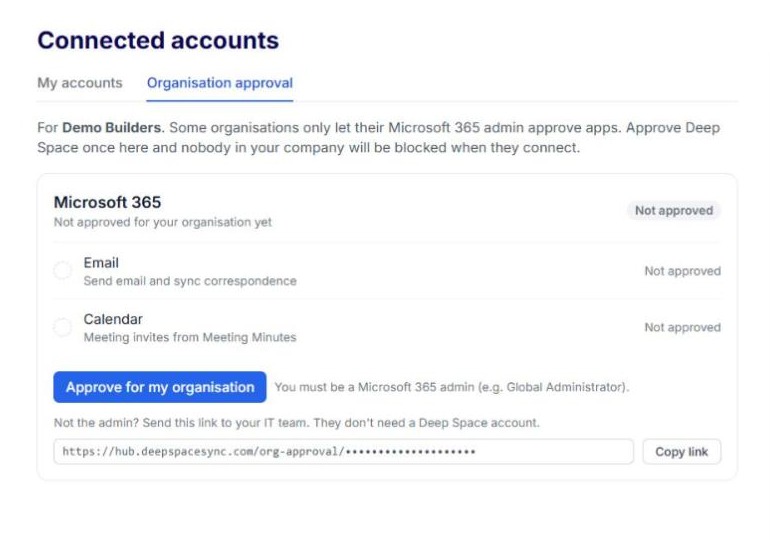
A Microsoft 365 admin approves Deep Space once for the whole company from Connected accounts. Not an admin? Copy the approval link and send it to your IT team. They don't need a Deep Space account.
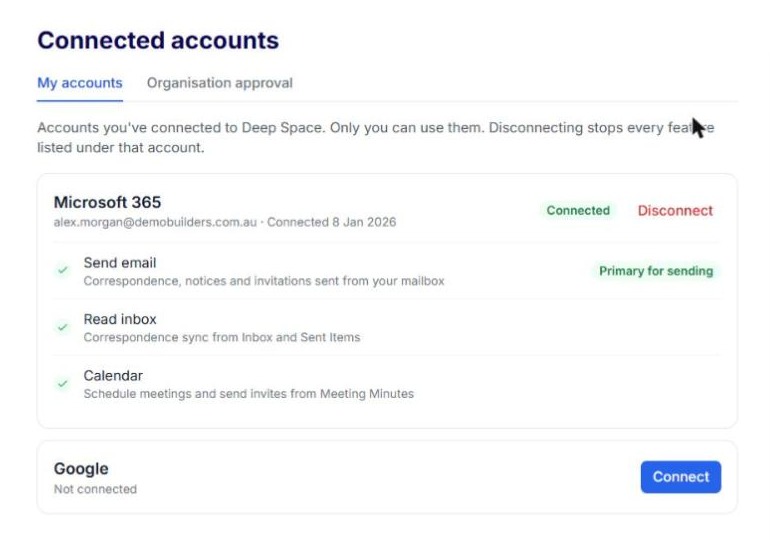
From the avatar menu, Connected accounts, Connect. One Microsoft 365 connection covers Send email, Read inbox and Calendar. Calendar can be added later without reconnecting.
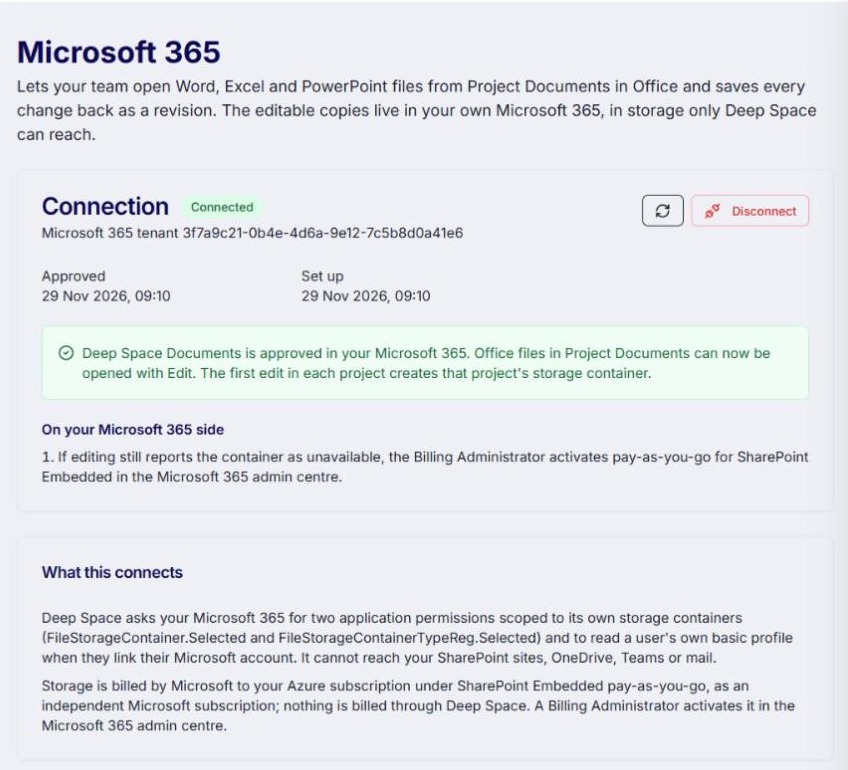
Admin, Microsoft 365. Approve Deep Space Documents in your tenant and your Billing Administrator turns on SharePoint Embedded pay-as-you-go. Office files in Project Documents can then be opened with Edit.
Send from the record, schedule from Meeting Minutes, edit from Project Documents. Deep Space keeps the record and Microsoft 365 in step.
Only you can use your connection
Each connection belongs to one person. Nobody else can send as you, and disconnecting stops every feature listed under that account straight away.
What syncs, and in which direction
Mail, calendar and Office files, each with its own permission, each one visible on Connected accounts with a tick when it is granted.

Why your files stay in your tenant

Word and Excel editing is built on Microsoft SharePoint Embedded. The editable copy of each file lives in your own Microsoft 365, in a storage container only Deep Space can reach, so your existing retention, data loss prevention and compliance policies apply to it. Deep Space stays the system of record: Project Documents keeps the revision history, and each save in Office becomes the next revision.
Email: sent as you, answered on the record
Correspondence that leaves Deep Space comes from a real person's mailbox, and the replies find their way back to the project.
What one connection covers
Send email
Correspondence, notices and invitations sent from your mailbox.
Read inbox
Correspondence sync from your Inbox and Sent Items.
Calendar
Schedule meetings and send invites from Meeting Minutes.
Primary for sending
Connect Microsoft 365 and Google if you use both. You choose which one sends.
Every permission shows on Connected accounts with a tick. If you connected before calendar features existed, grant Calendar on its own from the same card. There is no need to disconnect.

Replies come back to you
Because the email came from your address, the subcontractor or client replies to a person they know. Read inbox brings the thread back onto the project, so the next person to open the record sees the whole conversation.

Tender invites, notices, payment schedules and documents sent with your email templates all go out this way.
Meeting Minutes and your Outlook calendar
New Meeting offers Schedule and send invite, Import from Outlook and Minutes only. Scheduling creates the minutes record and sends the Outlook invite from the organiser's own calendar, so the meeting exists in both places from the start.
Change the date, time, title or location in Deep Space and Outlook follows. Move the meeting in Outlook and the record follows. Completed minutes are never changed.
Repeating site meetings, handled
A weekly site meeting becomes one record per meeting, with an end date pre-filled six months out. Next meeting creates the record for the following week.
Only the organiser can update or cancel a meeting. Everyone else sees Managed by the organiser in Outlook, and can unlink their own record if they need to.
Word and Excel, edited in Office
Open a Word, Excel or PowerPoint file from Project Documents with Edit and it opens in Office for the web or your desktop app, using the Microsoft 365 licences your team already has. It is real Excel, so formulas, formatting and co-authoring behave exactly as they do today.
When you save, the change comes back to Deep Space as a new revision on the same document. Opening a file without changing it doesn't create a revision.
Security, stated plainly
Deep Space asks for the least it needs, and tells you exactly what that is.
Mail and calendar access is per person and only covers that person's own mailbox and calendar. Word and Excel editing uses a separate app, Deep Space Documents, with two application permissions scoped to its own storage containers and a read of a user's basic profile when they link their Microsoft account. It cannot reach your SharePoint sites, OneDrive, Teams or mail.
Connection tokens are encrypted at rest, and disconnecting removes access straight away.
File storage for editing is billed by Microsoft to your own Azure subscription under SharePoint Embedded pay-as-you-go. Nothing is billed through Deep Space. Your Billing Administrator activates it once in the Microsoft 365 admin centre.
If you sign in to Deep Space with a different email from your Microsoft 365 one, link your Microsoft account once and Edit works from then on.

Microsoft 365 or Google for email
Email works with either. Calendar invites from Meeting Minutes and Word and Excel editing need Microsoft 365.
Controls and governance
Nothing reaches your ledger silently.
If your Microsoft 365 only lets admins approve apps, a single organisation approval means nobody is blocked by Need admin approval when they connect.
A connection belongs to the person who made it. Only they can use it, and disconnecting is one click.
Office files being edited live in your Microsoft 365, so your retention, data loss prevention and compliance tools see them like any other file.
Who can edit a project's files follows who has access to that project in Deep Space.
Project Documents keeps every revision. Microsoft 365 is where the editing happens, not a second filing system to keep in sync.
Only the person who sent the invite can move or cancel the meeting, in Deep Space or in Outlook.
Running it: nothing new to learn
Your team keeps working in Outlook and Office. Deep Space adds the project context: which project an email belongs to, which minutes a meeting produced, which revision a workbook is up to.
If a connection lapses, Deep Space asks for it at the moment you need it, for example Connect your Microsoft calendar to send invites, and keeps what you've entered.
One sequencing rule matters
Approve the organisation first. In companies where only admins can approve apps, people who connect before the approval will see Need admin approval.
Where the AI sits
KAI reads what arrives in Microsoft 365 so your team doesn't have to.
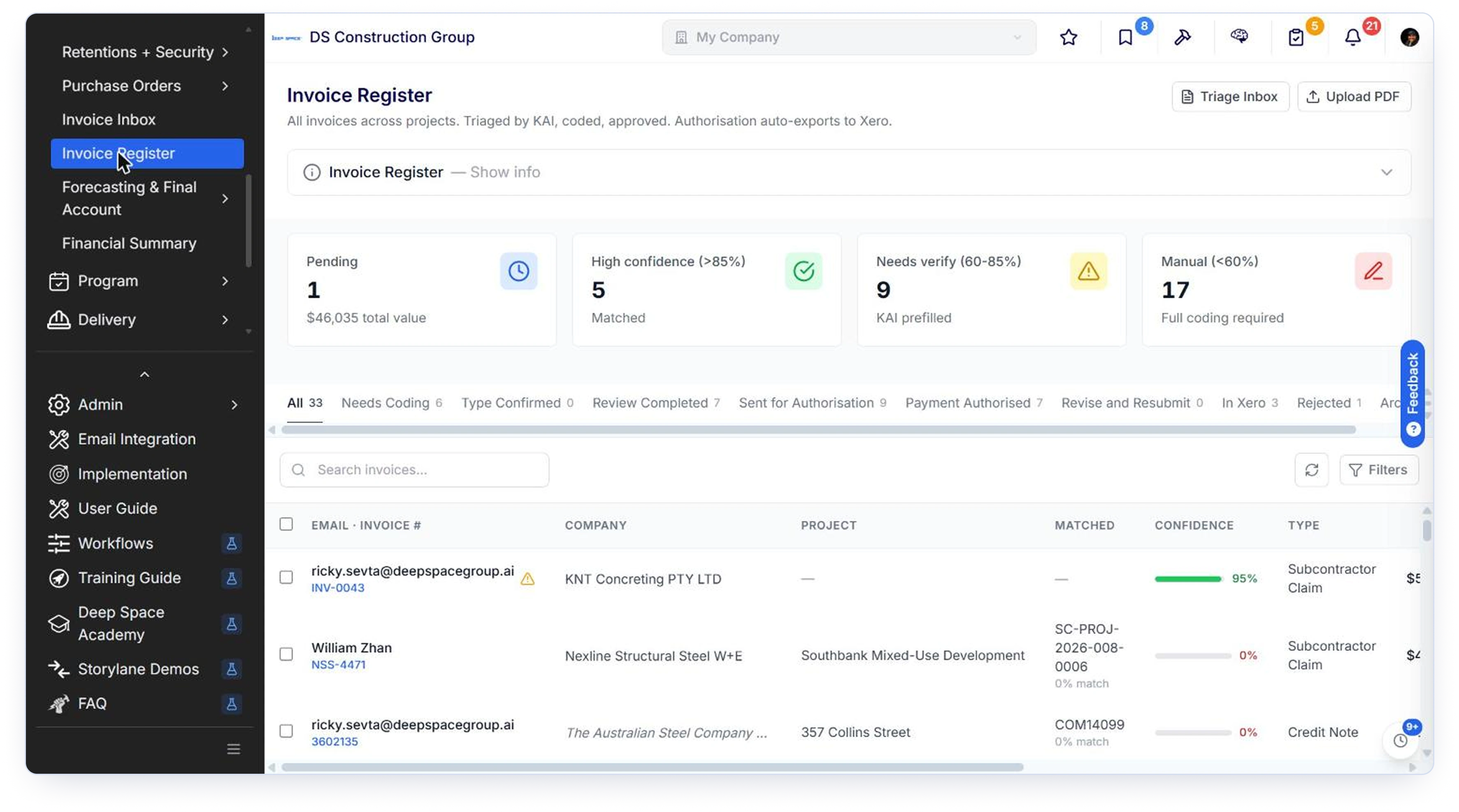
Supplier invoices sent to your accounts mailbox land in the AP Inbox. KAI reads them, extracts the invoice number, dates, amounts, GST and supplier, and matches them against the purchase order or subcontract agreement. High-confidence matches arrive pre-coded. Low-confidence ones are flagged for a human.
Meeting minutes recorded in Deep Space can be summarised by KAI, and the actions raised go to the project's action register.
Deeper into Microsoft 365 every sprint.
Built with ANZ builders whose teams live in Outlook and Excel, and whose IT teams ask the right questions.
Connected accounts
One Microsoft 365 connection per person for Send email, Read inbox and Calendar, managed from one page.
Organisation approval
Approve Deep Space once for the whole company, or send IT a link. They don't need a Deep Space account.
Meeting Minutes in Outlook
Schedule, import and keep meetings in step both ways, with acceptances in the register.
Word and Excel editing
Open Office files from Project Documents in Office, save, and get a new revision back. Built on SharePoint Embedded.
MS Project round trip
Import your program, then re-import an updated one without losing what Deep Space added to it.
AP Inbox from Outlook
Supplier invoices emailed to your accounts mailbox, read and matched by KAI.
What this integration does not do
Named limits build more trust than vague breadth, and they cut the support tickets that come from assuming.
 Deep Space does not read your SharePoint sites or OneDrive.
 Editing uses its own containers. Your existing libraries are untouched.
- No Teams integration yet.
- Teams chats and channels aren't connected. Mail, calendar and Office files are.
- Calendar invites need Microsoft 365.
- Google works for email. Meeting Minutes invites are Microsoft 365 only.
- Editing needs SharePoint Embedded pay-as-you-go.
- Your Billing Administrator activates it once. Until then, Edit reports the container as unavailable.
- Completed minutes are not changed by the calendar.
- Once minutes are complete, moving the Outlook event no longer touches the record.
- Only the organiser can move or cancel a meeting.
- Attendees can unlink their own record, not change the meeting.
- Repeating meetings need an end date.
- It is pre-filled six months out, and each meeting gets its own record.
- Importing needs project access.
- The person importing an Outlook meeting must be a DS Site user on that project.
- Different sign-in emails need a one-off link.
- If your Deep Space login isn't your Microsoft 365 email, link your Microsoft account once to use Edit.
- Opening a file is not a revision.
- Only a saved change creates a new revision in Project Documents.
- Deep Space doesn't host your mailbox.
- Mail stays in Microsoft 365. Deep Space sends and reads through your connection.
- One Microsoft 365 tenant per workspace for editing.
- Each workspace connects Deep Space Documents to one tenant.
Setup, honestly scoped

Microsoft 365 business licences for the people who'll connect, a Microsoft 365 admin for the organisation approval, and an Azure subscription your Billing Administrator can link for SharePoint Embedded pay-as-you-go if you want Word and Excel editing.
Your IT lead or Microsoft partner for the approvals, and one project champion to connect first and show the team.
Deep Space Implementation walks your IT team through the approvals, connects the first users, and proves a sent notice, a scheduled meeting and an edited workbook end to end before the rest of the team starts.
Everyone else connects from Connected accounts in under a minute. Calendar can be added later from the same card without reconnecting.
Questions we get asked
See it running in your own Microsoft 365
Book a demo and we'll send a notice from your mailbox, schedule a site meeting into Outlook and edit a workbook from Project Documents in Excel, live.