AI Takeoff Connected to Your Estimate, Budget and Xero
AI takeoff is the easy part. What happens next is where you win or lose margin.
Plenty of software can count symbols on a drawing now. KAI measures inside the same platform that runs your estimate, budget, subcontracts, claims and Xero. One quantity, accepted once, carried all the way through.

Why AI Takeoff on Its Own Doesn't Protect Your Margin
A faster count that still ends in a spreadsheet is still a re-key. Every handoff between systems is where errors creep in and margin leaks out.
01
Standalone AI takeoff stops at Excel.
US takeoff products and per-seat estimating add-ons measure quickly, then hand you a spreadsheet. Someone still has to rebuild the BoQ, re-code it and push it into the budget.
02
Every licence is another seat, another login, another copy of the numbers.
Standalone AI takeoff runs $299 to A$450 per estimator, per month, on top of Bluebeam, CostX, Excel and your project platform. The quantities live in one, the budget in another, and nobody trusts which is current.
03
A drawing revision means measuring it all again.
Addendum lands four days before submission. In a standalone takeoff, the old quantities, the estimate and the subbie scopes all need rechecking by hand.
“We just need something that connects to everything. Everything needs to be talking.”
-- Estimating lead, Melbourne commercial builder. April 2026.
From Drawing Set to Estimate in Eight Steps
Link the PDFs from Project Documents to a takeoff package and press Takeoff with KAI. KAI reads up to 60 sheets in one run while you keep working.


KAI does the measuring. Your estimator makes the call.
Nothing KAI produces counts toward a quantity until a person accepts it. Every quantity traces back to a shape on a sheet at a pinned revision.
- Link drawings
- Check scales
- Measure
- Review
- Accept
- Estimate
- Budget
Every Suggestion Shows Its Reasoning
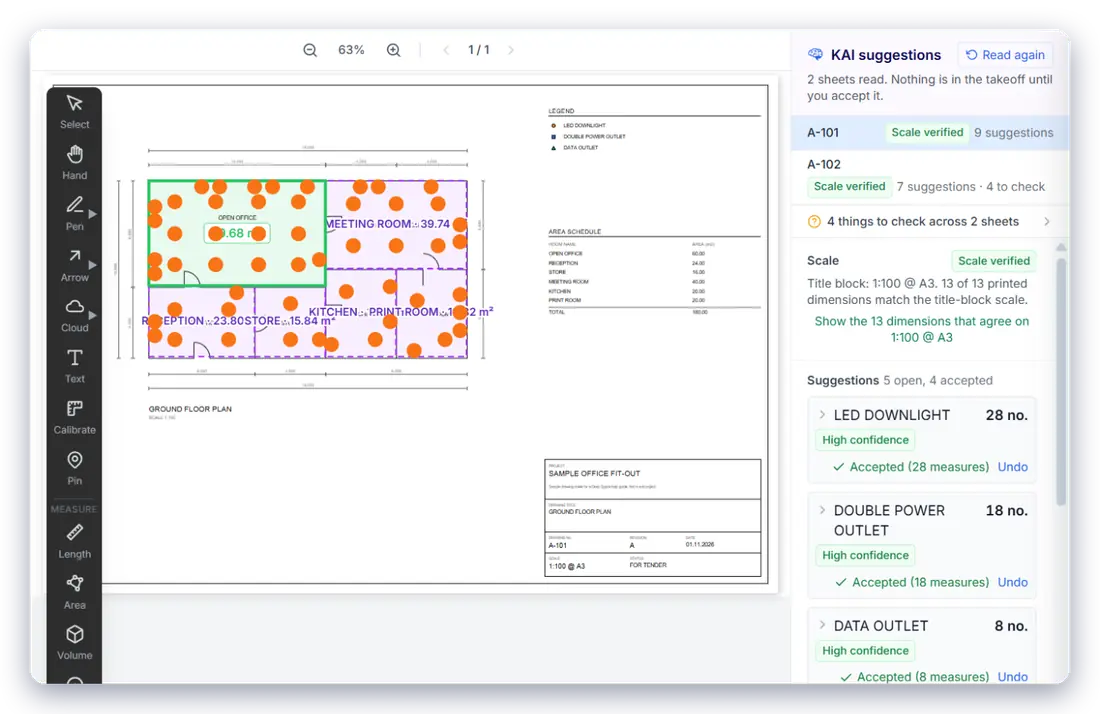
No black box. Each count and area carries a confidence level, the reason KAI believes it, and any check that failed. Accept the clear ones in one click and step through the rest.
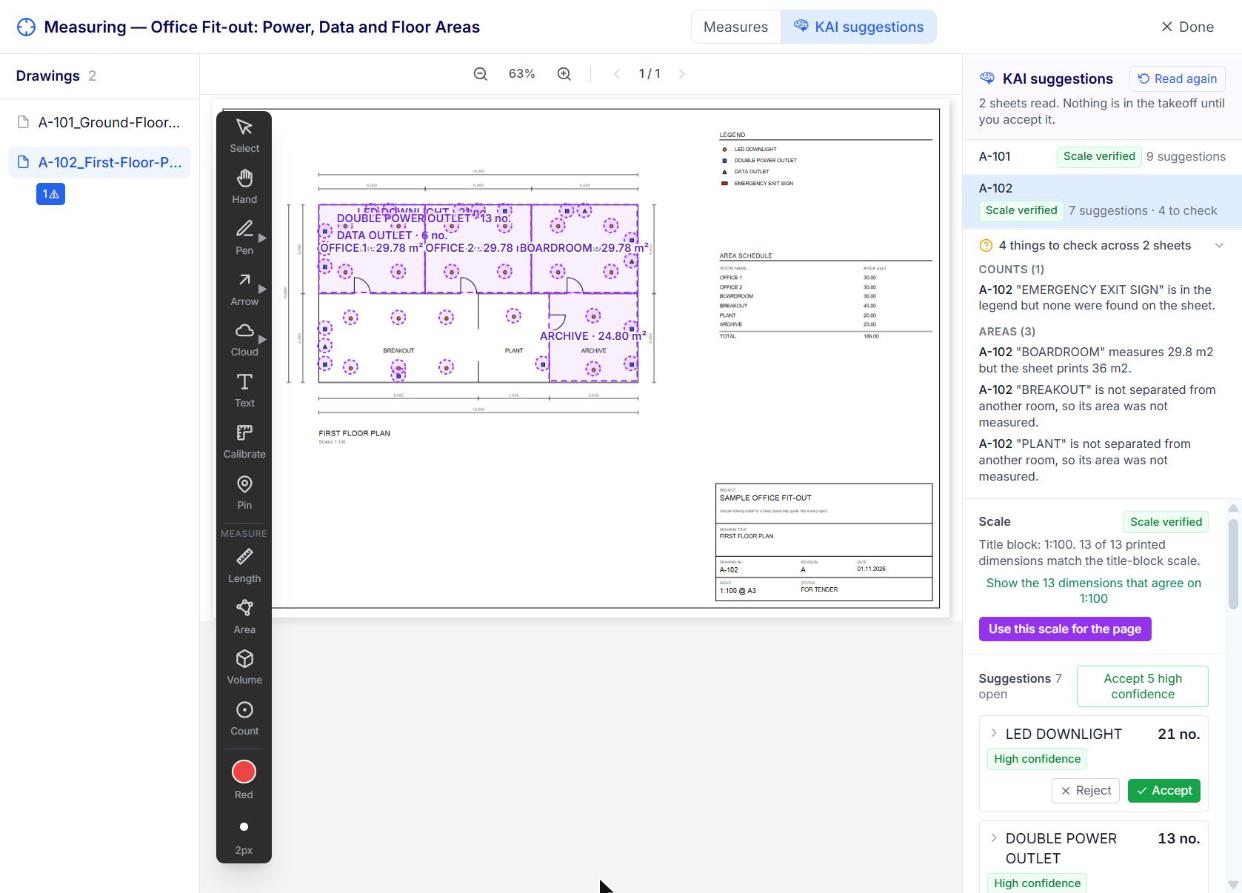
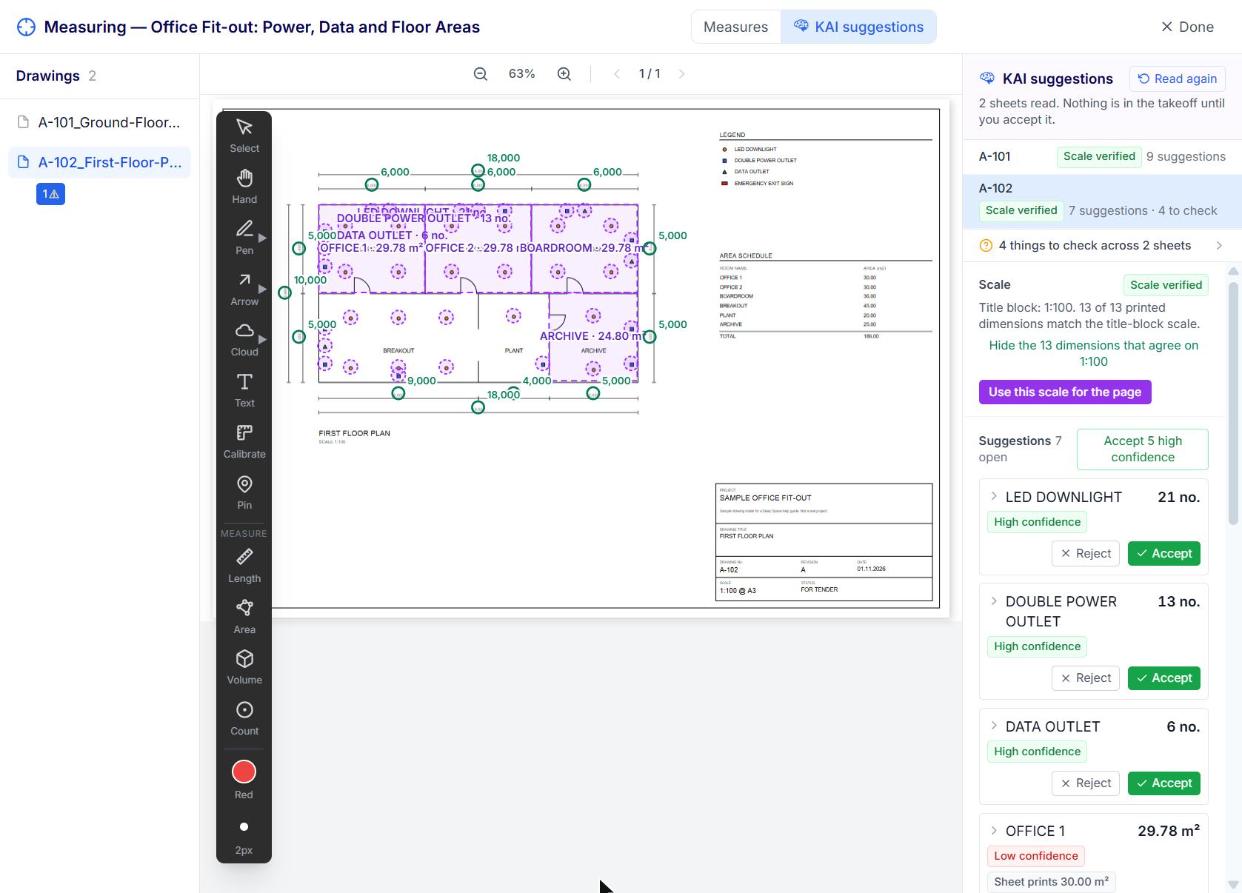

Scale verified. Quantities suggested. You decide.
KAI shows where the title block and the printed dimensions agree, what it counted and measured, and what a person should check before it reaches the estimate.
LED downlight 28 no.

High confidence: Legend symbol matched on every instance. Scale verified on sheet A-101.
Open office 158 m²

Room area. Outline traced from the named room. Accept, adjust with the normal tools, or reject.
Query: doors 42 vs 40

Check: Door schedule says 42, plans show 40. Raise an RFI at tender, not on site.
KAI Works Where Your Estimators Already Work
Takeoff with KAI is a button on the takeoff package, not another login. It uses your cost codes, your locations and your price lists, so every line is ready for the estimate the moment it is accepted.
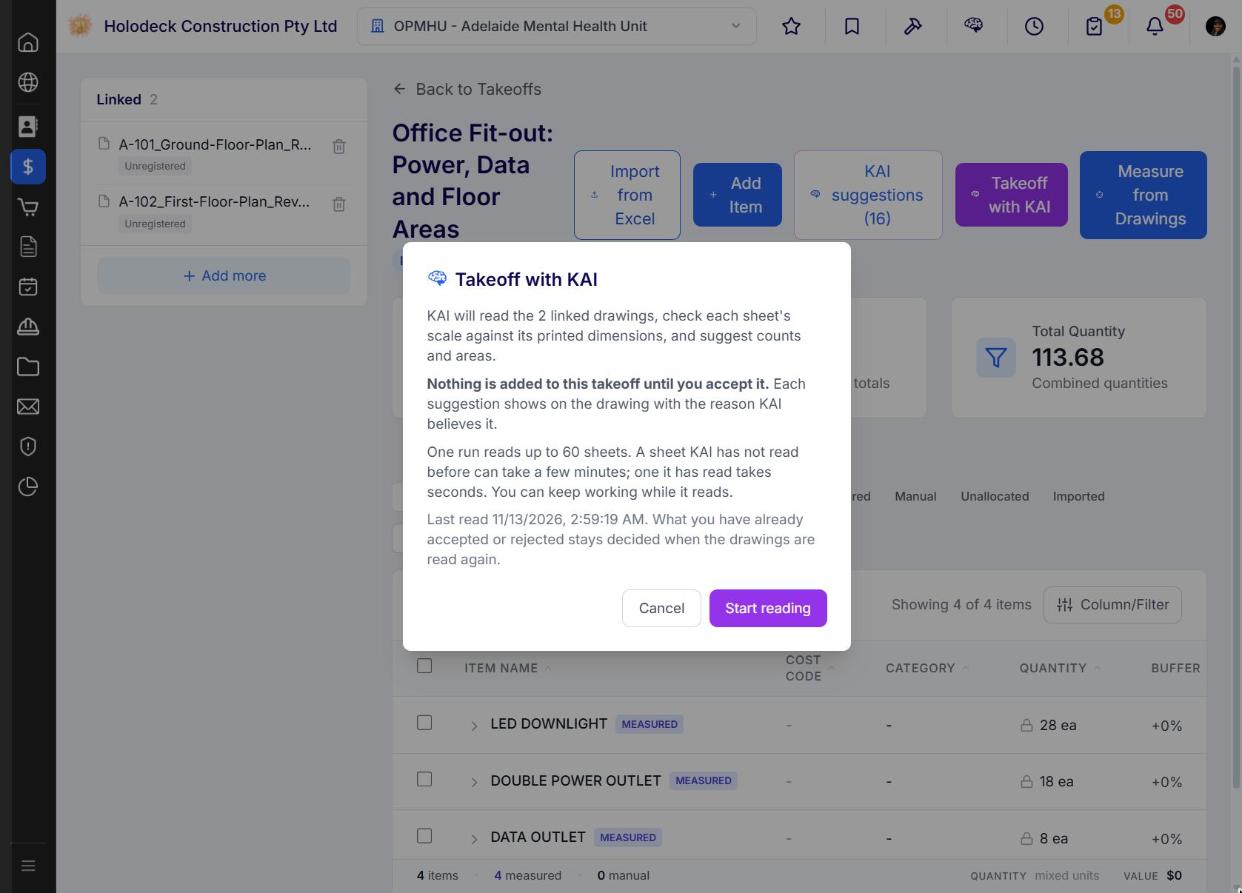

Press the button. Let KAI read the set.
A simple sheet takes under a minute. A dense sheet takes a few. Progress shows on the button, so the estimator keeps pricing other trades while KAI works.
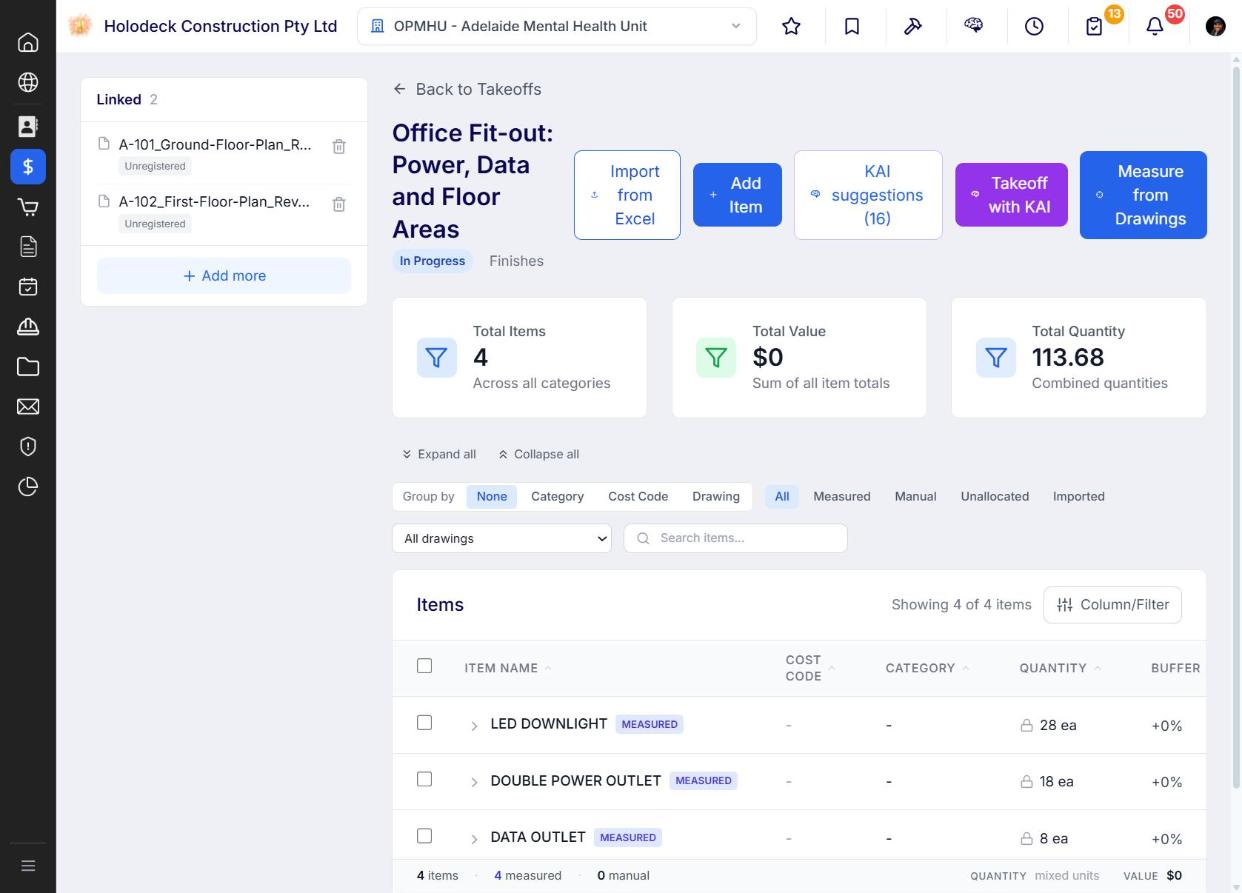
KAI's quantities are live-linked to your BoQ. No re-keying. No drift.
Every BoQ item links back to its takeoff source. Change a quantity in the takeoff and the BoQ updates. A manual override is flagged, so nobody overwrites a number without knowing.

Synced item warning

Synced Item Warning. Override knowingly or not at all.
The Source column on every line shows where the item came from: Takeoff, Manual or Imported. One look at the BoQ tells you what is connected and what was hand-keyed.
- Takeoff
- Manual
Revisions Without Starting Again
When a drawing is revised, KAI compares the sheets, re-measures only the regions that changed, and carries everything else forward. Coming next.

See what changed. Price the difference, not the whole set.
Packages that pin the old revision show "2 drawings revised, review changes". You get a change set: unchanged, changed, new and removed, each with the old and new quantity.
From the Drawing to Xero Without a Single Re-key
This is what standalone AI takeoff can't do. Each stage carries the quantity from the stage before. On award, the BoQ becomes the Original Budget.
- 01 Drawings
 Registered in Project Documents, revision controlled. Linked to the takeoff package.
- 02 Takeoff with KAIScales checked, quantities suggested. Your estimator accepts what is right. Badged KAI.
- 03 BoQLive-linked to the takeoff. Cost codes from your company library. Locations and categories on every item.
- 04 EstimateRates from your price lists. Markup, prelims and margin layered over the BoQ.
- 05 Subbie tenderingScopes go out with the measured quantities. Subbies respond by secure link, no login. KAI levels the quotes.
- 06 Proposal
Branded proposal pulls quoted items from the BoQ. Version control and e-sign. Tracked client view. - 07 BudgetOn award, the BoQ becomes the Original Budget. Every quantity still traces to its sheet.
- 08 Contracts, claims and XeroSubbie pricing becomes subcontract commitments. Claims and payment schedules run off the same lines, straight into Xero.

Why Connected AI Beats Another Takeoff Licence
Standalone AI takeoff saves your estimator hours. Takeoff with KAI on a connected platform protects the margin on the whole project.
Live lines, not a spreadsheet
Your cost codes from line one
No per-seat AI bill
Built for ANZ builders
Takeoff to subcontract to claim
An audit trail on every quantity
Accuracy gated on real drawings
Revisions that update the estimate
“Everything is included. No modules, no add-ons, no getting stung every time we need one more thing.”
Matt Hornby, Construction Manager, Matland Group
What KAI Measures Today, and What Comes Next
Live today: legend symbol counts, named room areas and scale checks on vector PDF drawings. Next: lengths and walls by type, areas with deductions, volumes, revision change sets, schedule reconciliation queries and scanned sheets.
Takeoff with KAI Runs on One Connected Platform
See Takeoff with KAI on your drawings.
Bring a drawing set you're pricing now. We'll run KAI on it live, check the scales, accept the quantities and show them land in the BoQ, estimate and budget.