The Project Layer Your ERP Was Never
Going to Give You
You bought the ERP for the accounting, then bought a project tool because the project side never landed.
Jobpac and Cheops are capable finance systems. They were built finance-out, which is why your CAs and PMs work around them. Deep Space runs the project layer end to end, so your ledger only has to be a ledger. Nothing about your year end changes.
5 Reasons Finance Leads Move the Project Layer to Deep Space
Not a feature checklist. The five things financial controllers tell us when they are running an ERP for finance and something else for delivery.
Your ERP

Pricing model
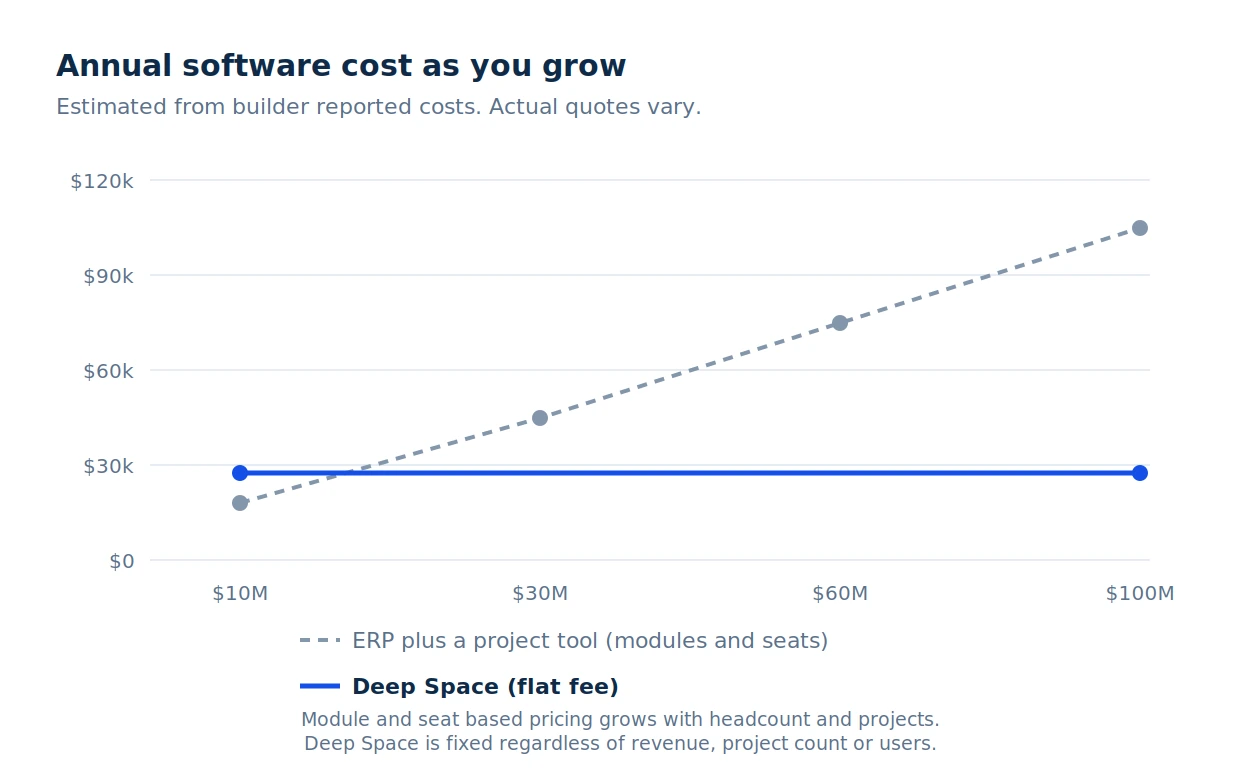
Modules, seats and negotiation. Cost
goes up when your turnover does,
even if margin doesn't.
Flat annual fee. Unlimited projects,
users, subbies, and consultants
Built for
The finance function first. Project
modules added on top, so delivery teams work around it.
ANZ mid-sized commercial builders. Native AS/NZS, CCA and SOPA compliant claims, GST, accounting sync, Sydney data centre.
Stack shape
Jobpac or Cheops for finance, plus Procore or Aconex for delivery, plus estimating in Cubit or CostX, plus MS Project, plus a safety system, plus middleware to hold it together.
One platform across preconstruction, procurement, programme, delivery, commercial, documents and HSEQ. Native accounting sync. No middleware.
AI
Rules-based matching against a PO number. Everything else is manual keying and manual review.
KAI is native, not bolted on. It reads supplier invoices and subbie claims on arrival, matches them to the commitment, and drafts the payment schedule for approval.
How it runs
A place to file documents and generate reports after the work has happened. The program is a static viewer.
A live, connected platform. Program is collaborative. Schedule shifts flag commercial impact automatically
Your ERP Was Built Finance-Out. Deep Space Was Built Project-First.
Jobpac and Cheops handle payroll, the ledger, WIP and statutory reporting properly, and the finance team chose them for good reasons. The ledger came first and project management was added later so the numbers had somewhere to come from. That works for finance. It rarely works for the CA, the PM or the site, which is why the business ended up buying a second system.
Deep Space is built here, with builders here. Native AS/NZS handling, CCA and SOPA compliant claims, GST, native accounting sync, AU and NZ data residency, local support, local roadmap. The product uses the language your team already uses.
- Project cost lives in the ledger, so the commercial team asks finance for numbers instead of seeing them.
- Connector, usually through middleware you maintain.
- Claims and payment schedules run in Word and email alongside the system.

- Commercial team owns the numbers. Live budget, committed cost and cost-to-complete, without asking finance.
- Native accounting sync. Contacts, invoices, POs, bills. No middleware. Built across ANZ.
- CCA-compliant claims native. Payment schedules drafted off the claim and approved under your delegation of authority. Sliding retention and milestone caps.
Two Systems, Two Licences, Two Sources of Truth One Platform Replaces All of It
The same invoice keyed twice. Commitments in one system, actuals in another, and a month end spent reconciling them. CAs back in spreadsheets because they cannot get what they need from either. Subbies outside all of it, so claims and variations arrive by email.
Eight or more subscriptions across categories. Multiple middleware tools to keep them in sync. Data spreads across systems that don't talk to each other.
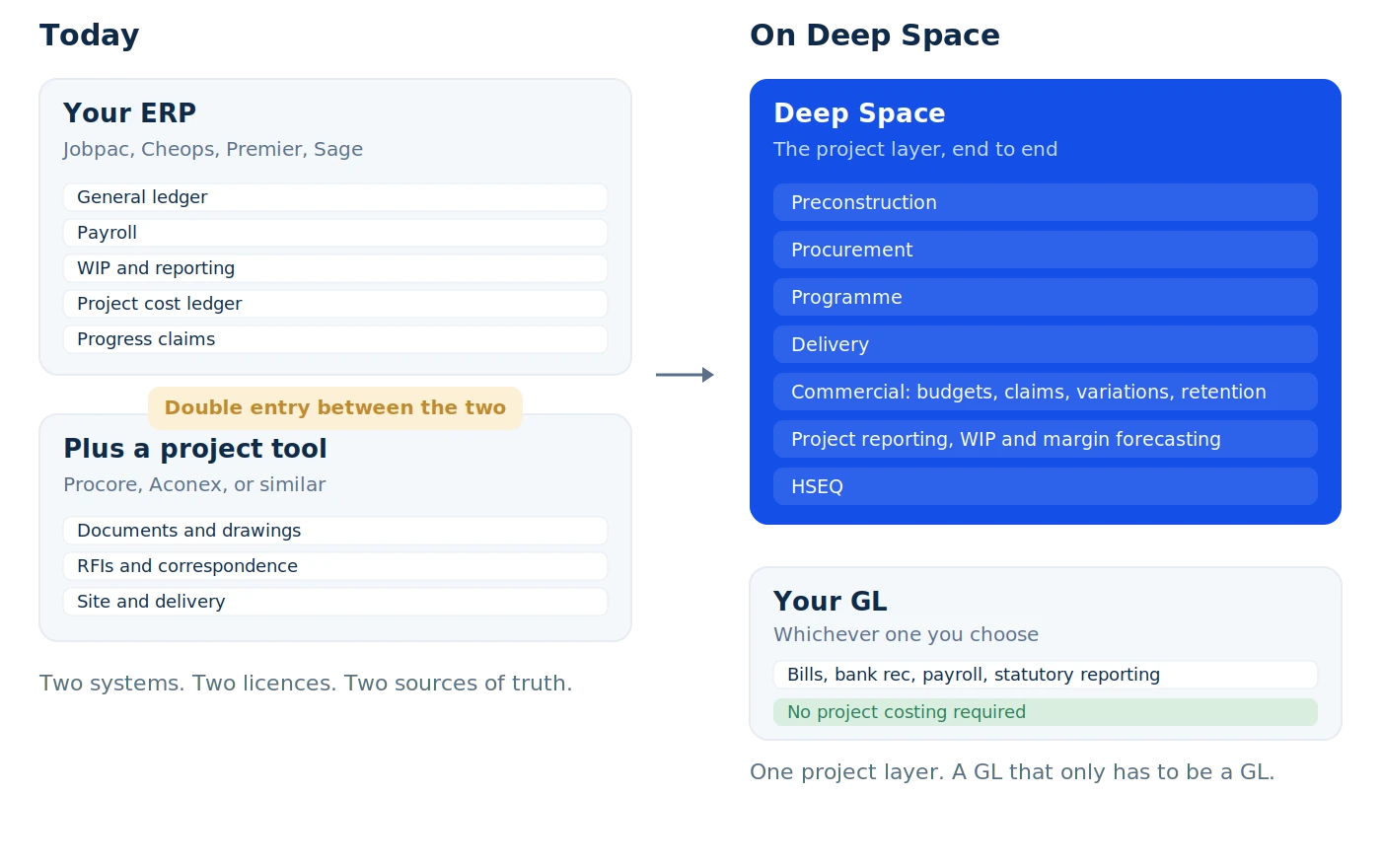
What's actually native in Deep Space:
- Native sync for contacts, invoices, POs, bills and payments, to whichever ledger you run. No middleware layer to maintain.
- Commitments, claims, variations and retention in one register, so committed cost and cost-to-complete are live rather than assembled at month end.
- Native programme module that ingests MS Project files and turns them into a live, collaborative working schedule. Subbies see only what concerns them.
- Approvals run on your delegation of authority, with a full audit trail behind every claim, variation and payment schedule.
On Invoice Matching, Let Us Be Straight With You
Construction ERPs have matched invoices to purchase orders for a very long time. Jobpac and Cheops both do it. What differs is how. Traditional matching is rules-based against a PO number, and it falls over when the invoice does not quote one, which in subcontract work is often. KAI reads the document itself, finds the likely commitment from what the invoice actually says, and flags the ones with no commitment behind them. It runs in the background as the invoice arrives. And it produces the payment schedule as well, drafted off the claim, approved under your delegation of authority, and pushed out with the invoice and signed schedule attached. That is the SOPA and CCA workflow, not just an accounts function.
KAI is native to Deep Space rather than bolted on. On the commercial side it reads supplier invoices and subbie claims as they arrive, matches them to the PO or subcontract, and drafts the payment schedule for your team to review and approve. It is not a feature you switch on. It runs in the background as the work happens.
Where the two approaches actually differ
Your ERP
Project cost
Held in the ledger. The commercial team requests reports rather than seeing the position themselves.
Live budget register with committed cost and cost-to-complete, owned by the commercial team rather than requested from finance.
Claims
Claim recorded in the ledger. The payment schedule is drafted in Word and sent by email.
Payment schedule drafted off the claim, approved under your delegation of authority, and issued with the documents attached.
Invoices
Matched automatically only when the invoice quotes a PO number. Everything else is keyed and reconciled by hand.
Invoice Inbox reads supplier invoices and subbie claims on arrival, matches them to the PO or subcontract, and flags anything with no commitment behind it.
Reporting
Accurate at month end, once finance has reconciled the two systems.
Live across every project, with committed cost, unactualised commitments and forecast in one register.
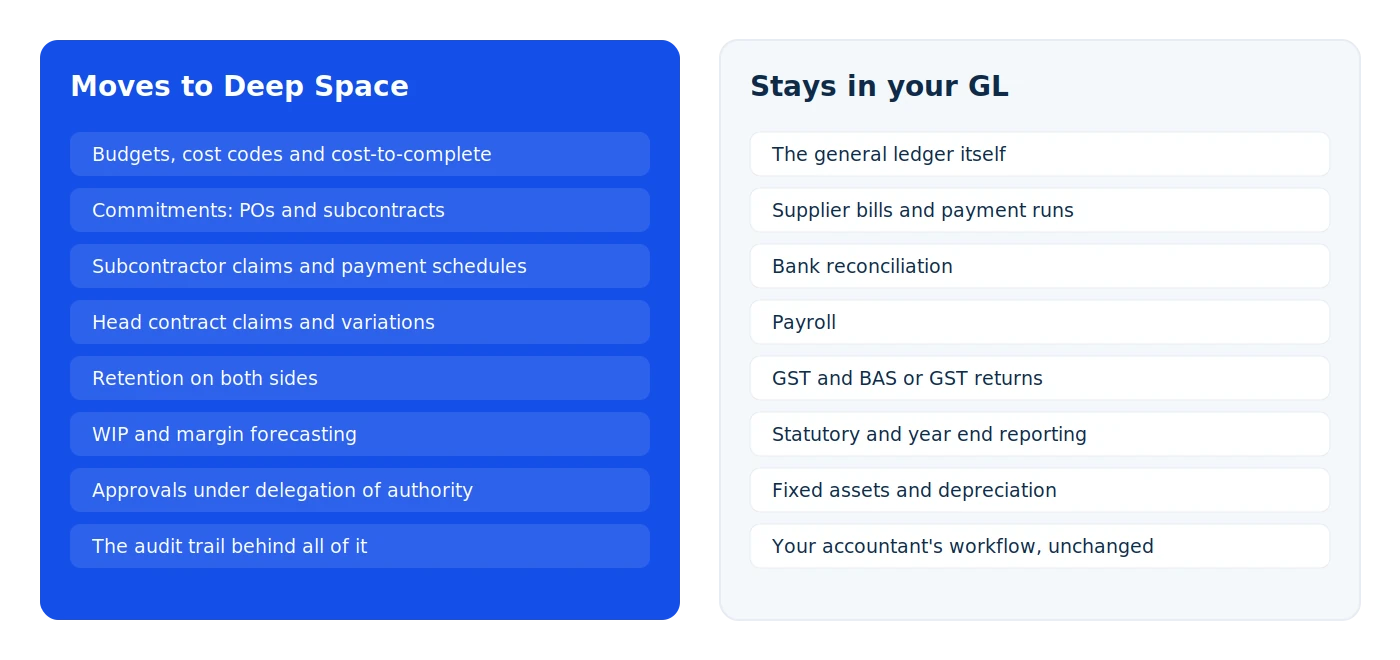
doesn't try to do.
We are not pretending to win in every dimension. Your ERP does things we do not, and payroll is at the top of that list. Here is what we tell you straight.
replacing your accounting system.
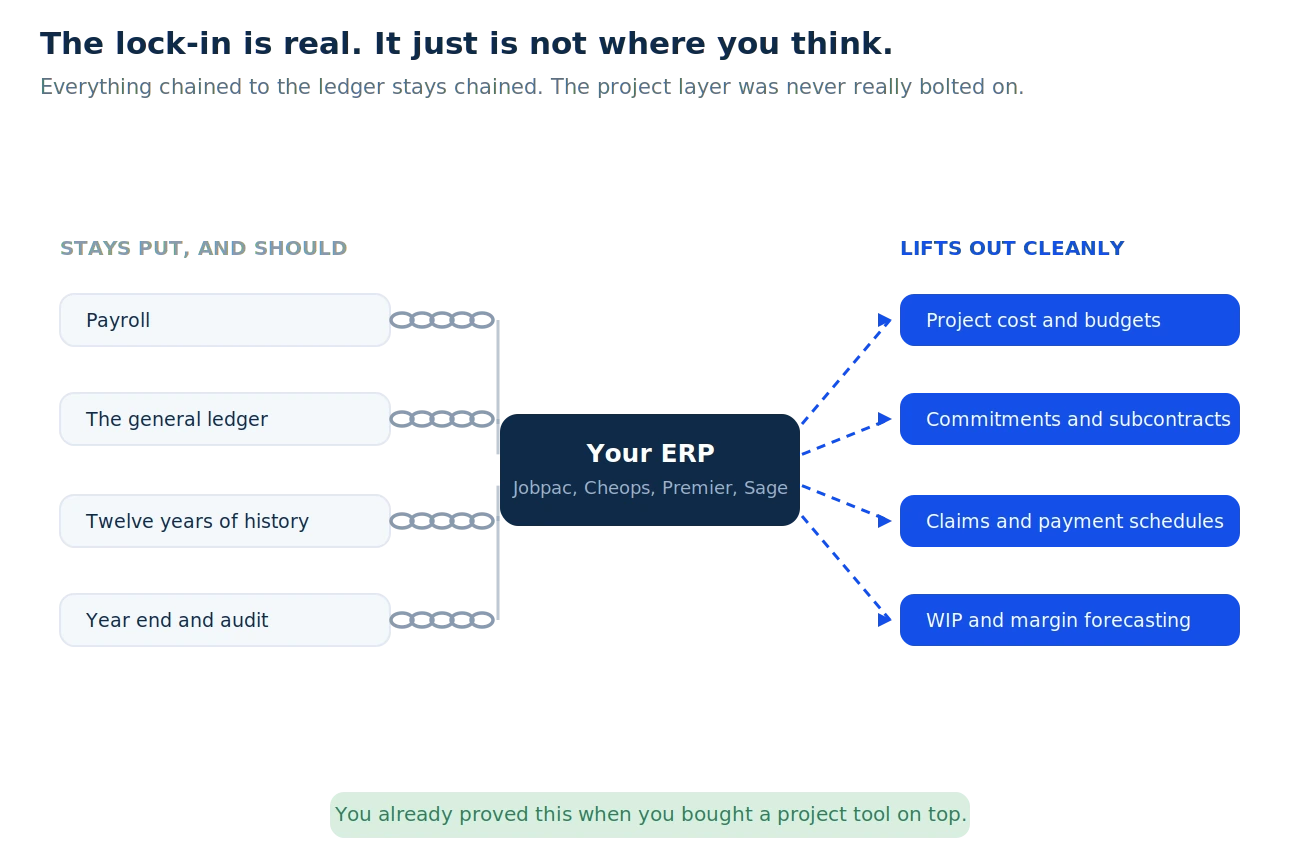
Payroll, the ledger, bank reconciliation, GST and statutory reporting stay exactly where they are. We sync approved transactions across and read paid status back, so the register reflects reality. Your year end, your history and your accountant's workflow are untouched.
honest about what fits.
Your finance team will ask about integrations, and they should. The ones most builders actually need are native. If you depend on something niche wired into the ERP today, tell us early and we will be honest about whether it fits.
keep it.
If your ERP is genuinely running delivery well and your CAs are happy working in it, keep it. Deep Space is for builders who ended up buying a second system because it was not. If that is not you, we will say so on the first call.
What builders actually say
(...some very real conversations)
From real evaluation calls with mid-sized commercial builders
weighing up their ERP against Deep Space across Australia and New Zealand.
Moving the project layer is
simpler than you think
No 18-month rollout. No dedicated IT project. No year-long contract before you see value. Builders are running real projects on Deep Space within weeks of signing.
See your current stack
mapped to Deep Space.
30 minutes with the team. Bring your current setup. We'll show you exactly how the workflows you run today translate into Deep Space, what you replace, and what stays. No generic demo.
.png)


.png)