Commercial Construction Management Software Built for ANZ Builders
Deep Space Commercial. Construction Financials for ANZ Builders
For ANZ commercial builders and large subbies. $10M to $200M+ turnover.
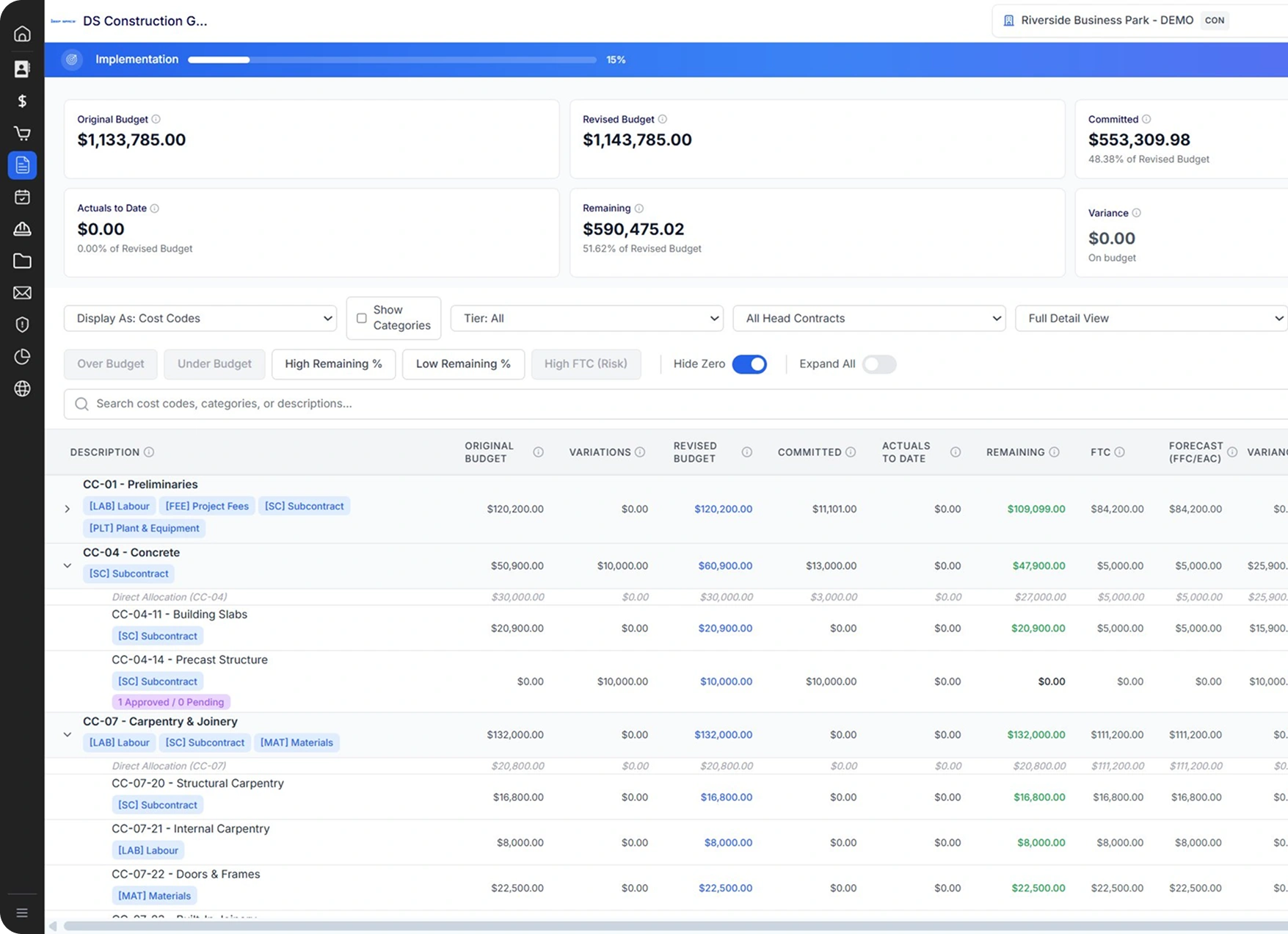
Revenue, cost, and margin at a glance. Every number is traceable to its source.
Deep Space is the single source of truth for project finances. Every commitment, claim, RCTI, variation, retention, and forecast is traceable back to the register that produced it, with the math always right. NSW SOPA, QBCC, and NZ CCA jurisdictions are handled natively. Xero is synced two-way with no middleware.

Commercial dashboard
Six connected registers
KAI invoice reconciliation

Why builders stop trusting their commercial system
Most platforms quietly misrepresent project finances. Three problems show up in nearly every commercial walkthrough.
The committed cost trap
You issue a $100K PO, negotiate it down to $70K, and close the contract. Most platforms still show $100K committed. Your "remaining budget" is permanently understated.
"It just leaves the bill. It's not actually a representation of what your budget is at." Commercial Manager, Brisbane commercial builder.

The cost stack that keeps growing
Procore Project Financials needs Smoothlink for Xero, DocuSign for signatures, per-seat fees for subbie portals, and Procore Estimating sold separately. Customers report stacks of $30K to $120K per year before middleware and add-ons.
The shadow spreadsheet
Because the platform's reports can't be trusted, the real cost-to-complete lives in an Excel workbook on someone's desktop. Versioned by filename. Out of sync the moment a variation lands.

From Estimate to Budget Register: Every Number Traceable
Build the estimate in Estimation, apply margins, click Push. The Budget Register populates with cost codes, categories, and baseline values intact. Re-push when the estimate updates and the register absorbs the change with full versioning.
Invoices reconciled before someone uploads them
Connect a shared inbox once (e.g. accounts@yourbuilder.com.au). Every invoice and claim that lands there is captured, read by KAI, matched against the right PO or subcontract, and routed for approval.
Capture from shared inbox
KAI reads every email and pulls
attachments automatically.
Match to commitment
Line items, ABN, dates, and dollar amounts extracted. Matched to subcontract or PO. Anything that doesn't reconcile is flagged.
Approve, push, done
PM approves, Deep Space pushes a draft bill to Xero, Budget Register reflects it within seconds.
Three tiers, no middleware
Connect Xero with one OAuth click. No Smoothlink. No SyncEzy. No middleware fee.
Tier 1. One-time setup (at onboarding)
Tier 2. Transactional sync (real-time)
- Approved head contract claims become Sales Invoices in Xero.
- Approved subbie claims and supplier invoices become Bills in Xero.
- Payment statuses flow back from Xero into Deep Space (no checking two systems).
Tier 3. Monthly journals (manual, audit-trailed)
"We've got a lot of failures on syncs all the time. That's one of the reasons we need to move."--Director, Sydney commercial builder running middleware between Procore and Sage 300 CRE.
Why Xero Alone Isn't Enough for Commercial Construction Project Management
Correct. Xero alone isn't a construction system.
Deep Space + Xero is.
Deep Space owns project commercials: subcontracts, claims, RCTIs, variations, retentions, progress claims, registers, and the forecast lock. Xero owns the GL, BAS, payroll, and bank reconciliation. They sync two-way in real time, with no middleware.
What a legacy ERP gave you 20 years ago, accounting and project costing in one box, Deep Space + Xero gives you in 2026. Better UX, AI built in, a local product team, a flat fee, and a roadmap shaped by the builders using it.


No Add-Ons. No Middleware. Every Commercial Construction Tool Built Into One Platform
Features Procore charges extra for, sells separately, or hides behind a support ticket. Included in every Deep Space plan.
For POs, subcontracts, variations, and payment schedules. No DocuSign subscription.
With threshold-based routing, parallel approvers, and delegated approvers.
(4 levels) with cost type as a separate dimension. No code-list explosion.
Drop in your logo, customise payment schedule, RCTI, and progress claim layouts yourself.
Issue from procurement schedule, responses come back into the platform, one click converts the winning bid to a PO or subcontract.
No CSV export, no Excel between systems.
linked to cost codes. Convert a materialised risk to a variation in one click.
Reconcile head contract, then subcontracts, then invoices, then retention release in one workflow.
For POs, subcontracts, variations, and payment schedules. No DocuSign subscription.
With threshold-based routing, parallel approvers, and delegated approvers.
(4 levels) with cost type as a separate dimension. No code-list explosion.
Drop in your logo, customise payment schedule, RCTI, and progress claim layouts yourself.
Issue from procurement schedule, responses come back into the platform, one click converts the winning bid to a PO or subcontract.
No CSV export, no Excel between systems.
linked to cost codes. Convert a materialised risk to a variation in one click.
Reconcile head contract, then subcontracts, then invoices, then retention release in one workflow.
Deep Space vs CAT Projects, Premier & Procore: Commercial Construction Software Compared
cashflow, contract management.
programme/HSEQ. Custom pricing.
(Trimble)
costing.
Software)
smart templates.
built-in AI.
Financials
added later).
broad ecosystem.
How a $30M-Revenue ANZ Builder Uses Deep Space Across the Full Commercial Lifecycle
- Procore Project Financials
- Smoothlink (Xero connector)
- DocuSign
- 1Breadcrumb / HammerTech (HSEQ)
- Procore Estimating
- Subbie portal seats (~50)
- Implementation & training (Y1)
- Total Year 1
- Deep Space, everything above
- $45,000
- $3,500
- $2,400
- $4,200
- $8,000
- $6,000
- $12,000
- $81,100
- $27,500
~$53K per year saved. Flat fee. No escalation.
Why ANZ Mid-Tier Commercial Builders Choose Deep Space Over Global Platforms
Project teams and finance teams use different products.
Mobile is bolted on, not native.
AI invoice reconciliation isn't there.
Subbie portals are per-seat or absent.
Templates are locked behind vendor support
Pricing isn't published.

Deep Space ships unlimited subbies, editable branded templates, public flat-fee pricing, one platform for project and finance teams, and the native DS Site mobile app. Included.
The full commercial lifecycle, on one platform

Estimating data flows into the budget. The budget feeds POs, subcontracts, and variations. Claims roll into actuals. Xero stays in sync. Final account reconciles head contract to subcontracts to invoices to retention release.
"It actually answers all the questions that, over my 20-something years, all the little issues you tried to tie in. Having one set of numbers as the true source is pretty important." Director, Sydney commercial builder, $60 to $70M annual revenue.
Bring Your Numbers. We'll Run Deep Space Live on Your Real Project
Bring a real project. We'll walk through your estimate, budget, subbies, and Xero connection. The actual platform, with your numbers in it. No slideware.
.png)


.png)