Preconstruction Software for Commercial Builders
From first opportunity to signed contract. Every stage feeds the next.
Most builders run preconstruction across seven tools that do not talk. Deep Space holds the bid-win lifecycle in one place. Opportunity. Takeoff. BOQ. Estimate. Proposal. Award.
.webp)

Why Builders Lose Context Across Preconstruction Tools
Re-key here, copy-paste there, pray the returnable schedule matches the workbook. Everyhandoff is where the context dies.
01
Opportunity tracking lives in HubSpot or a spreadsheet. The drawings do not.
A sales CRM tracks deal stages. It does not hold drawings, scope notes, or competitor analysis. When the deal hits Tender, the team starts over.
02
Takeoffs, BOQs, and estimates sit in three tools that do not talk.
Bluebeam takeoff. Excel BOQ. Costex or Qubit estimate. Re-key every line. The returnable schedule never quite matches the workbookstructure.
03
Tender conversations vanish once the job is let.
Every clarification, every commitment, every email with a subbie. By the time delivery picks up the subcontract, half of what was agreed is in someone's inbox.
“We just need something that connects to everything. Everything needs to be talking.”
-- Estimating lead, Melbourne commercial builder. April 2026.
Opportunity Tracking Built for Commercial Builders
Identified to Awarded. Project type, developer, value, probability on every card. One click converts a winning opportunity into a formal Tender, with everything you've collectedattached.
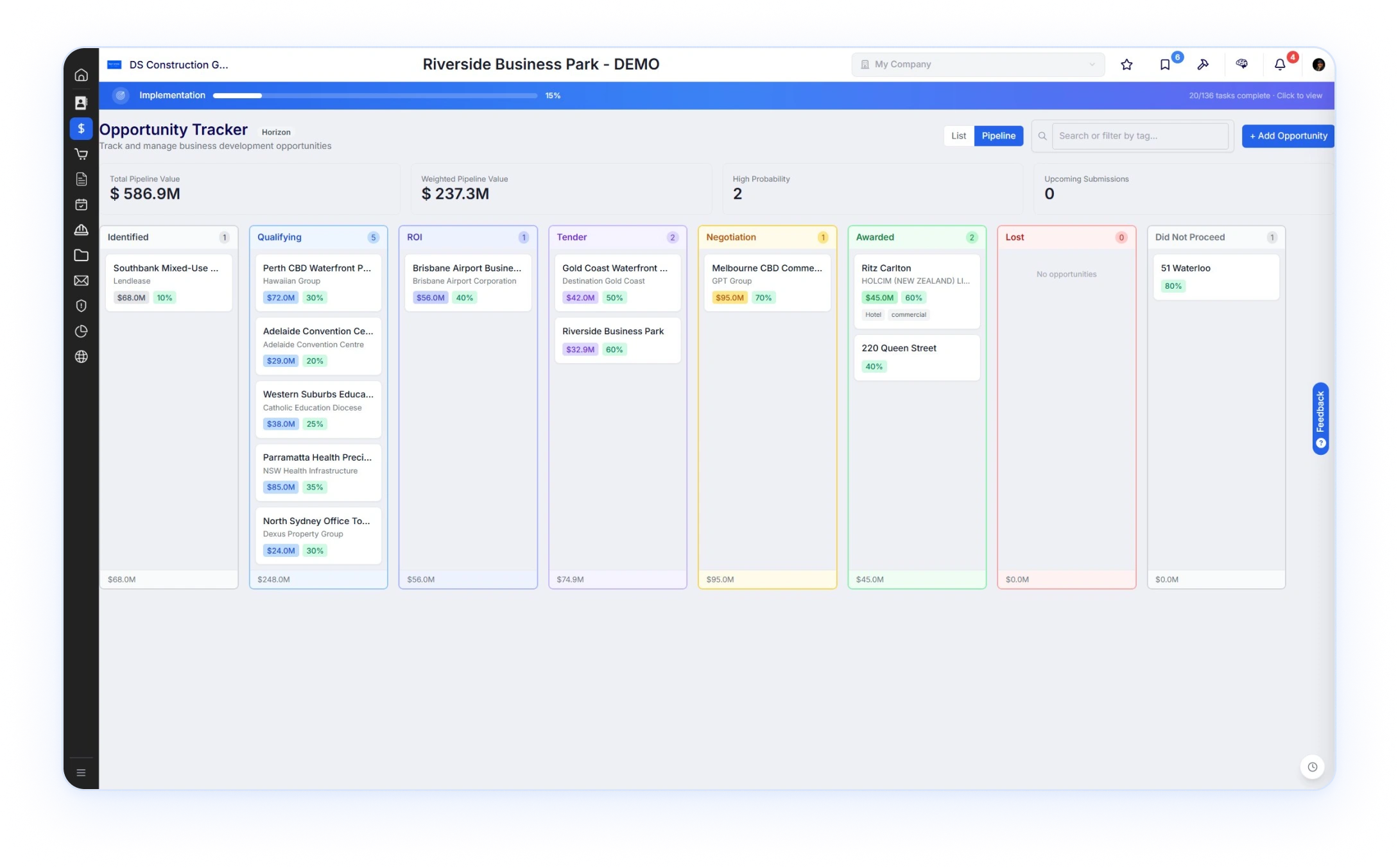

Track the work you're chasing. Not the deal a SaaS rep is closing.
Builders qualify projects on developer, value, probability, sector,and submission deadline. Stages here map to that decision.
- Identified
- ROI
- Tender
- Negotiation
- Awarded
- Lost
- Did Not Proceed
Tender Management with AI Readiness Scoring
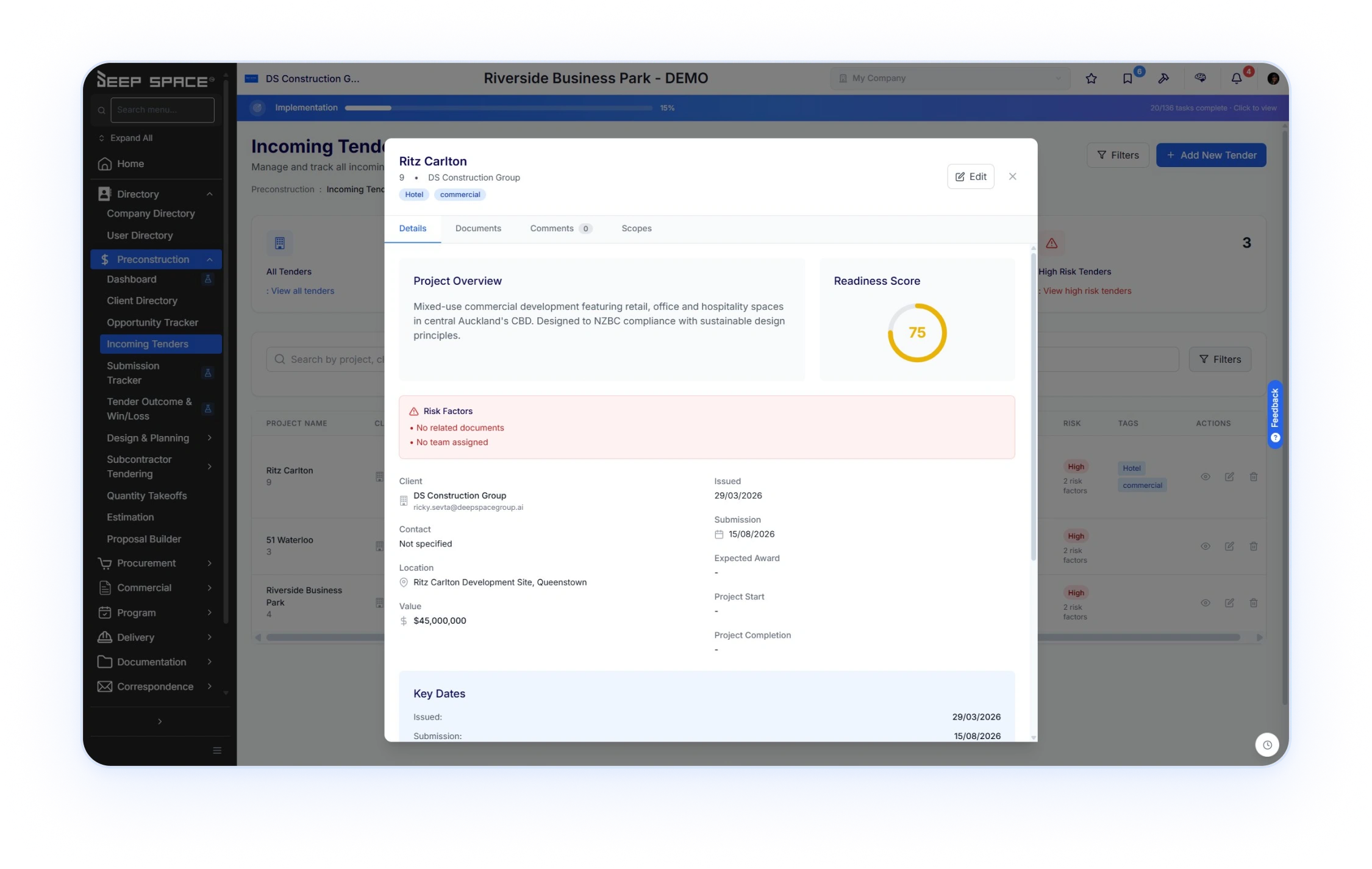
When a tender arrives, KAI scores readiness automatically and flags the gaps. Nodocuments. No team. Submission in five days. See what is bid-ready before the team burns hours pricing it.
.svg)
Readiness score and risk factors. Calculated.Not assumed.
Every tender gets a readiness score from 0 to 100. Calculated from documents attached, team assigned, scopes drafted, days to submission. Risk factors flag what is missing.
Readiness 75

Risk: No related documents. No team assigned.
Readiness 92
.jpg)
Bid-ready. Team assigned.Scopes drafted. 12 days tosubmission.
Readiness 38
.jpg)
Risk: Drawings outdated. Addendum unread. 4 daysto submission.
Manage Opportunities, Takeoffs, Estimating, and Preconstruction Workflows in One Platform
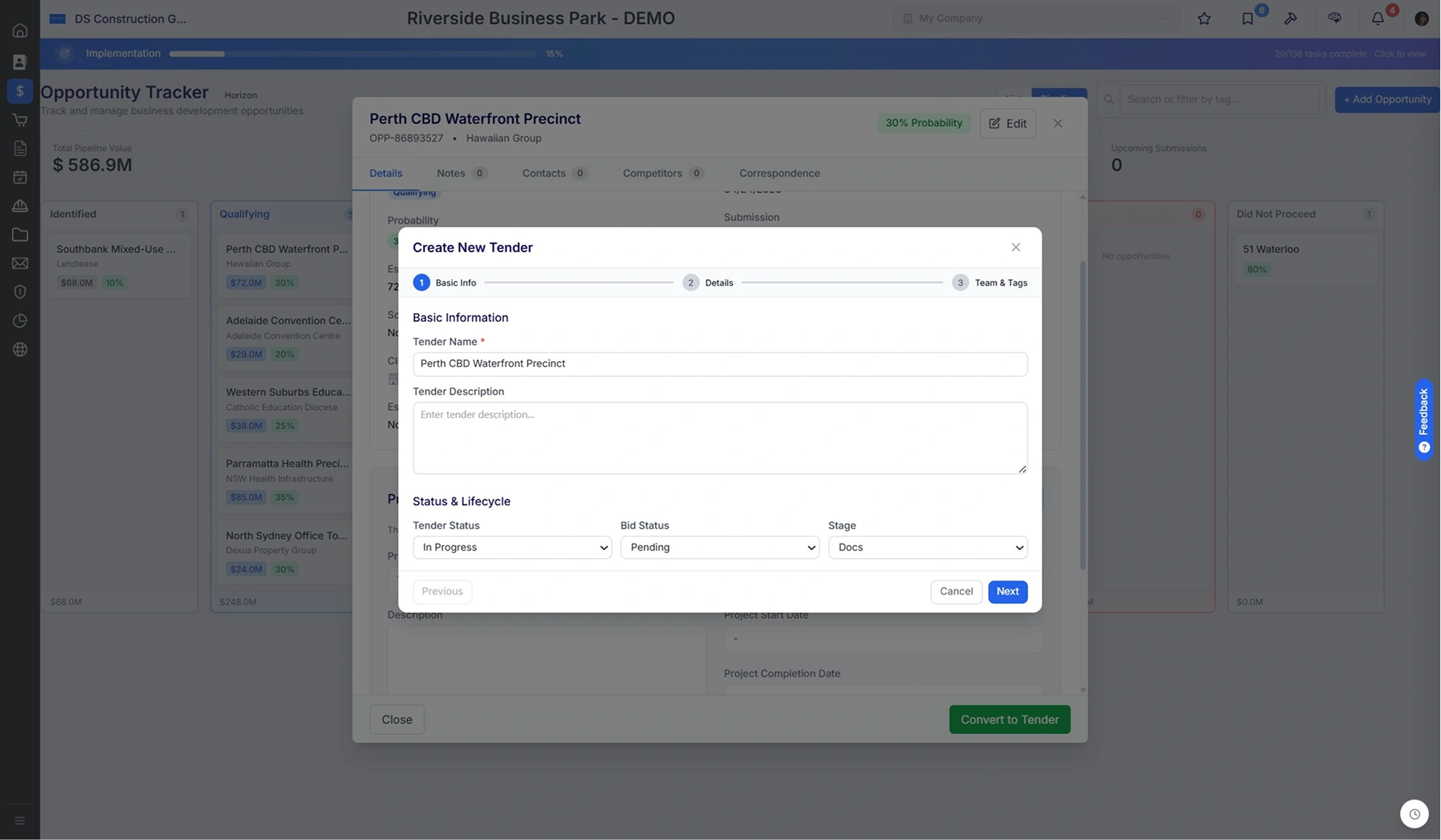
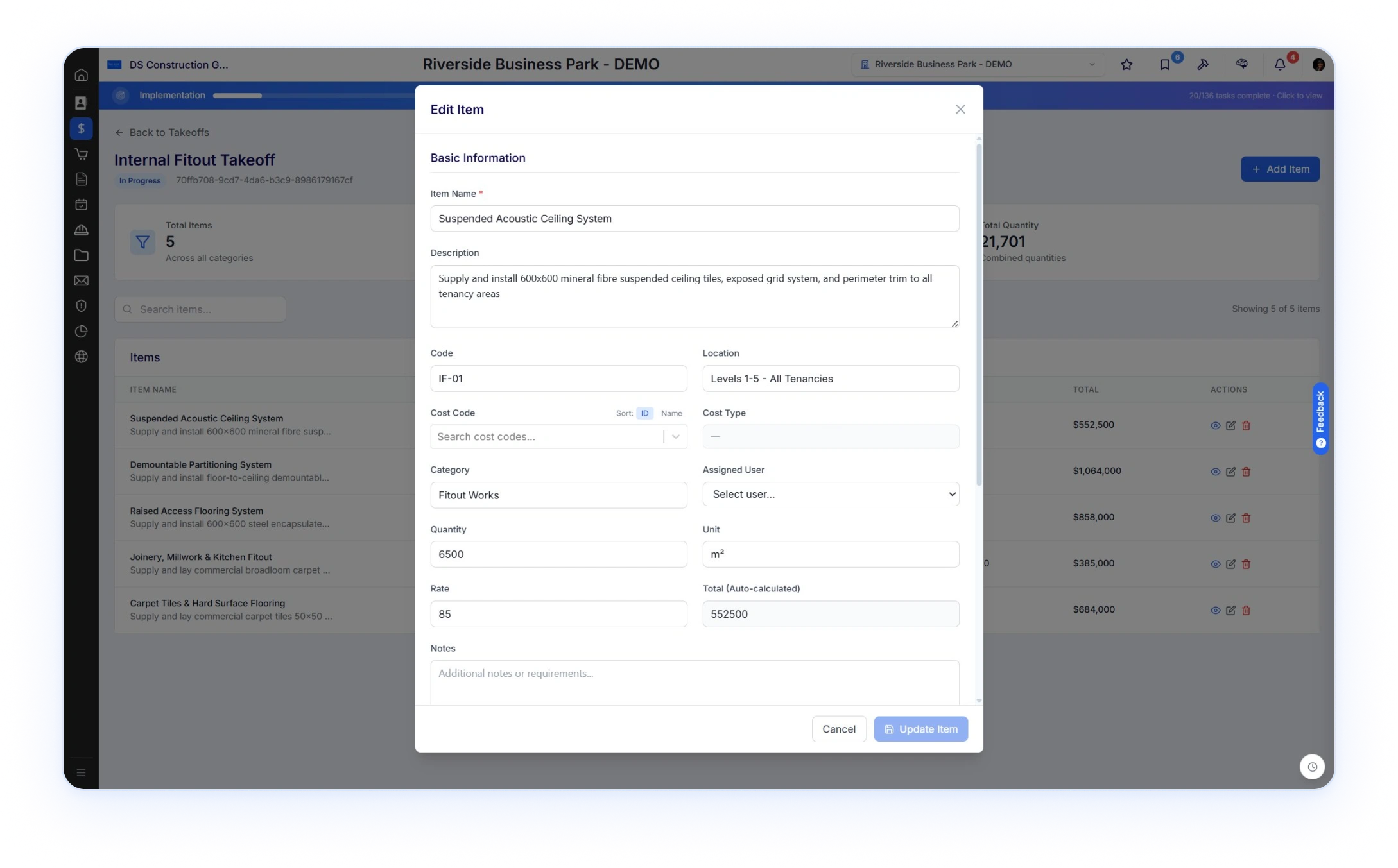
Click Convert. Three-step wizard captures tender name, status, team, tags. The takeoff workspace opens. KAI extracts items from drawings with quantity, unit, location, and category.
.svg)
One click into a structured tender. Then KAI on the takeoff.
Convert lifts the opportunity record into a formal tender, withdocuments and contacts attached. The takeoff workspace opens.KAI extracts items from drawings with cost codes, locations, andcategories on every line.
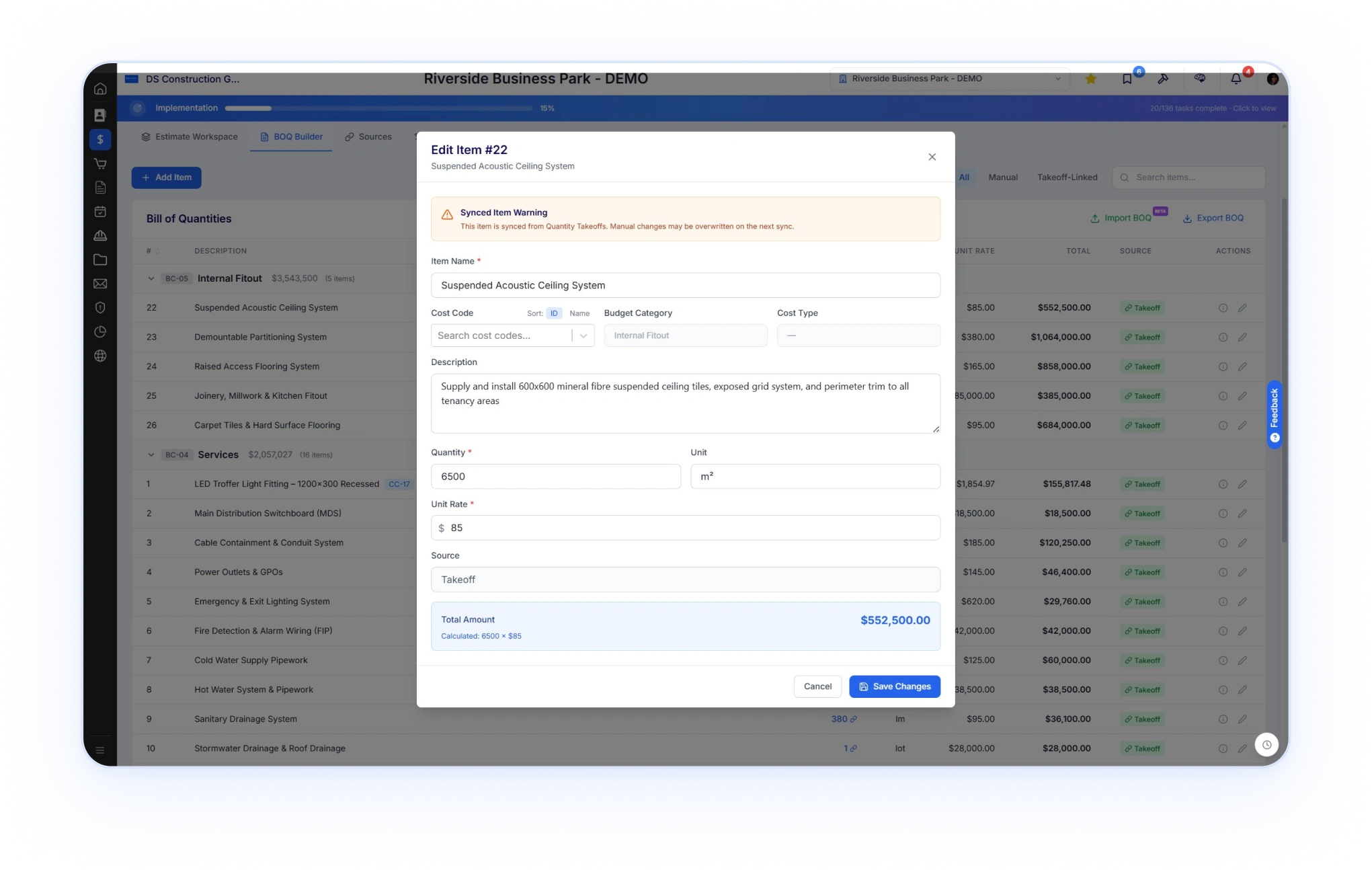
Bill of Quantities live-linked to your takeoffs. No re-keying. No drift.
Every BOQ item linked to its takeoff source. Edit a quantity in the takeoff, the BOQupdates. Manual override flagged because next sync will overwrite it. One source of truth.

Synced item warning

.svg)
Synced Item Warning. The architecturalmoment.
Override knowingly or not at all. The Source column on every line shows where the item came from. Takeoff. Manual. Imported. One look at the BOQ tells you what is connected and what was hand-keyed.
- Takeoff
- Manual
Proposal Builder with Version Control and E-Sign
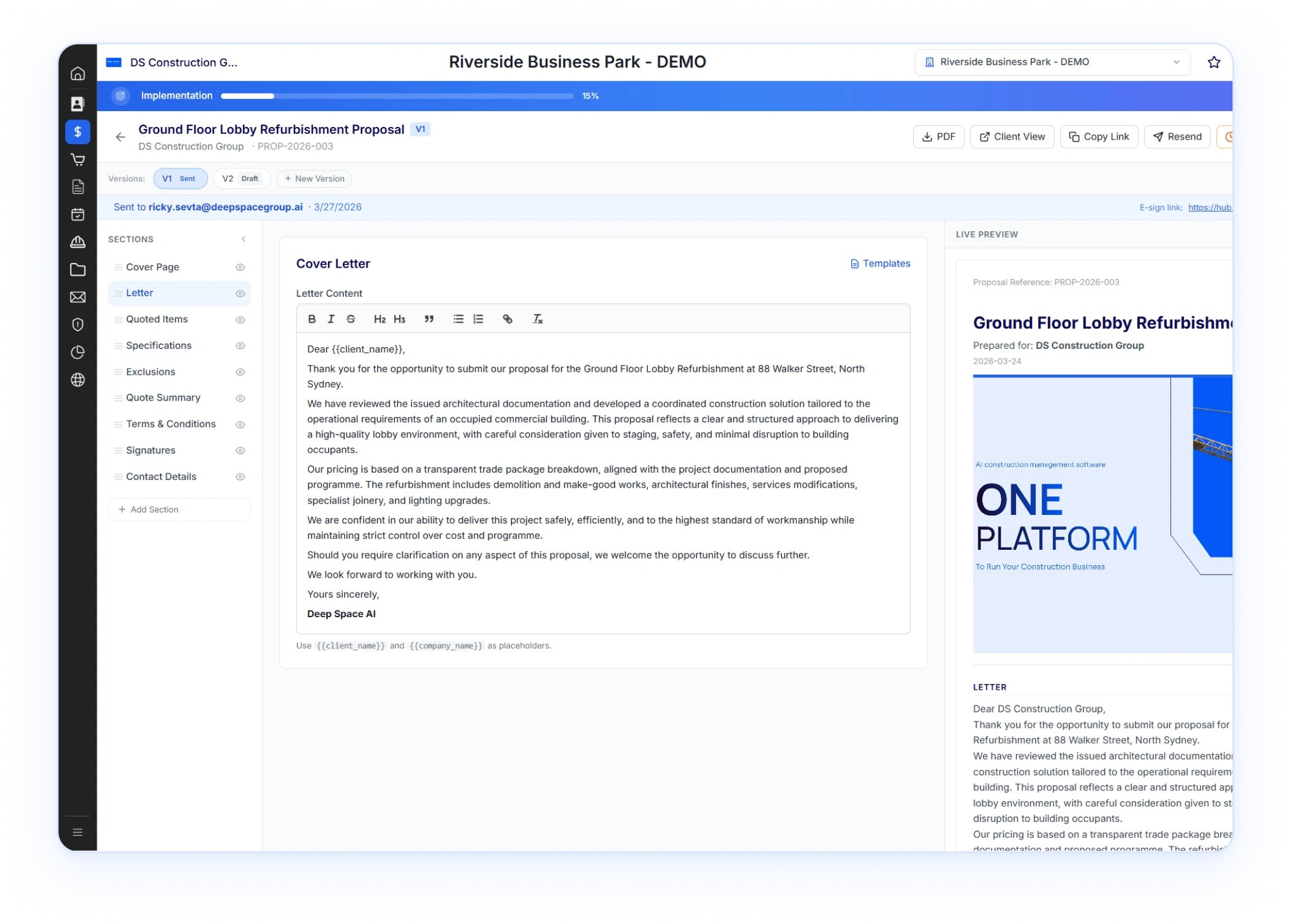
Cover, letter, quoted items, specs, exclusions, terms, signatures. Live preview as you edit.Send with a tracked link. The client signs in their browser.
.svg)
Edit on the left.See it as the client will, on the right.
Sections sidebar on the left. Live preview on the right. Edit inlineand watch the proposal update as the client will see it. Quoteditems pull from the BOQ.
Connect Preconstruction Workflows From Opportunity Through Project Delivery
Each stage carries the work from the stage before. On Award, the BOQ becomes theOriginal Budget.
- 01 Opportunity
 Pipeline card with developer, value, probability, sector, drawings, contacts. One click to convert.
 - 02 TenderFormal tender record. Readiness score and risk factors auto-calculated. Documents and scopes attached.
- 03 TakeoffKAI extracts items from drawings. Cost codes from the company library. Locations and categories on every item.
- 04 BOQLive-linked to the takeoff. Synced item warning on manual override. Hierarchical with budget categories.
- 05 EstimateMarkup, escalation, prelims layered over the BOQ. Labor rates from the central register. Cost codes carry.
- 06 Subbie
tenderingIssue scopes via portal or secure URL. No login needed for subbies outside your directory. Bid comparison and leveling. - 07 ProposalBranded PDF pulls quoted items from the BOQ Version control. E-sign. Tracked client view..
- 08 AwardBOQ becomes Original Budget. Subbie pricing becomes subcontract commitments.Delivery picks up a project that already knows itself.
.webp)
One Connected Preconstruction Workflow From Tender to Delivery
Cost codes set once and used everywhere. KAI takeoff that hands clean items to a live-linked BOQ. Every connection is deliberate. Every handoff is engineered.
Shared cost codes
KAI takeoff
One PDF templating engine
Push-to-Commercial on award
Sync-linked BOQ
Project structure persists
Subbie tendering on portal or URL
Version control everywhere
“We need something with a more commercial view. Something that fits a small to medium enterprise.”
-- Co-founder, NSW developer-builder. A$10M turnover. Currently using BuildExact. March 2026.
Manage the Full Preconstruction Lifecycle in One Connected Platform
The full lifecycle is live today. Estimation V2, Labour Rate Card flow-through, RFQ Module, and Clone Wizard ship next. Built with the customers running it.
Preconstruction Is One Module of Seven in the Platform
See preconstruction running on your project.
Bring a tender you have on your desk. We will load the drawings, run the takeoff, build the BOQ, and walk through the proposal.
.png)


.png)