Your site diary is evidence. Write it like it.
Eighteen months after Practical Completion a delay claim lands, and what defends it is a diary someone filled in on a Friday for a week that had already gone, with a headcount they estimated and plant hours they reconstructed off a docket in the ute.
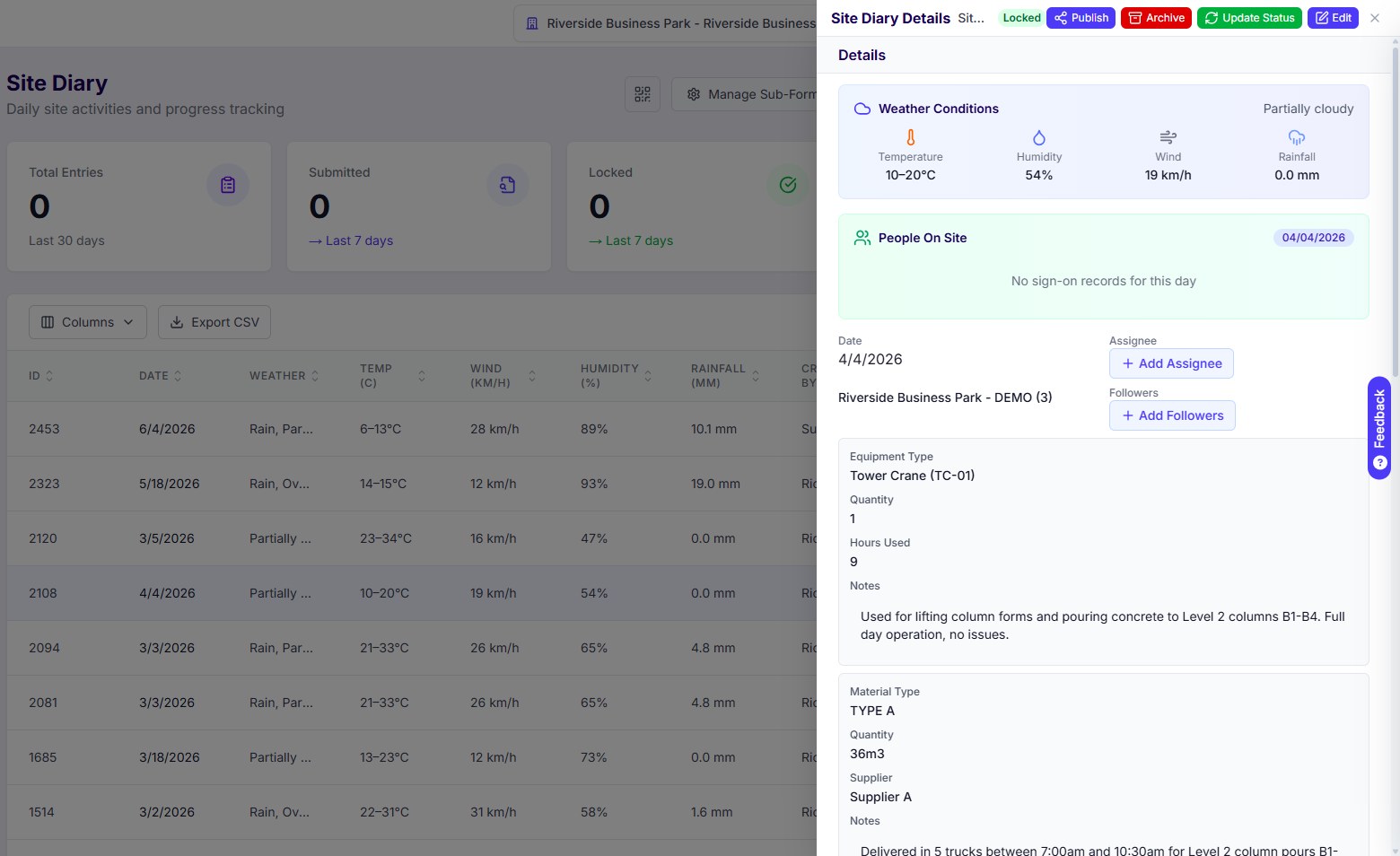
Deep Space builds the record from what actually happened that day, then locks it. The people who signed on at the gate are the headcount. The weather is the weather that fell on the project. Plant hours and deliveries are captured as numbers against an asset and a supplier, not as a sentence describing the day.
One day on site has to land in four different places.
The gate, the diary, the subbie's claim and the forecast are four records of the same Tuesday. On most stacks they are four separate acts of data entry, done by four people, at four different times, and they do not agree with each other. That disagreement is the whole problem, and it only surfaces when something is being argued about.
People arrive
Crew and subbies sign on by QR in DS Site. Every sign-on is an event with the person, their company and the time attached.
Work happens
Plant hours, deliveries, photos, prestarts, permits and toolbox talks captured on the phone as they occur, not recalled at the end of the week.
The diary assembles
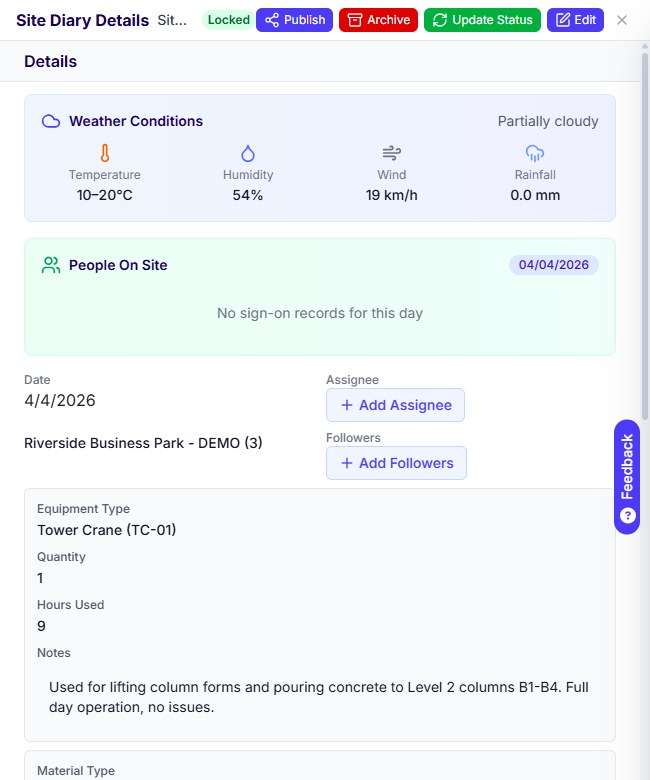
Headcount already there from the gate. Weather already there. Plant and deliveries already there as structured sub-forms. Submit, and it locks.
It gets used
Dockets check against who signed on. Plant hours check against the asset. And when the claim comes, the diary is the one written that day, not the one rebuilt for the occasion.
Four uses, one record. The site team enters it once, where it happens, and nobody types it again.
Every platform has a daily log. Most of them are a form, not a record.
If the question is whether your current tool can hold a site diary, the answer is almost certainly yes. The questions worth asking are where the numbers in it came from, whether anyone could have changed them since, and whether any of it is structured enough to check.
Written from memory, on a Friday
Five days recalled at once. Weather guessed. Trades approximated. The delay that mattered on Tuesday has softened into half a sentence by the time anyone writes it down.
A record anyone can quietly amend
If an entry can be edited a month later with no trace, it is a note, not evidence. That distinction only matters once, and by then it matters enormously.
Three records of the same Tuesday
The gate has one version, the diary has another, the subbie's docket has a third. Nobody notices they disagree until someone is being invoiced for hours that no sign-on supports.
Prose where you needed data
Crane on site most of the day, concrete arrived in the morning is a nice summary and useless against a docket. Nine hours on TC-01 and 36 cubic metres across five trucks is a number you can check.
We had the site diary in one system, sign-on in another, and timesheets in another. Three records of the same day and none of them matched.
Project Manager, mid-tier ANZ commercial builderA diary you can edit later is a note. A diary that locks is evidence.
Deep Space assembles the day from records that already exist, captures plant and materials as structured sub-forms rather than a paragraph, and locks the entry on submission with the change history behind it. Manpower is read from the sign-on register, held as one event per person per day with their company attached, so last March still reports correctly today and still reconciles to what the subbie claimed for the same shift.
- People On Site reads that day's sign-on events, with company recorded against each one
- Weather captured against the project location: temperature, humidity, wind and rainfall
- Plant sub-form with the equipment ID and hours used, not a description of what was on site
- Materials sub-form with quantity, supplier and delivery notes, so a docket can be checked against it
- Submitted, then Locked and published, with change history retained
- Drafted in DS Site on the phone or at a desk, into the same project register either way
The prestart should happen at the plant, not back at the site office.
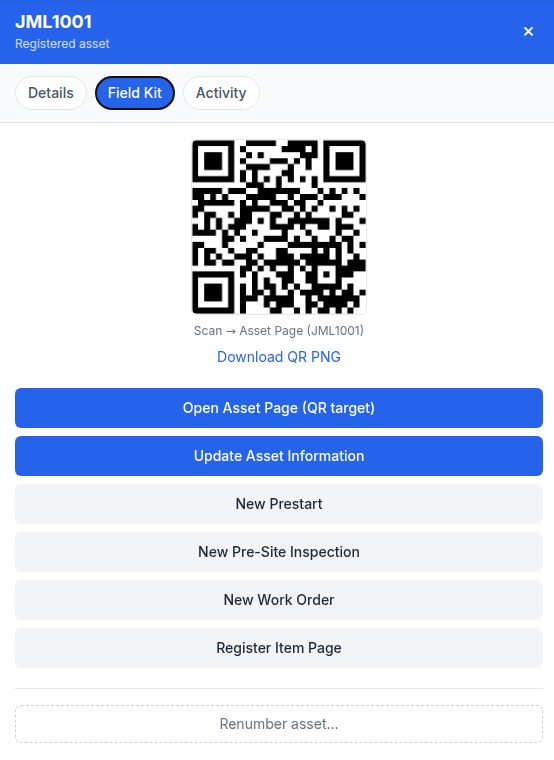
Every asset in the register carries its own QR, printable as a sticker. Scan it at the machine and the field kit opens against that asset. Raise the prestart, log a pre-site inspection, or raise a work order, standing next to the thing being checked, which is the only place the check is worth anything.
- Asset register across the workspace with type, supplier, location and the checks required on each item
- A QR per asset, downloadable as a PNG for the sticker
- Prestart, pre-site inspection and work order raised straight off the scan
- Maintenance tracked as OK, due or overdue, so an overdue item is visible before it becomes an incident
- Plant hours flow through to the diary sub-form rather than a separate log
An action without a source is just a to-do list.
Actions get raised in a coordination meeting, off an RFI, off a site instruction, off something a foreman flagged in the diary. Flatten them into one list and you lose the only thing that makes them closeable, which is the record that raised them. On Deep Space every action carries its source and links back to it by reference.
- Source recorded on every action: the RFI, the site diary entry, the site instruction, the meeting or the DS Site form
- Assignee, category, due date and priority, with overdue and unassigned surfaced on the delivery dashboard
- Recurring actions grouped rather than repeated forty times down the register
- Meeting minutes carrying attendees, health and safety, progress, programme update and risks, tracked to close-out
- Subcontractor dockets and workforce directory alongside, so the names on a docket are the names that signed on
- Weekly labour timesheets for self-performed work, entered per day against a cost code and submitted for approval

A site record is worth more when the notice can reach for it.
Delivery captures what happened. The moment it has to become a contractual position, a delay notice, a time claim, an instruction passed down to a subbie, it moves into the notice register and takes the record with it.
One register for every notice type
RFI, consultant advice notice, client instruction, site instruction, notice to subcontractor, head contract and subcontract variations, notice of delay and extension of time. Numbered per project per type, chained so the full history of a question is one click away, and issued from your own email address so the consultant replies in their inbox without logging into anything.
Delay notices and time claims run against your head contract clause and its notification window, not a generic due date, and the delay position reads off the contract rather than a spreadsheet.
See how Correspondence worksProcore is a real platform. It was not built for a builder your size, in your market.
Procore's daily log is mature and genuinely well built: weather, manpower, deliveries, safety violations, copy yesterday forward. On a feature-by-feature read it wins some rows outright. The ones that decide it for a mid-tier ANZ builder are about where the record comes from and what it costs you to keep.
An enterprise platform, scaled down
Running today- The record is a narrativeA description of the day rather than structured plant hours and delivery quantities you can check a docket against.
- Manpower is typed inWhatever the site manager remembers, with the sign-on data it should have come from sitting in another product.
- Priced on annual construction volumeA strong year raises the licence fee whether or not the site team opened the app more often.
- Contract logic is configurationAS 4000, ABIC and NZS 3910 notification windows set up by a consultant, if they are set up at all.
Deep Space
On one platform- The record is structured and lockedEquipment ID and hours, quantity and supplier, and no quiet edits after submission.
- Manpower is read from the gateThe diary reads that day's sign-on events, company attached, reconcilable to the subbie's claim for the same shift.
- One flat annual feeGrowth is not a pricing conversation with your software vendor.
- Contract logic is the productDelay and time notices run against your head contract clause and its window, out of the box.
The questions builders actually ask on the first call.
We already run Procore. Why would we move the site off it?
Usually you would not move the site alone. The case for moving is that the site record, the commercial position and the notices stop being three systems, so the diary that supports a delay claim and the claim itself live on the same project. If the rest of your stack is staying put, we will say so on the call.
Will the site team actually use it?
DS Site is free to download and there is no per-user licence for your crew or your subbies, so nobody is rationing seats. Sign-on is a QR at the gate. If a foreman has to be trained for an afternoon to log a diary, we have built it wrong.
How long until we are live?
Weeks, not quarters. Implementation is hands-on and done by people who have run projects, not a partner network. We seed your workspace with your cost codes, your directory and your forms before your team logs in.
Who is this actually for?
Mid-tier commercial builders in Australia and New Zealand, roughly ten million to two hundred million in annual turnover, running several projects at once without a systems administrator on staff. Too big for a diary app. Too lean for an enterprise rollout.
Bring one real week on site and we will build the record from it.
Thirty minutes. We set up a workspace against your project type, run a single day through sign-on, diary, dockets and timesheets, and show you what it looks like at the other end when someone disputes it.
.png)


.png)