Run your entire construction business faster, smarter, and cheaper.
One platform to replace the systems that don't talk to each other. Purpose-built for mid-tier ANZ commercial builders, from tender to final claim, office to site.
Faster
Less double handling. More building.
Tenders, financials, safety, delivery and reporting all run off the same live data. Nothing gets keyed in twice, so changes flow through straight away and decisions get made faster.
Smarter
AI built in. Not an add-on.
KAI is native to the platform. It codes subbie claims and supplier invoices to the right project, compares subbie quotes, reads drawings and cuts admin overhead. And KAI does so much more.
Cheaper
One subscription. All the functionality to run your whole business.
No more paying licences on different software for everything. It's all in one subscription, and our team migrates you across quickly so you're not paying for both.
The builders building with Deep Space





















See one project, end to end
See how ANZ builders run a project end to end, from tender to final account, on one platform.
Ready to see it on your own projects?
Book a DemoAsk the builders who already made the switch
“After years of construction software that always had something missing, Deep Space closed the gaps and simplified the whole process.
The ongoing support since onboarding has been just as good.”

“Everything is included. No modules, no add-ons, no getting stung every time we need one more thing.
It handles the tender, the programme, the procurement, the build, the compliance and the claims. All of it in the one platform.”

“Deep Space replaced multiple disconnected systems with one platform that manages our project and financial workflows.
The Xero integration is seamless, and their support is outstanding. When we find an issue, it’s often fixed the same day, which is rare in this industry.”


The only construction platform built as one system.
From your first tender to your final claim, it is one project. Your estimate becomes your budget. Your subcontracts, variations, claims and payment schedules all run off it, straight into Xero. Your programme, drawings, RFIs and site records sit against the same project. Everyone from your estimator to your site manager, at the same time.
.png)
Multiplied
Weeks
to go live
Why Australian and New Zealand Builders Still Run Projects the Hard Way
01
Drawing reviews take too long and miss too much
Your QSs and PMs are manually combing through consultant packages looking for coordination issues, scope gaps and missing information. Most get missed regardless. By the time they surface, they are already RFIs, variations or delays on site, and the conversation with the client has already happened.
02
By the time the numbers are current, the decision is already made
Budget registers and forecasts get updated after decisions are made, not before. The PM has already committed to a subcontractor, approved a variation, or signed off a claim based on last month's numbers. The commercial team is always reporting on what happened, never seeing what is happening.
03
Subcontractors don't respond because your system makes it too hard
RFI response rates below 20 percent because emails go to spam. Subbies ignoring portal invites because they refuse to create an account to respond to one question. Payment schedules emailed as Word documents and chased by phone. The admin burden sits entirely on your team because the tools require too much of the people you have least leverage over.
04
The stack costs far more than the licences and now you feel trapped in it
Jobpac or Cheops for the ledger. Procore or Aconex for drawings and correspondence. A safety platform. MS Project for the programme. Each one seemed reasonable when you bought it. Now you are paying six figures in combined licensing, your teams are doing hours of re-keying between systems every month, and nobody wants to be the one who says it isn't working. The real cost is not the subscriptions. It is the decisions being made on stale data while the systems talk past each other.
One platform instead of a stack of disconnected software.
Most builders use separate systems for preconstruction, project management, financials, HSEQ, procurement, documents and reporting. Each system becomes another room, with integrations and spreadsheets trying to hold the building together. Deep Space was built as the whole house. Every part of the construction business works from one connected project record, from the first estimate through delivery and final account.
- ✗Separate software for estimating and preconstruction
 Preconstruction connected directly to project delivery
- ✗Financial software plus spreadsheets for budgets, costs and forecasts
- Project financials managed from the same live project record
- ✗Separate project management and document control software
- Programmes, RFIs, documents and correspondence in one place
- ✗Standalone HSEQ and site management applications
- HSEQ and site workflows connected to projects, people and subcontractors
- ✗Separate procurement, prequalification and subcontractor tools
- Procurement and subcontractor management connected to commercial data
- ✗Data copied between systems and reconciled manually
- Information entered once and shared across every module
- ✗Reports assembled from exports, spreadsheets and BI tools
- Live reporting across the whole business from one source of truth
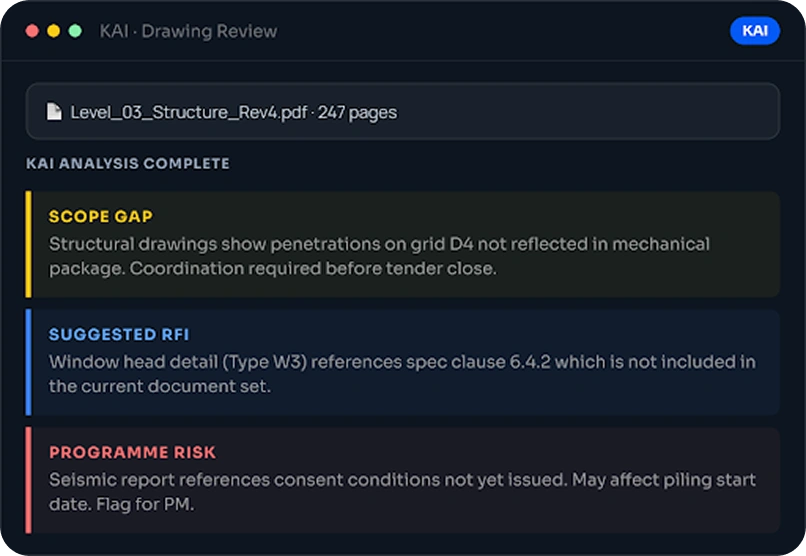
"KAI reviewed our drawing package and flagged three coordination issues we
had missed. We raised RFIs before the subcontractors were even on site."
Made for your teams.
One
platform.
Simplify your teams' day-to-day. From raising a commitment to completing site inspection forms, our platform has it covered.
%20(1).gif)
All-in-One Construction Management Platform for Every Workflow
Simplify your teams' day-to-day. From raising a commitment to completing site inspection forms, our platform has it covered.
See how each module works.
Seven modules covering every workflow your team runs. Click through each one below.
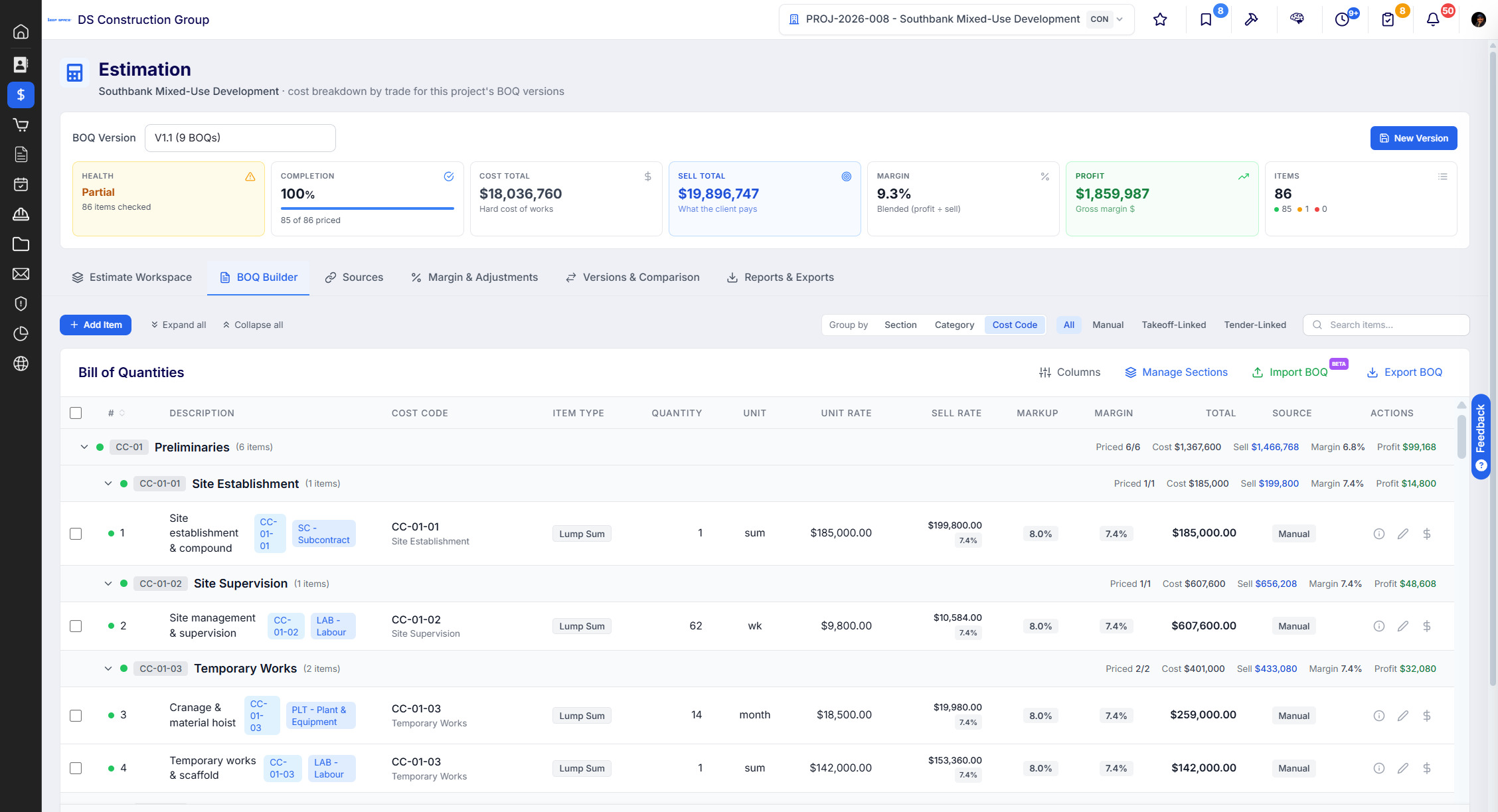
Everything you do before the job is yours. Opportunity through to proposal, with subbie pricing built in, so what you price at tender carries into the budget and the procurement schedule.
 Opportunity and tender tracker, so nothing sits in someone's inbox
- Estimates your way, elemental, trade or full BoQ, built off your own cost structure
- Subbie tendering with the scope of works attached to every invite
- Bid comparison that lines quotes up against your scope, not just on price
- Proposal out the door with the pricing that actually won it
Replaces today:
Going back to market to buy the job. Packages driven off the programme, carrying the scope and pricing from the tender you already ran.
- Procurement schedule built from programme need-by dates, not a separate list
- Packages carry the scope and pricing from the tender you already ran
- Back out to market where you need to test the price again
- Award and let subcontracts without rekeying the numbers
- Commitments flow into the budget register as packages are let
Replaces today:
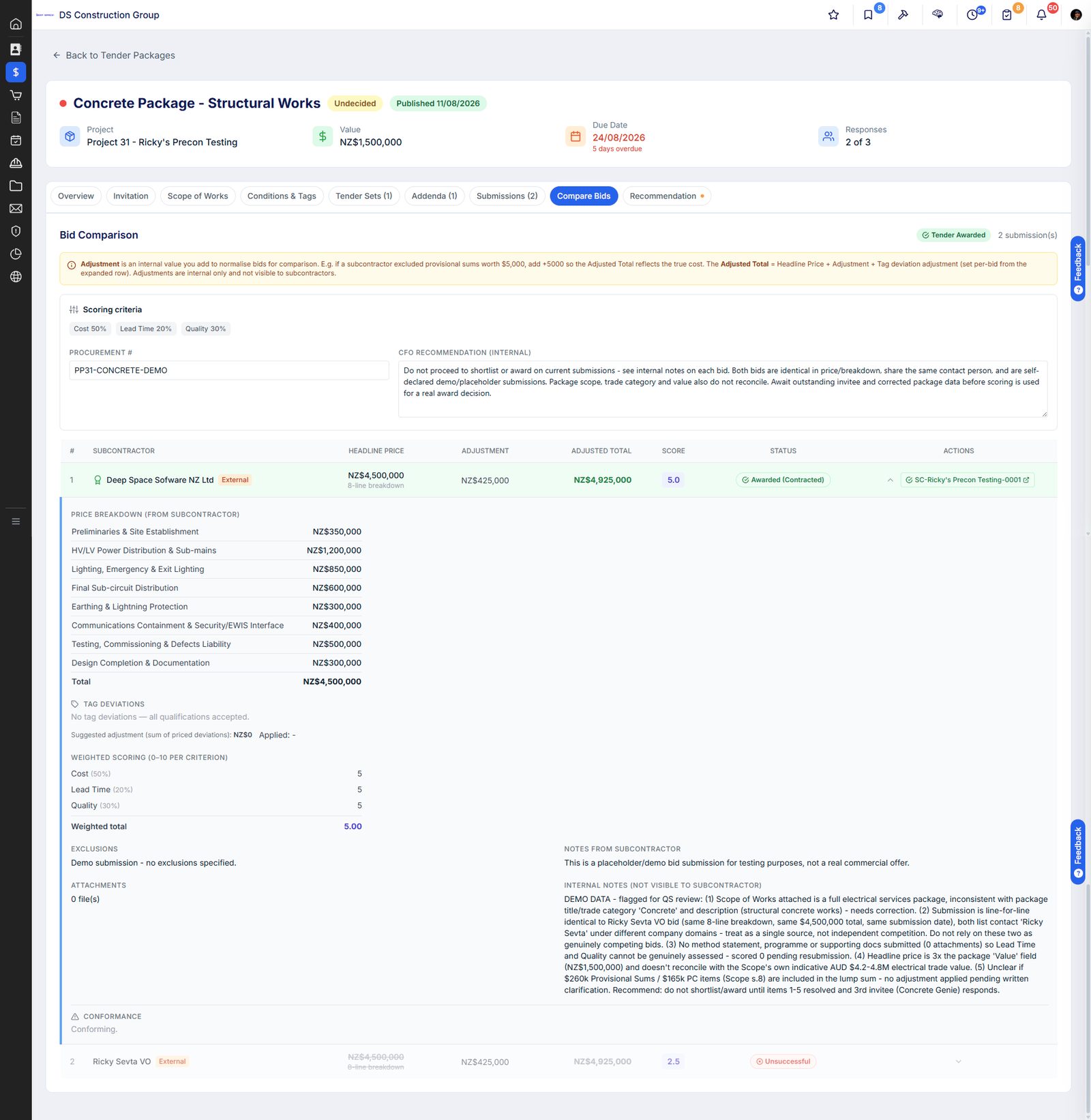
The programme your team actually works to, with activities tied to cost codes, so a slipped date shows up as a cost forecast, not just a bar that moved.
- Master programme with milestone and package tracking
- Rolling look-ahead planning for trade coordination
- Assign activities and tasks to cost codes, so progress drives the cost forecast
- Import from MS Project or Asta, and keep working without rebuilding the programme
- Procurement need-by dates read off the programme, so long leads get bought in time
- Connected to delivery; RFIs and site instructions link to affected activities
Replaces today:
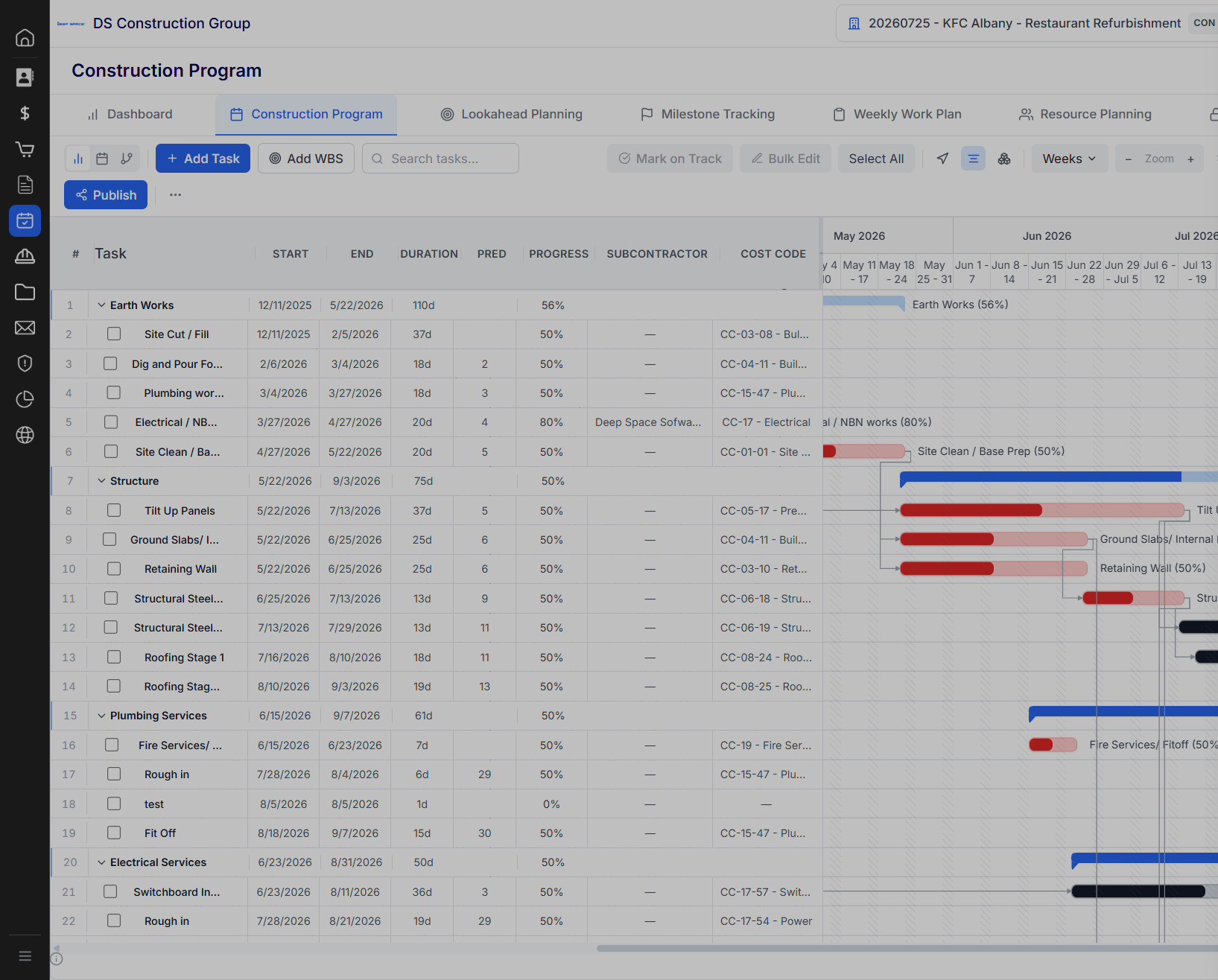
The day-to-day record of what happened on site. Diaries, minutes, RFIs, instructions and defects in one place, so when there is a claim or a dispute the evidence is already there.
- RFI register with drawing links, response tracking, and status
- Site diaries from DS Site, with weather, labour, plant and photos captured on the day
- Defect register with subcontractor assignment and closeout
- Meeting minutes with actions carried forward, so nothing dies in someone's notebook
- Site instructions and delay notices issued with the contract clause and dates attached
- Subbies respond by secure link, no login and no chasing, so response rates hold up
Replaces today:
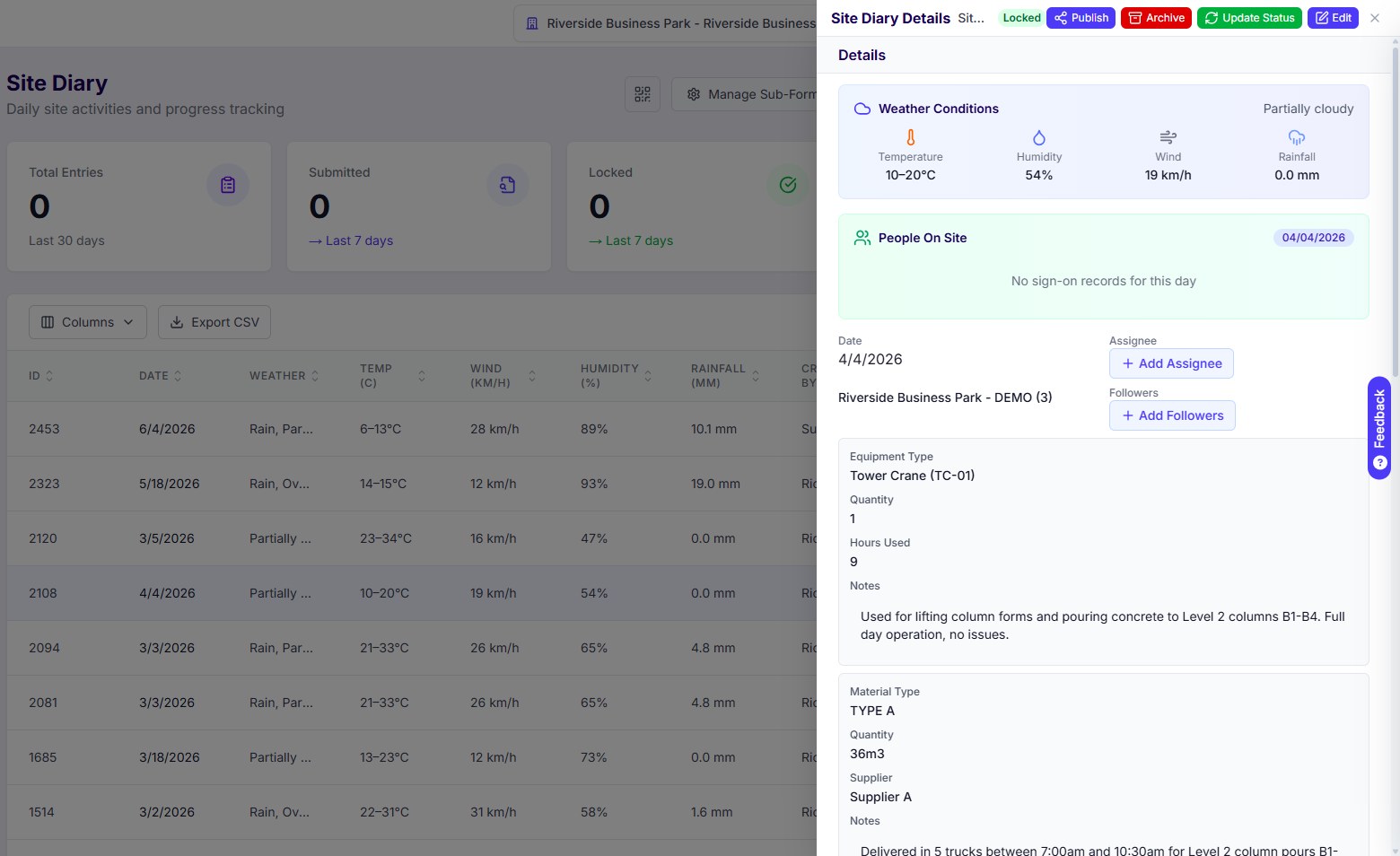
One current set, and everyone on it. Revisions controlled, transmittals recorded, and the site working off the latest drawing rather than whatever was printed last month.
- Drawing register with full revision history and superseded tracking
- Transmittals with automated distribution and read receipts
- Revisions read off the title block, so the register is right even when the filename is not
- Consultants and subbies pull the current set themselves, so you stop emailing drawings
- RFIs and site instructions link back to the exact drawing and revision they came from
Replaces today:
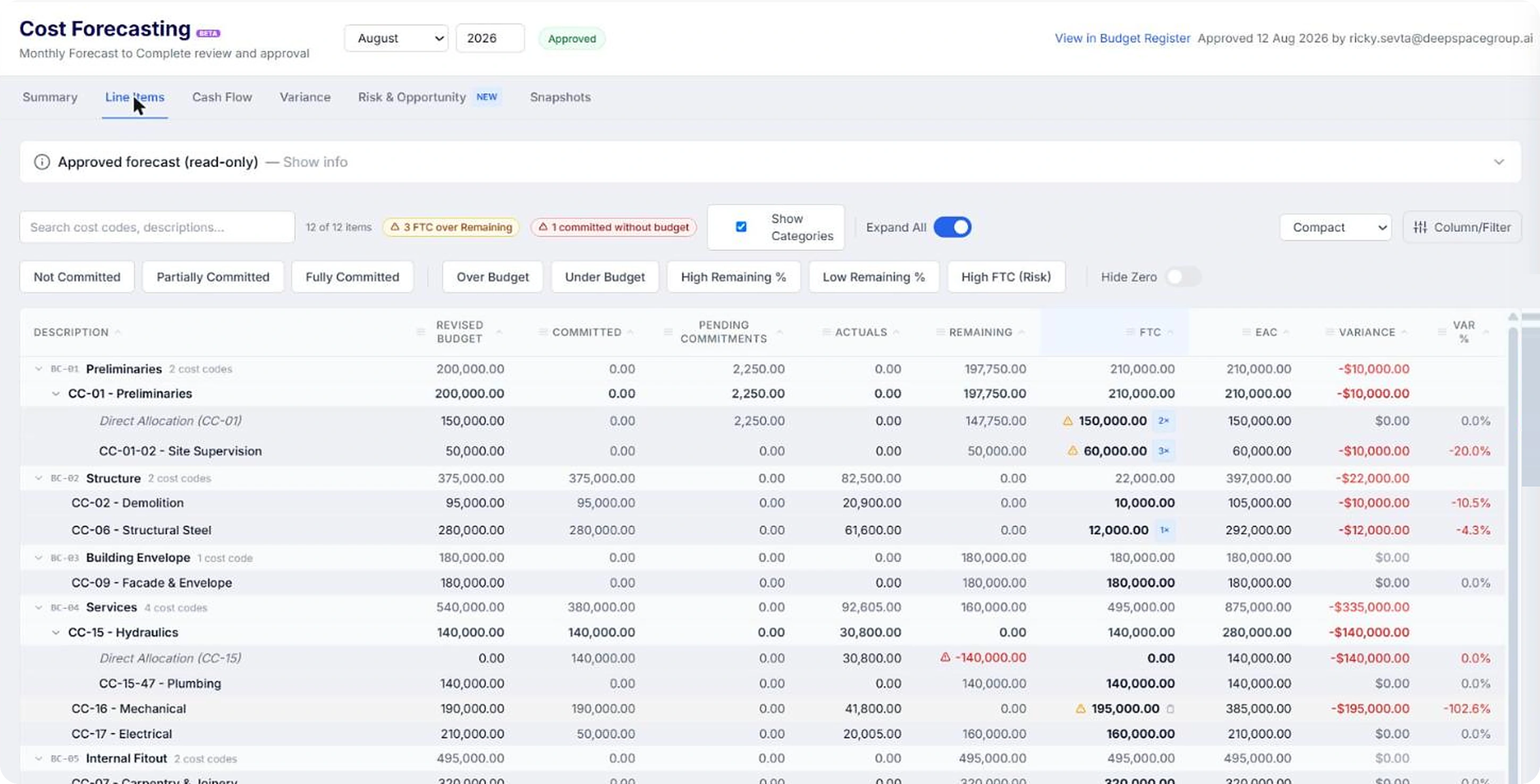
Supplier invoices and subbie claims arrive in the Invoice Inbox and KAI reads them on the way in, matches them to the commitment and drafts the payment schedule. Your team reviews and approves, rather than keys.
- Budget register with live forecasting, committed cost and cost-to-complete
- KAI matches every invoice and claim to its PO or subcontract, and flags the ones with no commitment behind them
- Payment schedule drafted off the claim, approved under your delegation of authority, built for SOPA and CCA timeframes
- Approved schedules push to Xero with the original invoice and the signed schedule attached, and paid status comes back, so the register shows what is actually paid
- Variations from instruction through to claim, with retention tracked on both sides
Replaces today:
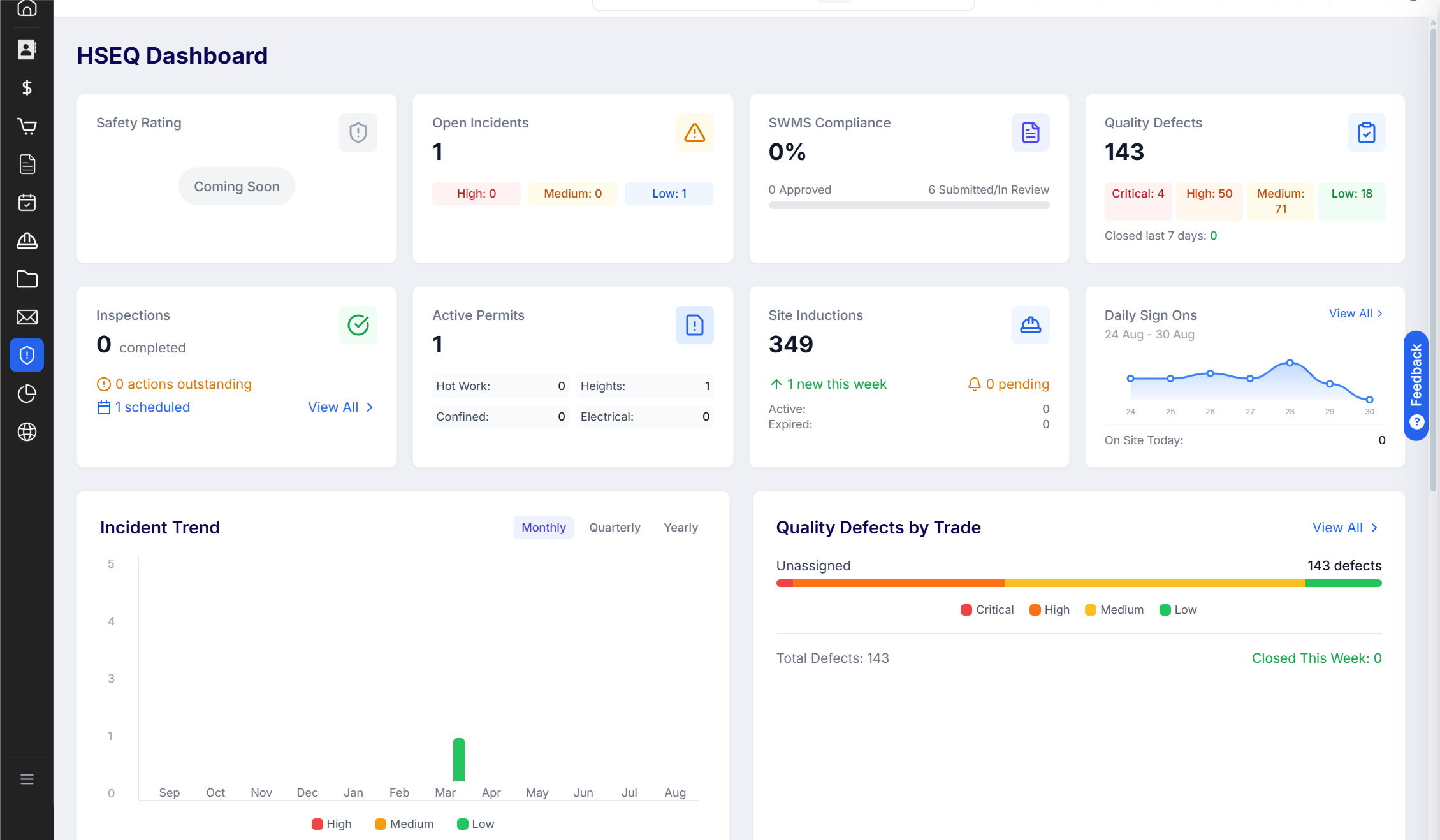
Safety and quality captured on site through DS Site, not typed up later. Inductions, ITPs, defects and permits done on the phone, in the field, by the people doing the work.
- Site inductions managed and tracked per project and trade
- ITPs and hold points signed off in the field, with photo evidence attached
- Defects raised on the phone, assigned to the trade, and tracked through to closeout
- Insurances, licences and prequals tracked with expiry alerts before they lapse
- Handover pack builds itself from the ITPs, sign-offs and defect closeouts already captured
Replaces today:
Teams on Deep Space achieve significantly more.
.gif)
From winning the job to closing out.
Deep Space runs the full project lifecycle. Here's what it looks like in practice.

AI Construction Management Software — Built In, Not Bolted On
KAI sits inside real project workflows, helping teams review drawings, analyse project information, and move decisions forward faster. It works inside your projects, across your documents, and surfaces what matters before it becomes a problem.
%20(1).gif)
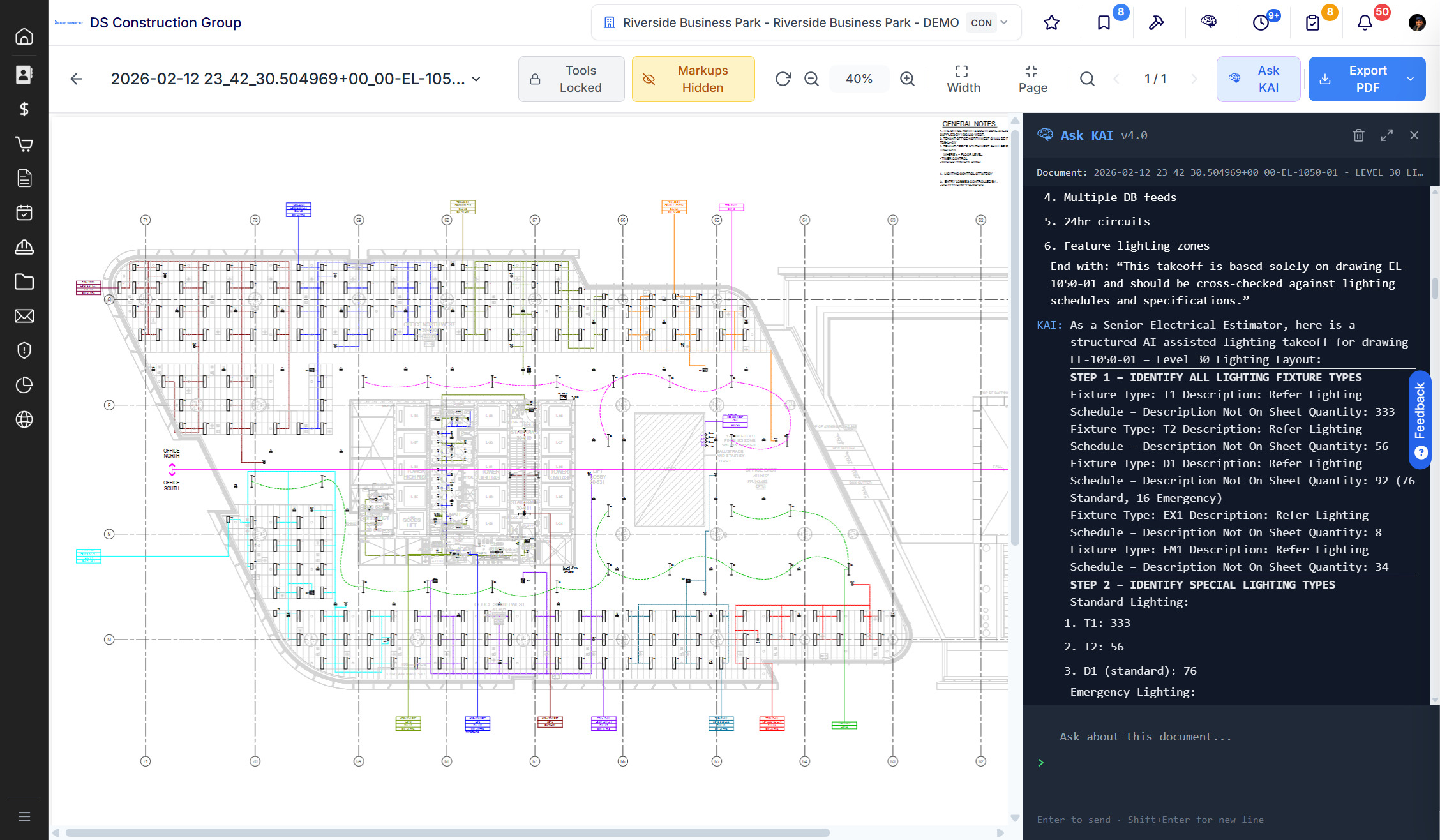
Reviews drawings and specs to identify scope gaps and coordination issues. Automatically, on upload. Identifies risks across consultant packages before they surface as RFIs on site.
Suggests and drafts RFIs based on document analysis. Your team reviews and sends Analyses consultant reports (LIM, seismic, structural) and surfaces commercial and programme risk
Embedded across every module, not a separate tool you open separately. Log issues, update statuses, track what's open. No manual entry, no chasing your team.
What they say
"I ran partial document sets through KAI and it still picked up scope gaps, risk items, and potential RFIs. I shared the outputs with my team and told them it will change how we review projects."
Live and running in
weeks, not months.
From initial opportunity to final invoice, Deep Space runs the workflows your team uses every day.
Setup & configuration
Your platform is configured to match your business. Before you go near a live project.
 Account and project structure setup
- Xero integration configured
- User roles and permissions mapped
- Templates built to your standards
- Workspace seeded with your project data
Training & onboarding
Your PMs, QSs, and site teams trained on the workflows they actually use, not a generic walkthrough.
- Training for every function and department
- Guided walkthroughs by your project type
- KAI workflow training for drawing review
- Deep Space training for internal advocates
Live project rollout
First live project runs with hands-on support from our team. Then you scale at your pace
- Live project migration support
- Dedicated support during first month
- Usage review at 30 and 60 days
- Scale to more projects at your pace
What else do you need to know?
Deep Space is a construction management platform built specifically for mid-tier commercial builders across Australia and New Zealand. It covers the full project lifecycle from tender and estimation through procurement, programme, delivery, HSEQ, commercial management and reporting. Unlike enterprise platforms built for Tier 1 contractors, it is priced, configured and supported for businesses your size.
Most builders arrive running Jobpac or Cheops for their ledger, Procore or Aconex for documents and correspondence, MS Project for the programme, a safety platform, and Excel for everything the other tools miss. Deep Space replaces the project layer entirely, one system covering all of those workflows. Your accounting system stays where it is. We connect to it.
One flat annual fee. AUD $27,445 per year for Australian customers (GST added at invoice), or NZD $33,000 per year for New Zealand customers (no GST applies). That covers unlimited users, unlimited projects, unlimited subcontractors and consultants, and every module. The price does not change as your team grows or your turnover increases. One invoice per year.
No. Subcontractors receive RFIs, transmittals, scope documents and contract notices through a secure browser link. No account, no app, no portal login required. For subcontractors who want more visibility, the Deep Space Subcontractor Portal gives them a dedicated view to track open items, respond to instructions and submit claims. You choose how much you ask of them.
Most construction software started as one thing and grew outward, often by acquisition. A drawings tool that added cost. A ledger that added a Gantt. A safety app that added forms. The seams show up as exports, syncs and re-keying, which is why your team enters the same day three times. Deep Space was built as one platform from the start, so records derive from each other instead of being typed twice. The sign-on at the gate becomes the headcount in the site diary. The awarded package becomes the commitment in the budget register. A delay notice runs against the clause in your head contract and its notification window, not a generic due date. On top of that, ANZ contract frameworks are native rather than configured by a consultant, KAI is embedded in the workflows rather than sold as a separate product, and the price is one flat annual fee rather than a percentage of your construction volume.
Procore was built for Tier 1 US contractors and Aconex, while Australian-built, was acquired by Oracle and is now priced and positioned for enterprise. Neither was designed for mid-tier ANZ builders running commercial jobs. Deep Space is purpose-built for that market, at a flat price, on ANZ contract frameworks, with KAI native from day one. It also goes live in weeks, not the twelve to eighteen months those platforms typically require.
Yes. Every implementation starts on a single live project, not a migration of your entire business. You pick one active job, set it up in Deep Space, and your team learns the platform on real work. Other projects come across at your pace. There is no requirement to stop what you are doing or wait for a clean start.
KAI runs inside your workflows, not in a separate chat window. When a supplier invoice or subcontractor claim arrives, KAI reads it, matches it to the relevant commitment and drafts the payment schedule for your team to review and approve. It imports estimates from Excel directly into your cost structure. It reads construction drawings so your team can ask questions about the package without manual review. It drafts correspondence and notices based on project context. Built in from day one, not added later.
Most builders have their first project live within three to four weeks. By the end of week one your workspace is configured with your cost codes, accounting connection and user permissions. By the end of week four your team is running real workflows through the platform. The commercial team typically sees the biggest immediate impact, with live cost position replacing the month-end spreadsheet scramble.
Xero is native and included in the subscription. Approved invoices, purchase orders and payment schedules sync automatically, and paid status flows back so your cost register reflects what has actually been paid. If you run Jobpac or Cheops, the ledger stays in place and Deep Space sits on top of the project layer. MYOB integration is on the roadmap. If you run something else, talk to us.
Everything you need to operate at your best.
From initial opportunity to final invoice, Deep Space runs the workflows your team uses every day.
“Eighteen months, significant cost, and the team was still working out of spreadsheets. Deep Space was live on a real project in three weeks.”
.png)


.png)