Correspondence Management for ANZ Commercial Builders
Notices that go from your email. Replies that threadback. Audit trail for the lot.
Notices issued from Deep Space land in the recipient's Outlook or Gmail inbox from your actual email address with your signature. They reply normally in their email client. Their reply threads back into the notice. Every word, every attachment, every status change tracked. No logins, no portals to learn, no new system the consultant has to get used to.


The Notice Register Is in One Place. The Actual Conversation Is Spread Across Everyone’s Inbox
Most builders run a notice register in one platform and the actual emails in another. The two have no idea about each other. Status updates happen by hand. The audit trail is detective work after the fact. And the consultants and subbies who need to respond? They never log into the platform. They live in email.
Email is where the work actuallyhappens. Your platform doesn't know about it.
RFIs go out as Outlook emails. Replies come back into Outlook. The RFI register lives in a different platform. Every status update is manual. Every audit trail is detective work pulling threads out of fifteen inboxes after the claim arrives.
Subbies and consultants won't log into your platform.
They live in email. Every builder we work with has told us the same thing: getting externalparties to use a portal is the hardest part of a rollout. So the conversation happens in email, the audit trail dies in email, and three weeks later someone has to dig through inboxes to prove what was said and when.
A late RFI is a programme delay and acost claim.
When a notice is buried in someone's inbox, no one is tracking the response. By the time the slip is visible on the programme, the impact is already locked in. The cost has accrued. The variation is coming. And the team is trying to reconstruct the timeline from email subject lines.

“I've tried a lot of platforms in the past. Procore, Aconex, 4Projects, IBM. Quite a lot, over time at Hutchies, trying to find something that worked. I didn't really find anything. I don't particularly like Procore or Aconex. It feels like they create more work, not less.”
Owner, A$30M Queensland commercial builder. 11 years at Hutchinson Builders before founding his own firm. Discovery call with Deep Space, April 2026.
One Register for RFIs, EOTs, Variations, Site Instructions and Every Notice Type
RFIs, Site Instructions, Notices of Delay, Extensions of Time, Variations, Sub Variations, Meeting Minutes, General Communication. All in one register, with one universal status flow. Kanban or list view. Filter by type, by status, by company. Click any notice for the full thread, recipients, response status, internal notes, and linked email threads.
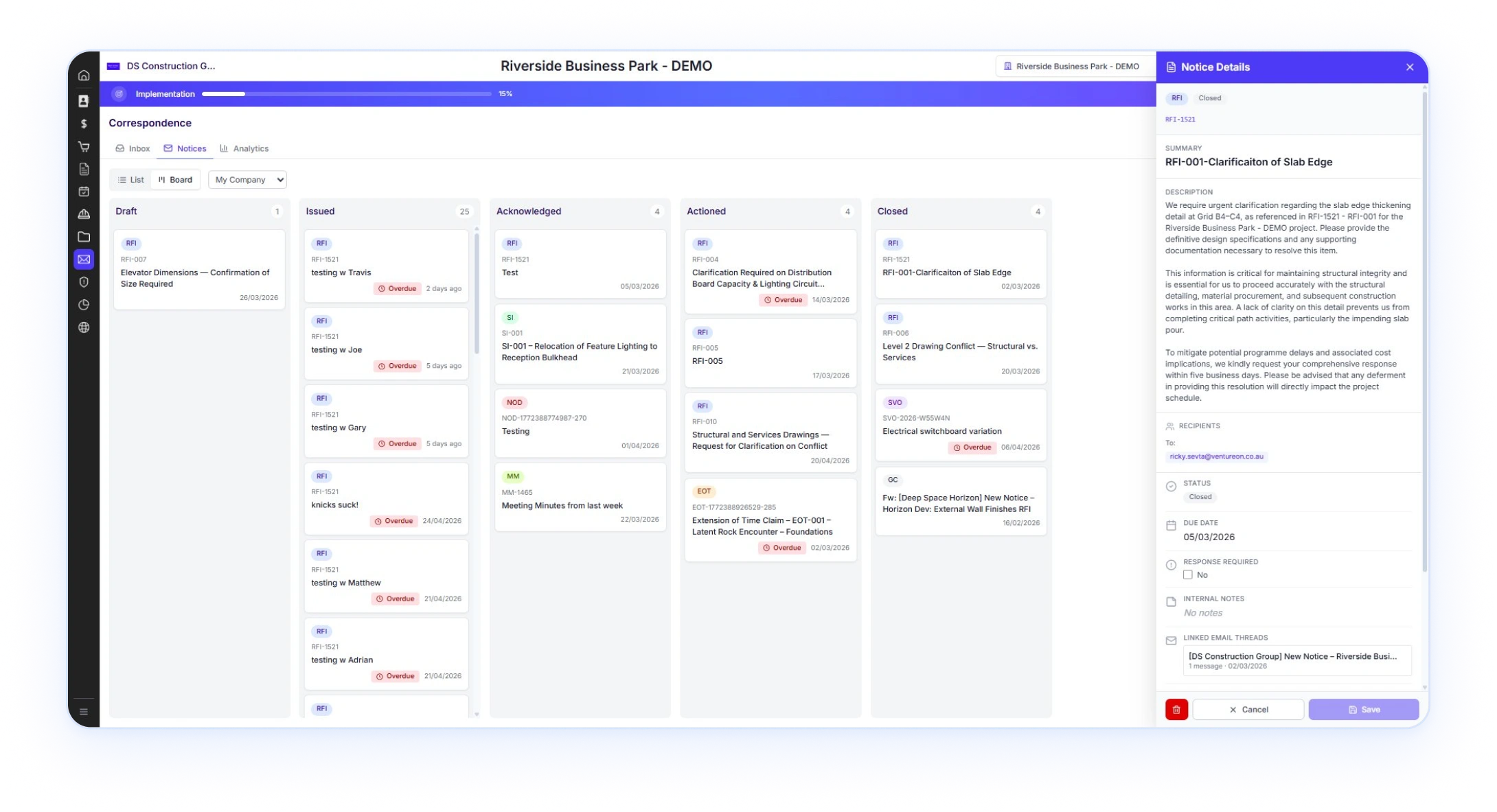

Every notice type. One register. New types ship in days, not sprints.
The notices register is built on a Type Registry. The composer, document view, response rail, and PDF render pipeline are shared across every type. Add a new notice type by writing one config doc, and the entire workflow just works. RFIs, Site Instructions, Notices of Delay, Extensions of Time, Variations, Sub Variations, Meeting Minutes, General Communication, Consultant Advice Notices. Whatever the project needs, the registry supports.









attach
awaiting
replied
recorded
audit trail
team, separate from external correspondence. Same notice,
two layers of context.
through RFI-067, NOD-001
onwards, each type independent.
Original numbers preserved on
legacy data migration.
Subbies and consultants reply in their email client. You get the audit trail.
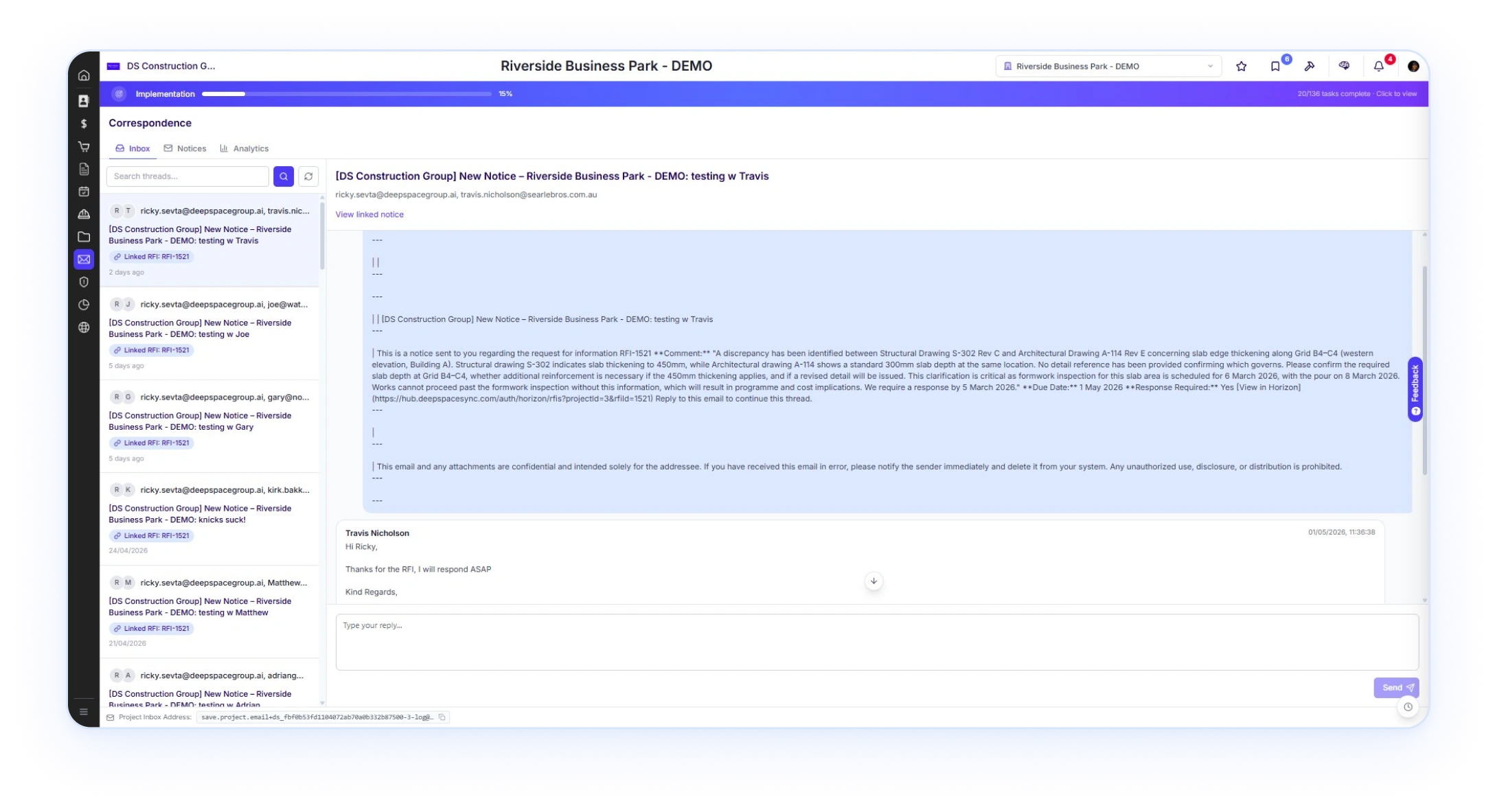
Notices sent from Deep Space land in the recipient's Outlook or Gmail inbox from your actual email address with your signature. They reply normally. Their reply threads back into the notice. No no-reply addresses, no logins, no learning curve. When an existing email thread is already running, CC the project inbox address and the whole conversation pulls into the project.

Composer on your screen, recipients selected from project directory or typed. Attach drawings or documents from the CDE.
CC the project inbox address on your next reply. The whole conversation pulls into Deep Space, threaded into the project.

From your.name@yourbuilder.com.au, with your signature. They reply normally. Their reply threads back into the notice in Deep Space.
Leave it as standalone correspondence or link it to a notice. The full audit trail without changing how anyone works.
.svg)
Per-recipient send-as. Your address. Your signature. Their inbox.
Connect your Outlook or Gmail mailbox via OAuth from the EmailIntegration page. From that point on, every notice and reply yousend from Deep Space goes through your linked mailbox account.The recipient sees your actual email address as the sender. Yoursignature is attached automatically. They reply in their email client.The reply threads back into the notice in Deep Space.
AI-Drafted Construction Notices — RFIs, EOTs and Variations Written in Your Voice
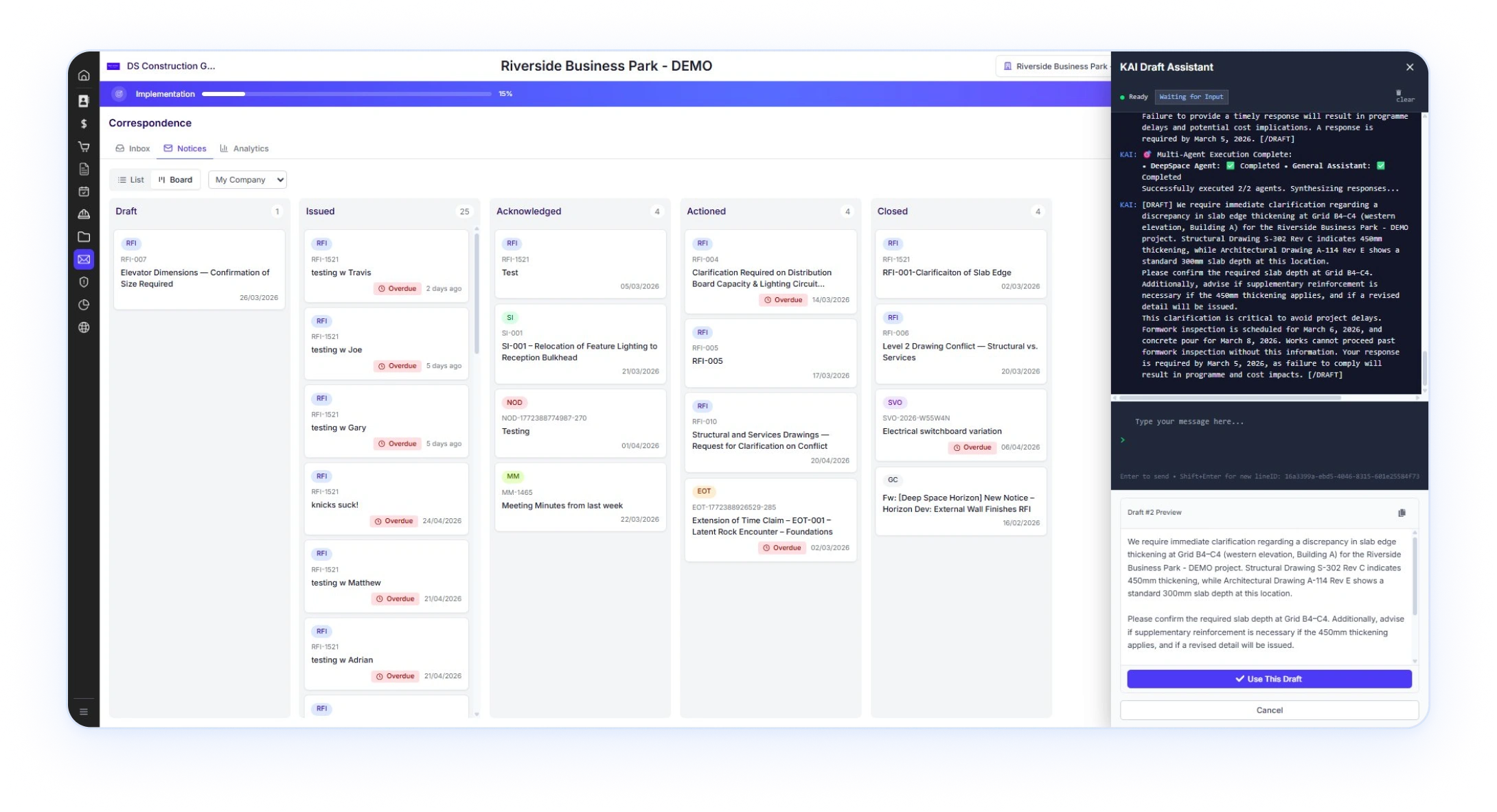
KAI reads the project context, the linked records, and the email history. Then drafts the notice for you. Multi-agent execution combines a Deep Space Agent for project knowledge with a General Assistant for prose. The result is a clean draft you review and send. Works for RFIs, NODs, EOTs, SVs, every notice type the registry supports.
.svg)
Deep Space Agent pulls thecontext. General Assistant writes the draft.
Open the notice composer, ask KAI to draft it. The Deep SpaceAgent reads the linked drawings, programme tasks, relatednotices, and email history relevant to the request. The GeneralAssistant turns that into formal notice prose. You see the multi-agent execution complete, then preview the draft. Click Use ThisDraft to populate the composer, edit, and send.
RFI Management With Open Tracking, Multi-Party Gating and Full Audit Trail
Notices sent from Deep Space land in the recipient's Outlook or Gmail inbox from your actual email address with your signature. They reply normally. Their reply threads back into the notice. No no-reply addresses, no logins, no learning curve. When an existing email thread is already running, CC the project inbox address and the whole conversation pulls into the project.
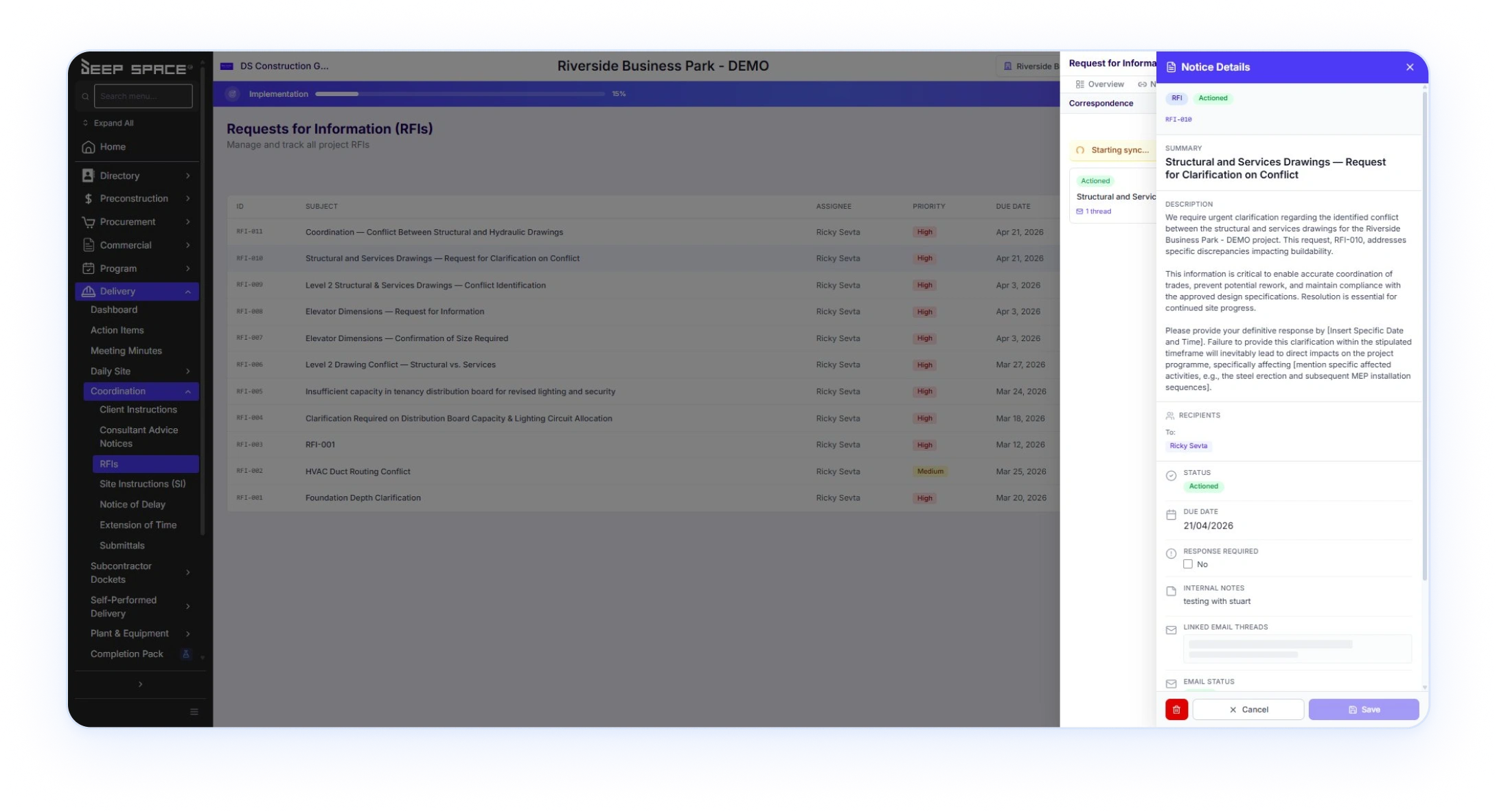
- 1Sortable by priority and due date. Late RFIs surface to the top of thelist, not buried in the middle.
- 2Internal notes for your team, separate from external responses. Comment threads visible only to your company.
- 3Linked Email Threads tab on every RFI. The full conversation history, including replies that came back through email.
- 4Email status tracked per recipient. Sent, delivered, opened. Know whether the architect actually saw your RFI before chasing.
- 5Multi-party gating. When an RFI has two consultants on it, the response rail shows who's replied and who hasn't.
- 6Flow into related notices. The RFI response can trigger a Consultant Advice Notice, which feeds a Client Instruction, which lands as a Site Instruction. Each step inherits context from the prior one.
Linked Notice Chains — RFI to Variation, Every Step Traceable
A single decision rarely lives in a single notice. An RFI raised against a design conflict gets a response from the consultant. That triggers a Consultant Advice Notice. Which becomes a Client Instruction. Which lands as a Site Instruction to the trade on site. If pricing is involved, an SVO and a VO follow. Each step inherits context, attachments, and provenance from the previous one.
- step 1
 A site team raises RFI-001 against a structural conflict between drawings S-302 and A-114. Two consultants on it: structural and architectural. Multi-party gating shows "Awaiting Lautrec, Boyd."
 - step 2Both consultants respond via email. Replies thread into the RFI. Their answers conflict. Platform flags structural conflict detected and offers three actions: raise a clarifying RFI, schedule a coordination call, or accept one response.
- step 3Once resolved, the architect issues CAN-007 (Consultant Advice Notice) with the revised drawing detail. CAN inherits the RFI thread, the conflict context, and the attachments automatically.
- step 4The PM issues CI-014 (Client Instruction) formally accepting the change. The CI carries the CAN reference, the RFI history, and the revised drawing through.
- step 5Site receives SI-022 (Site Instruction) with the revised detail. SI inherits the chain. Trade on site sees the full provenance: RFI → CAN → CI → SI. No "where did this come from" emails.
- step 6Pricing impact triggers SVO-008 (Sub Variation Order) from the framing sub, then VO-031 (Variation Order) from the head contract. Provenance traceable through the breakdown. The property owner sees VO-031. They neversee SVO-008. The chain holds.
Every notice in the chain is a typed edge to the previous one. Every attachment carries forward. Every context preserved. Nodetective work. No rebuilding the timeline from email subject lines.
Every Notice Type. One Workflow. One Connected Communication System.
Most platforms built RFIs first as a one-off. Then variations as a separate one-off. Then EOTs as a third. Each notice type a different module, a different data model, a different UI, a different email path. That's why moving from RFI to CAN to CI to SI to SVO requires copying details by hand. That's why two consultants on a single RFI can return conflicting answers and no one notices until the dispute lands. Two hard problems no legacy platform actually solved: multi-party gating and cross-organisation auto-transitions.
Deep Space launched the Notice Platform as one architecture. Every notice type is a config in a Type Registry. The composer that renders an RFI is the same React component that renders a CI, an NTS, a VO, an SVO, an EoT. The email engine that dispatches one type dispatches them all. The PDF renderer is shared. The response rail is shared. New notice types ship in days, not sprints, because the
plumbing was built once.

Type Registry · the load-bearing layer
Every notice type defined as one config doc. Add EoT after RFI is live by writing one file. Composer, document view, response rail,status engine, PDF renderer all just work.
One composer · used by every type
The composer rendering an RFI is the same React component rendering a CI, an NTS, an SVO. Every notice type your projectruns on, each one a config away from existing.
One email engine · per-recipient send-as
Hardened email backbone. Per-recipient send-as from the user's actual address with their signature. Inbound threading. Open tracking. Same path Transmittals run through.
Typed edges · chains hold together
Every relationship between notices is a typed edge with semantic meaning. instructs_from , passes_to_sub , prices . Not generic linked records. RFI → CAN → CI → SI inherits attachments, recipients, and provenance automatically.
Multi-party gating · cross-org transitions
Two consultants on a notice, the rail shows "Awaiting Lautrec, Boyd." Conflicting answers detected automatically. Cross-organisation transitions handle CI → NTS → SVO → VO without copy-paste between systems.
Scoped portals · same component
Consultant, sub, and client portals built on the same NoticeList component a builder uses. Server-enforced visibility. No separate codebase to drift.
Standards-aware · NZS3910 and AS4000
RFI categories aligned to NZS3910:2023 cl 9.5 in New Zealand and AS4000-1997 in Australia. The notice configs know the contract clauses your project actually runs under. Not a US platform with ANZ paint.
Migration with dry-run · zero surprises
Bringing legacy RFIs, CIs, SIs, NTSs, VOs, SVOs, NoDs, EoTs in from your previous platform? Per-type port scripts run dry-run first. See exactly what becomes a notice, what becomes a typed edge, what attachments re-reference. Original numbers preserved.
This is what builds a real audit trail. Not an integration between products. Not "we connected RFIs to
variations" as a feature. One platform. One model. Every notice type your project will ever need.
“ We are using about 25 different systems. No, it's not that bad. But it's pretty bad.”
Director, Melbourne commercial fit-out. 50+ years in business. Current stack includes Procore, BuildLogic, MYOB Acumatica, Qubit, HubSpot, OneBreadcrumb. Discovery call with Deep Space, April 2026.
.svg)
Actively Developed: New Correspondence Features Shipped Every Cycle
Correspondence is the most actively developed module in Deep Space right now, with the Notice Platform initiative unifying every notice type onto one composer, one document view, one response rail, one email engine. New capability lands every cycle, shaped by real customer onboarding sessions and live projects on real sites. The version you see today is not the version you'll see next month.
Construction Correspondence Is One Part of the Deep Space Platform
Deep Space is one connected platform. Correspondence runs your notices, RFIs, and email. The Program module runs your construction schedule. Commercial runs your budget, claims, and Xero sync. The CDE controls drawings and documents. HSEQ runs your safety and quality. KAI sits across the lot.
.png)


.png)