Your project team approves it once. Microsoft Business Central gets it right.
Deep Space connects to Microsoft Business Central so your projects exist in BC, certified claims become draft invoices and approved purchase orders post line by line, each tagged with the right BC project and COST CODE and coded to the right G/L account.
No staging tables. No one in finance re-keying what the project team already approved. One set of numbers in Deep Space and Business Central.
Who this is for
Business Central sits in the Move the Money segment of the Builder's Wheel. This integration is for builders who run their finance on Microsoft Business Central, usually with a Microsoft partner who owns the BC setup, and want the project side to stop being a manual feed into it.
Project and Commercial Managers
You approve a PO or certify a claim once in Deep Space. It reaches Business Central as a draft with the project and COST CODE already on every line.
Financial Controllers and Accounts
Business Central stays your master for vendors, customers and the general ledger. Deep Space links to your cards, never edits them, and every document arrives as a draft for you to post.
Directors and BC Partners
Standard Business Central APIs, Microsoft Entra sign-in and BC's own dimensions. No custom extension to maintain, and nothing that fights your existing chart.
The pain this removes is specific
A typical project system feeds Business Central through staging tables. Every few minutes data lands in a holding area, and someone in finance validates and processes it by hand before it touches the ledger. On Deep Space, the project number, cost code and vendor are linked once at setup, so each approved document arrives in BC ready to post.
How it works
Four steps, and the second one is where the actual work is.
Your IT team or BC partner registers an app in Microsoft Entra ID and gives Deep Space the client credentials. We connect your workspace to the right BC environment and company, test the connection, and you can rotate or disconnect it at any time.
Projects link to BC projects, cost codes link to your COST CODE dimension, and vendors and customers link to your BC cards by ABN. Covered in detail below.
One G/L account per cost type, a revenue account, a default cost account and your retention accounts. Each one is checked against your live BC chart before it saves.
Send to Business Central from the claim, schedule or PO, and read payments back from BC onto your claims.
Sandbox first, then production
Your testing workspace connects to a BC sandbox and your live workspace to BC production, as separate connections. You prove every flow end to end before a real invoice moves.
What syncs, and in which direction
Deep Space sends the commercial documents. Business Central stays the master for companies and the ledger, and sends back payments. Every document lands in BC as a draft, so nothing posts without your finance team.

Why Deep Space never creates a vendor card

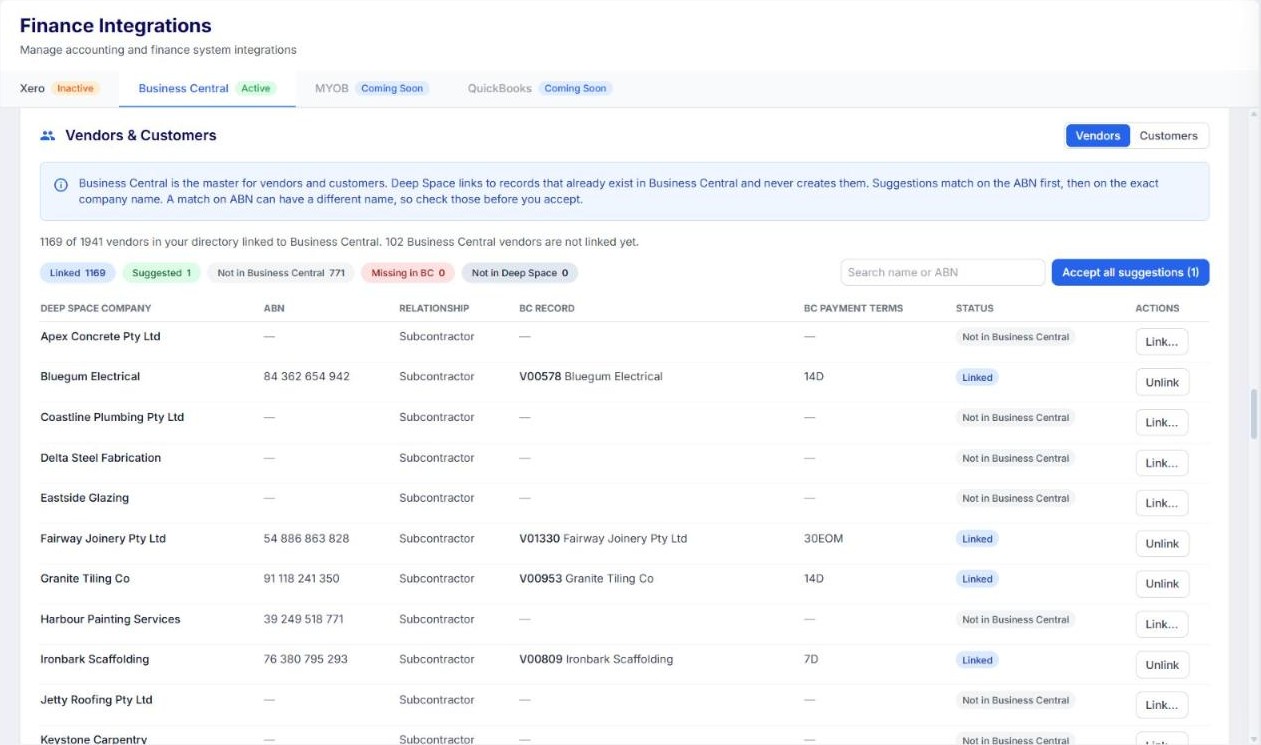
This is deliberate. Business Central holds the companies you actually transact with, set up by finance with bank details, payment terms and posting groups. Deep Space holds the complete list: every subbie, supplier and client you have ever tendered. Linking only, never creating, keeps your BC vendor list clean. If a company that is only in Deep Space needs to transact, the document waits and tells you it isn't linked, rather than inventing a card.
Coding: where the money actually lands
Two links and one account map. Get these right at setup and every document after that lands on the right project, COST CODE and G/L account without anyone thinking about it.
Four accounts cover the whole workspace
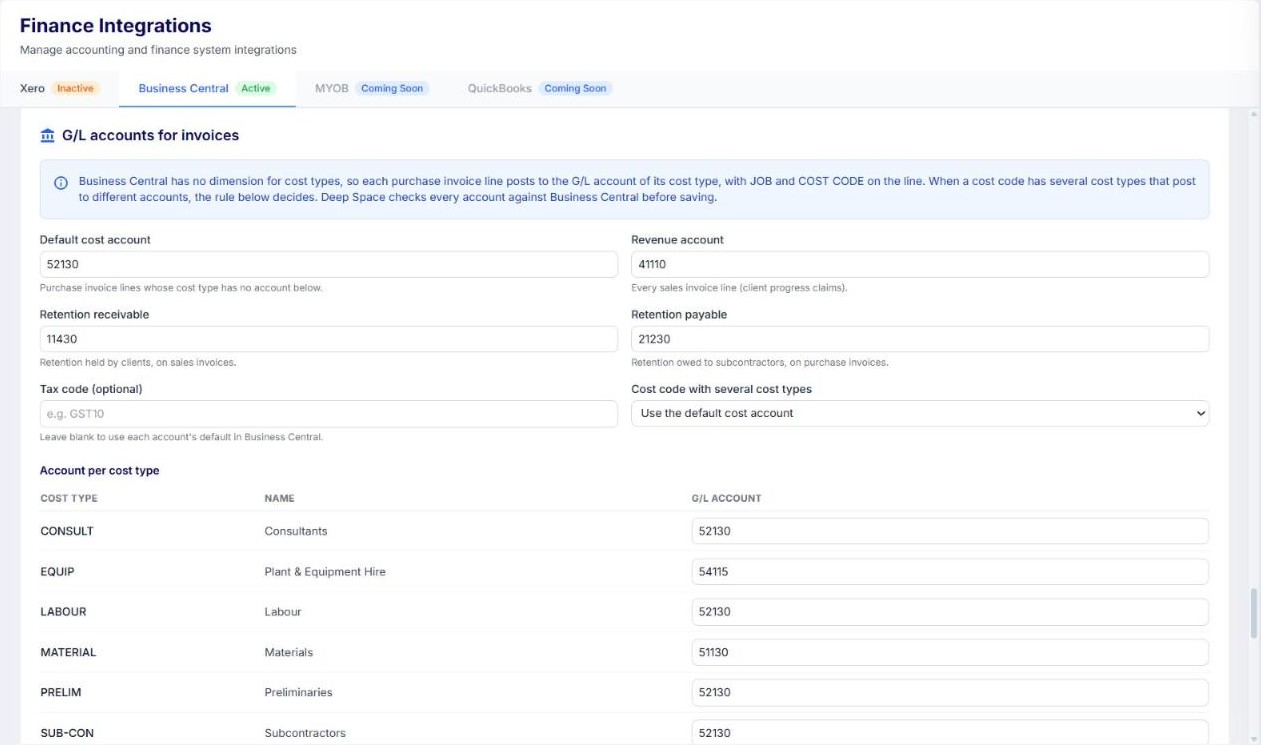
Revenue
Where certified head contract claims post as sales invoice lines.
Default cost account
The fallback for cost lines when a cost type has no account of its own.
Retention Receivable
What your client holds back on your head contract invoices, posted as its own negative line.
Retention Payable
What you hold back from subcontractor invoices. A release posts back as a positive line.
Every account is checked against your live Business Central chart before it saves: it has to exist, it can't be blocked, and it has to be a posting account. A typo or a heading account is caught at setup, not at month end.

Plus one account per cost type
Subcontract, Materials, Labour, Plant Hire, Consultants, Preliminaries: each cost type points at one G/L account, so a hundred cost codes need fewer than ten mapping decisions. Many cost types can share an account.
Where a cost code carries several cost types, you choose the rule once: post to the default account, or to the first listed type's account. An optional tax code applies to every line.
Your chart of cost codes, your COST CODE dimension
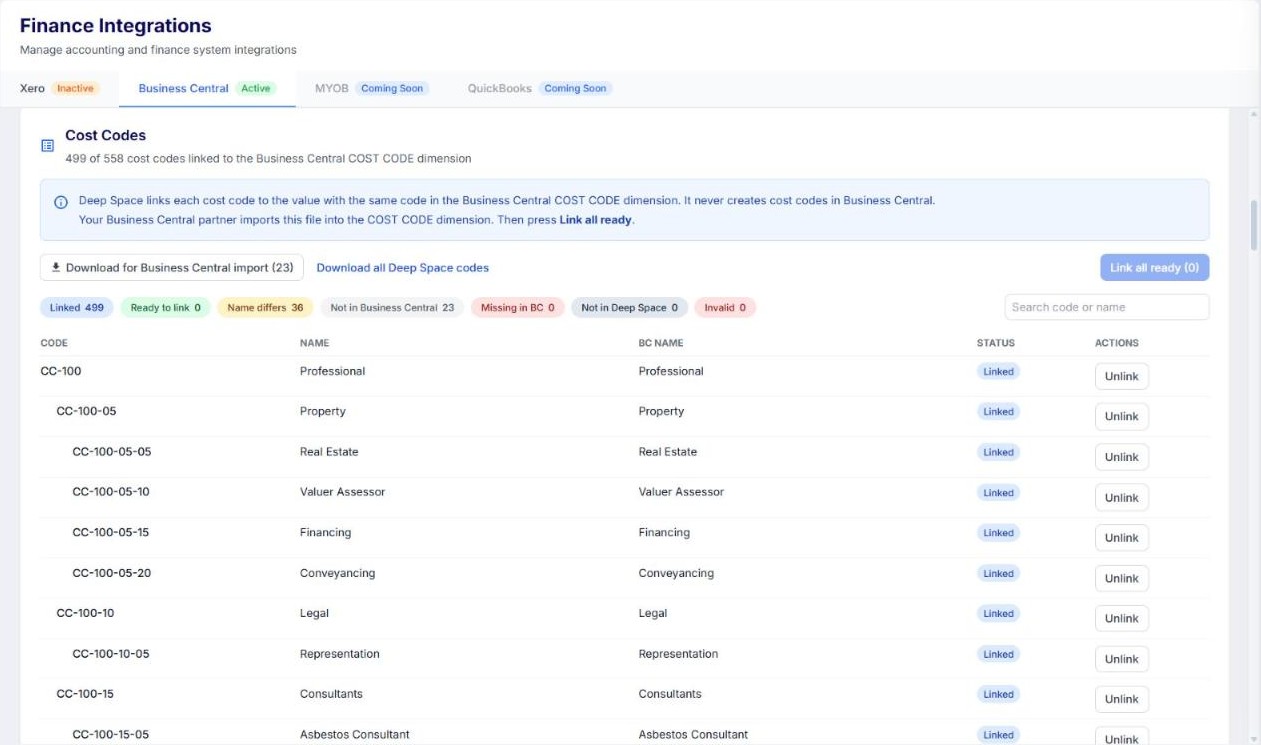
Deep Space's cost code chart is the master. Export it from the Business Central page as a simple Code and Description file, your BC partner imports it into the COST CODE dimension, and Deep Space links every code by exact match.
Any code that isn't in BC yet is listed as Not in Business Central, so you can see the gap before a document needs it. Old BC cost codes you no longer use can stay or be blocked at go-live. That is your call.
Projects become BC projects
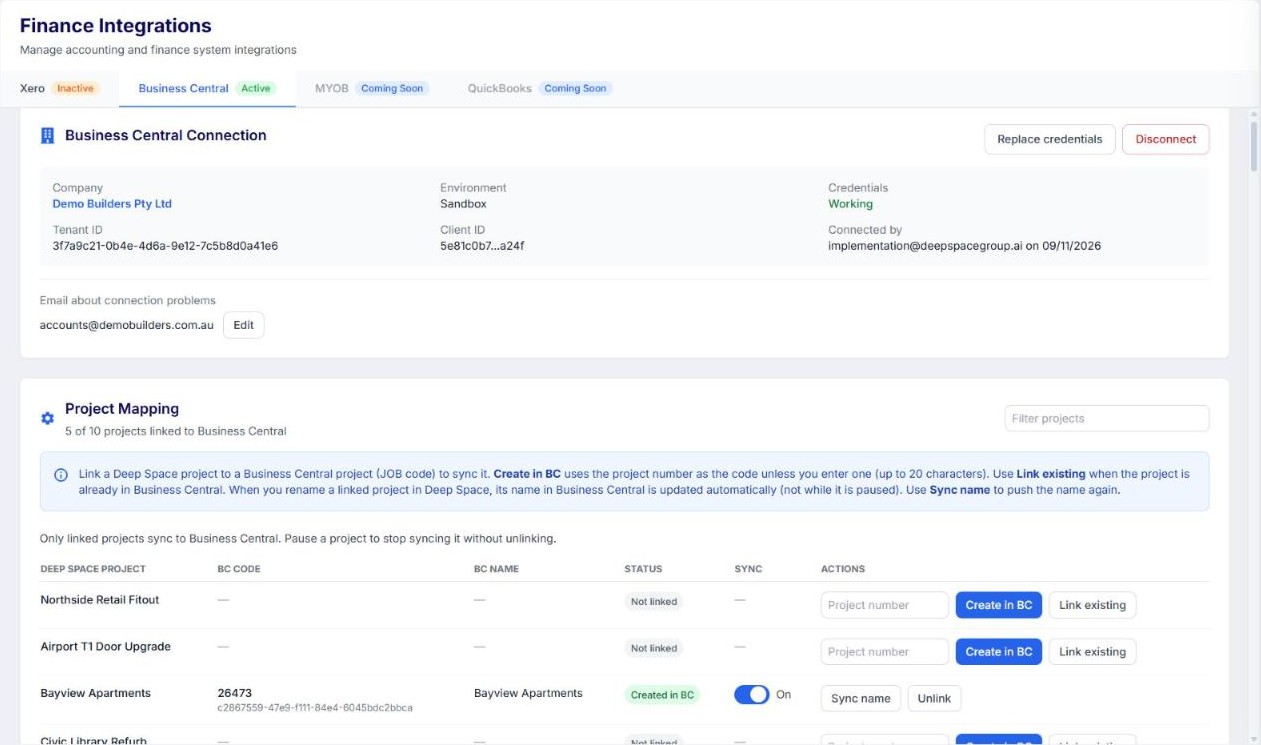
Every line Deep Space sends carries the project, so your Business Central project costing and profit and loss read per project. Project numbers start in Deep Space at estimating, and the project is created in BC with the same number.
Already have the project set up in BC? Link the Deep Space project to it instead. Rename a project in Deep Space and BC follows. Pause a project and nothing is sent for it.
Companies link by ABN
Deep Space suggests a Business Central match for every vendor and customer in your directory, on ABN first and then on name. Your finance team reviews the suggestions, accepts them in bulk, and fixes the odd one with a picker. A card already linked to another company can't be linked twice.
Company Sync runs the other way: it adds BC vendors and customers that are missing from the Company Directory, with the ABN required. A company that is both your client and your supplier lands as one company, not two.
Safety rails
Business Central is your ledger. Deep Space checks everything before it sends, and checks again after.
Before a document is sent, Deep Space checks the project is linked and not paused, the vendor or customer is linked, every cost code and cost type resolves to a BC project, COST CODE and G/L account, and the claim hasn't already gone to another ledger. Every problem is listed at once, and nothing is sent while any remain.
One push runs at a time per workspace, so two people clicking Send never create two invoices.
If Business Central rejects the client credentials, for example after a secret expires, Deep Space emails the person you nominate to re-enter them. Nothing is sent until the connection works again.
Every link, rename, push and payment read is written to the activity log on the Business Central page, with the record, the trigger and the result, so you can see exactly what Deep Space did and when.

One accounting integration per workspace
A workspace connects to Business Central or to Xero, not both. A claim already sent to one ledger is never sent to the other.
Controls and governance
Nothing reaches your ledger silently.
Sales invoices, purchase invoices and purchase orders land in Business Central as drafts. Your finance team posts them, in BC, under your own approval process.
Once BC creates the document, Deep Space reads its total back and compares it to Deep Space. If they disagree, the draft is deleted and the record shows why. It does not leave a wrong draft behind.
Before creating, Deep Space looks up the document reference in BC. If a matching document already exists, it is adopted and linked instead of created again.
Deep Space links to your vendor and customer cards and never creates or changes them. Bank details, posting groups and payment terms stay with finance in BC.
A PO or payment schedule only becomes sendable after it clears your approval route in Deep Space, so what reaches BC has already been authorised by the right person for the right amount.
Head contract claims post the client-certified values from the payment schedule, not the claimed values.
Running it: from the record
Send to Business Central sits on the claim, the payment schedule and the purchase order, and the Invoices to Business Central list on the BC page shows what is ready, what is waiting and why. Registers and drawers show the BC status and document number once a record has been sent.
Read payments from Business Central brings payment status back onto your claims on demand. A scheduled daily run is next on the roadmap.
One sequencing rule matters
Link before you send. A claim, schedule or PO can't go to Business Central until its project, its vendor or customer and its cost codes are linked.
Where the AI sits
KAI does the work before Business Central ever sees the transaction.
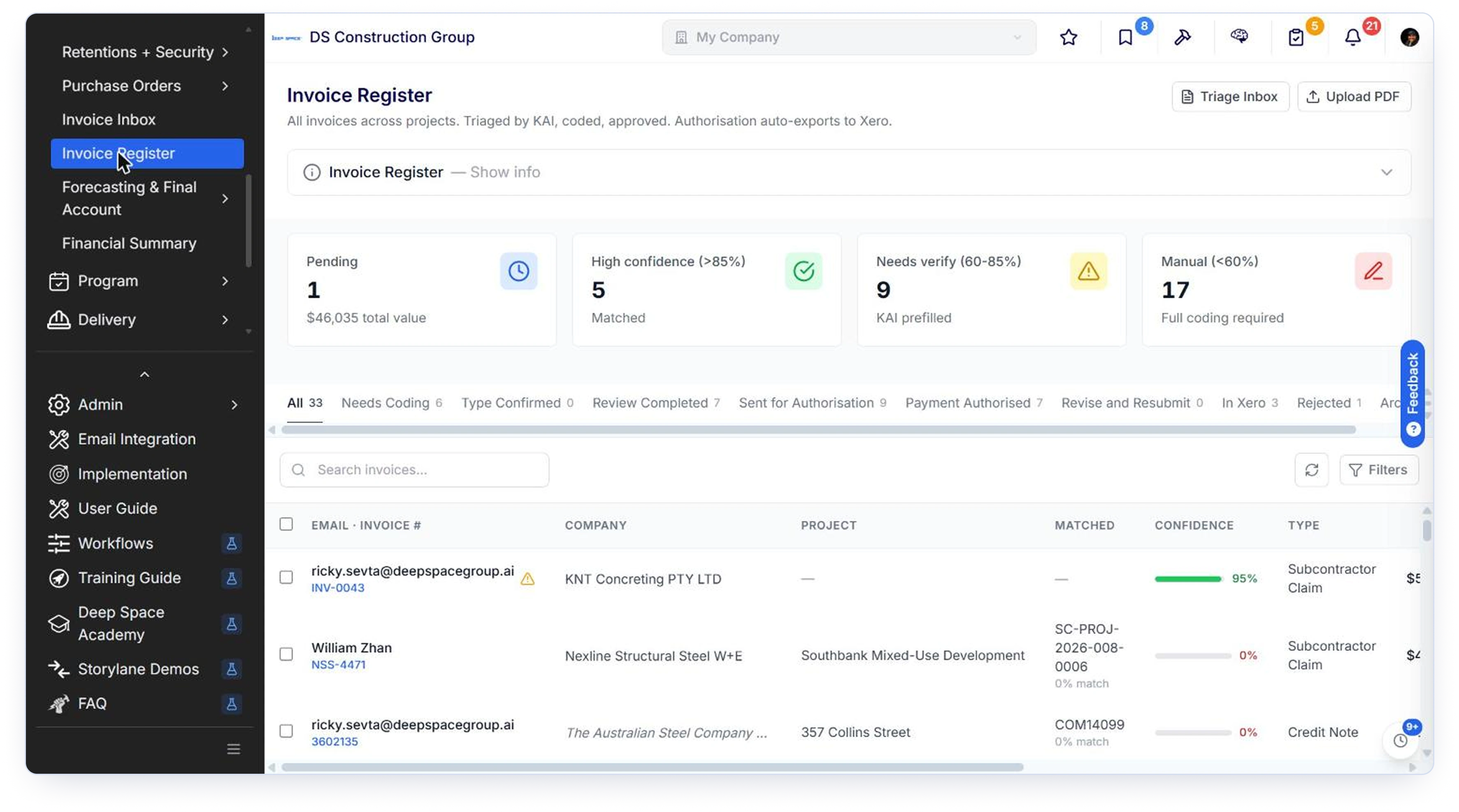
Supplier invoices arrive by email, KAI reads them, extracts the invoice number, dates, amounts, GST and supplier, and matches them against the purchase order or subcontract agreement. High-confidence matches arrive pre-coded. Low-confidence ones are flagged for a human.
By the time a document reaches Business Central it has already been read, matched, coded to a project and COST CODE, and authorised under your delegation of authority. BC receives a finished transaction, not a starting point.
Deeper into Microsoft Business Central every sprint.
Built with an ANZ commercial builder replacing their old project system to Business Central link, tested end to end against a live BC sandbox with their finance team and BC partner.
Purchase orders to BC
Approved POs go to Business Central line by line, with the project, COST CODE and the cost type's G/L account on every line.
Claims as draft invoices
Certified head contract claims become sales invoices and accepted payment schedules become purchase invoices, with retention on its own line.
Part paid and Paid back
Read payments from Business Central and claims move to Part paid or Paid, the same way they do for Xero.
ABN matching
Vendors and customers are matched on ABN through your BC partner's API, then on name, so suggestions are right first time.
Company Sync
BC vendors and customers missing from Deep Space are added to the Company Directory, one company per ABN, even when they are both client and supplier.
G/L accounts, validated
Map an account per cost type, plus revenue and retention, each checked live against your BC chart before it saves.
What this integration does not do
Named limits build more trust than vague breadth, and they cut the support tickets that come from assuming.
 Deep Space does not create vendor or customer cards.
 Finance creates them in BC, then Deep Space links them by ABN.
- Documents are not posted for you.
- Everything lands as a draft. Posting stays with your finance team in BC.
- A sent draft is not rewritten later.
- Change the record in Deep Space after sending and the BC draft is not updated. Correct it in BC or delete and resend.
- Timesheets and labour journals do not go to BC.
- Approved timesheet hours post to the Deep Space Budget Register as labour cost. Payroll stays where it is.
- Supplier invoices against a PO are not sent yet.
- Next on the roadmap, after purchase orders.
- Direct costs posted in BC do not pull yet.
- A pull of direct costs from BC into the Budget Register is planned with BC partners.
- Credit notes do not push.
- An invoice with a zero or negative total is blocked. Raise credit notes in BC.
- No scheduled sync yet.
- Send and read payments on demand today. A daily run is on the roadmap.
- One claim is one invoice.
- Splitting one certified claim into a separate invoice per client PO is Xero only for now.
- Deep Space does not create G/L accounts or dimension values.
- Your BC partner creates them in BC, then Deep Space links and validates them.
- Payment terms are not sent to BC.
- The payment terms note on a company stays in Deep Space. BC's terms on the vendor card apply.
- One accounting integration per workspace.
- A workspace connects to Business Central or Xero, not both. Sandbox and production are separate connections.
Setup, honestly scoped

Microsoft Business Central (cloud), an app registration in Microsoft Entra ID with access to your BC environment, a BC sandbox to test in, your project and COST CODE dimensions, and G/L accounts for revenue, retention and each cost type.
Your financial controller for the G/L map and the vendor and customer suggestions, your BC partner for the app registration and the cost code import, and whoever owns cost codes in Deep Space.
Deep Space Implementation connects your sandbox, runs the linking and mapping with you, and validates a claim, a payment schedule and a PO end to end before we connect production.
Your IT team issues fresh production credentials (never reuse the sandbox secret), we connect your live workspace to BC production, and the links are redone there before the first real document is sent.
Questions we get asked
See it running against your own Microsoft Business Central
Book a demo and we will walk your finance lead and BC partner through the linking and G/L map, then show a real claim landing in a Business Central sandbox as a coded draft invoice.