Construction Timesheets That Post Straight to Your Budget
Your crews are your margin. Most builders can't see what they cost until payroll has run.
Carpenters, labourers, foremen and plant operators clock time on site in DS Site. Supervisors approve the week, every hour lands on the right project and cost code, and approved labour posts to the Budget Register as cost the same day. Payroll gets a clean export. Nobody re-keys a timesheet again.

Why Labour Is the Cost You See Last
Subcontracts show up in your commitments the day you award them. Your own crews show up weeks later, as a payroll journal nobody can split by project.
01
Paper timesheets, texts and photos of the whiteboard.
Hours arrive late, in five formats, missing the project or the task. The office spends Monday chasing and guessing which cost code a day belongs to.
02
Payroll and project cost live in different systems.
The payroll system knows who got paid. The project budget doesn't know who worked on it. Someone re-keys hours into a spreadsheet so the PM can guess at labour to date.
03
Overruns surface at month end, not on Tuesday.
By the time labour hits the cost report, the task is finished and the overrun is locked in. There is no early warning on the line you control most.
“We pay our guys to the next fifteen minutes. If the export doesn't match the timesheet to the minute, payroll is wrong and the crew knows it.”
Operations lead, NZ commercial builder. October 2026.
From the Site Gate to the Budget in Eight Steps
Crews record their day in DS Site. The weekly timesheet builds itself, supervisors approve it, and labour cost and payroll both run off the same approved hours.
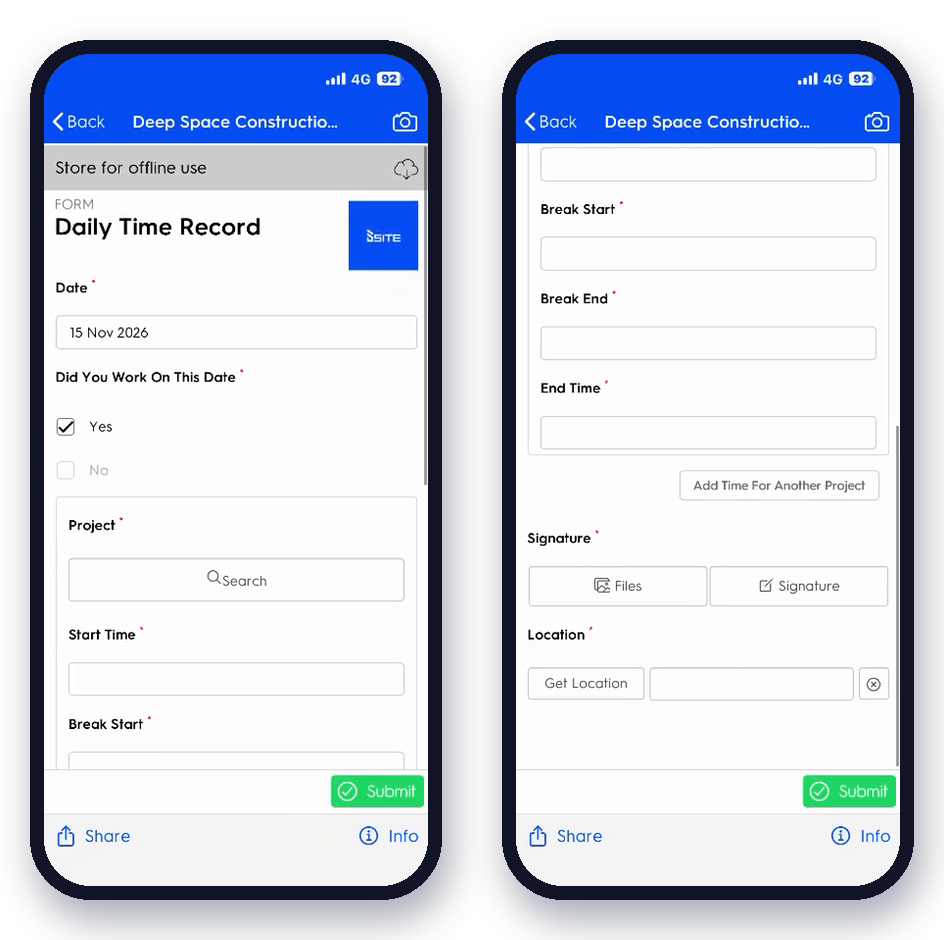

Crews record the hours. Two approvals make the call.
No hour reaches the budget or payroll until it passes two approvals: an admin check on the hours and a manager sign-off on the week. Every change is logged with who made it and why.
- Clock on
- Code it
- Round it
- Review
- Approve
- Cost
- Pay
Every Worker, Every Day, One Screen
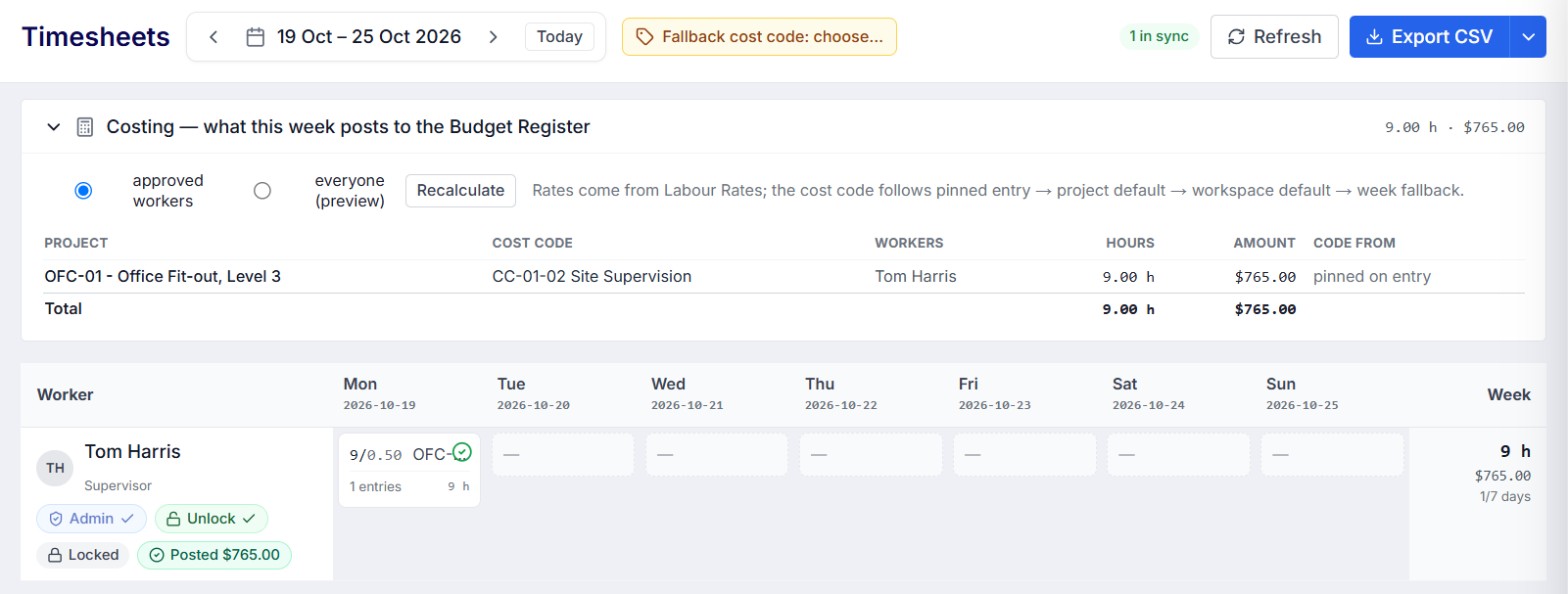
A seven-day grid across the whole workspace. Each worker shows their rate and role, each day shows hours by project, and anything odd is flagged before you approve it.
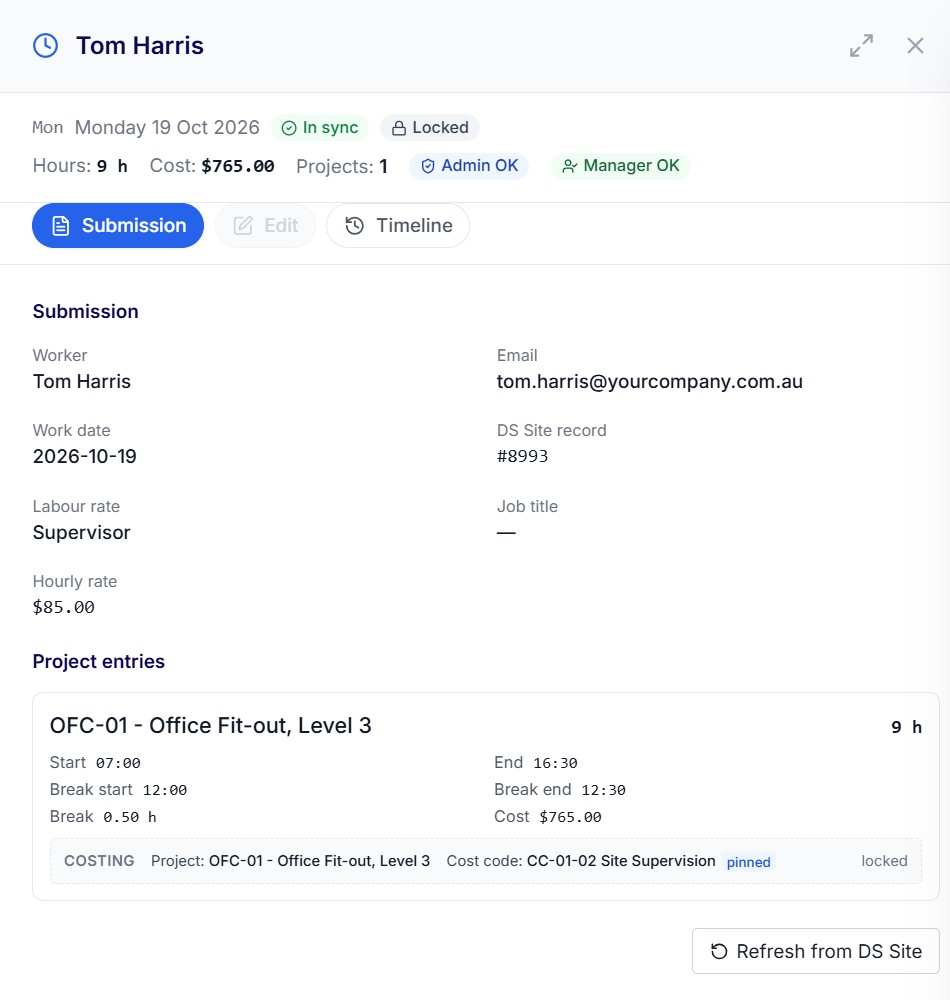

Hours captured. Costs coded. You approve.
The supervisor sees the week as the crew recorded it, what each day costs, and anything that needs a decision before it reaches the budget or payroll.
Leading hand 42.5 h

Approved: Five days on COM-12, coded to framing and fit-out. Posted to the budget as labour cost.
Carpenter 8 h override

Override. Clock shows 9.5 h, supervisor set 8 h with a reason. The export pays 8 h and the audit keeps both.
Second record: Tuesday

Check: Two time records for the same worker and day. Pick the right one before it is paid twice.
Every Hour Lands Where Your Accountant Expects It
Project hours code to project cost codes. Yard, travel, training and admin code to overheads. Labour rates, awards and defaults come from your company settings, so the cost is right without anyone looking it up.

Approve the week. Watch labour hit the budget.
Approved hours multiply out at each worker's rate and post as wages cost against the project and cost code. The PM sees labour to date against budget on Tuesday, not after month end.
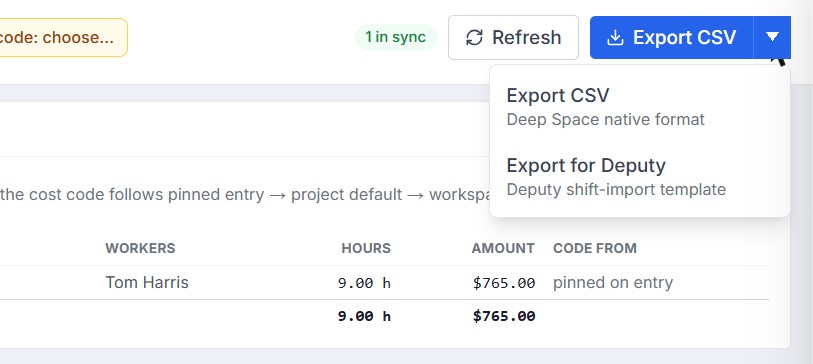
Your payroll export matches the timesheet to the minute.
Export the approved week in the format your payroll system imports. Overrides, rounding and breaks carry through, and exporting a week that isn't approved asks you to confirm first.

Export check

Approved before it's paid. Every export is logged.
One approved week, exported in the format your payroll needs. Pick the template once in Company Settings and the export is ready every Monday.
- Deputy
- Smartly
Labour rates and a workforce directory that every timesheet already knows.
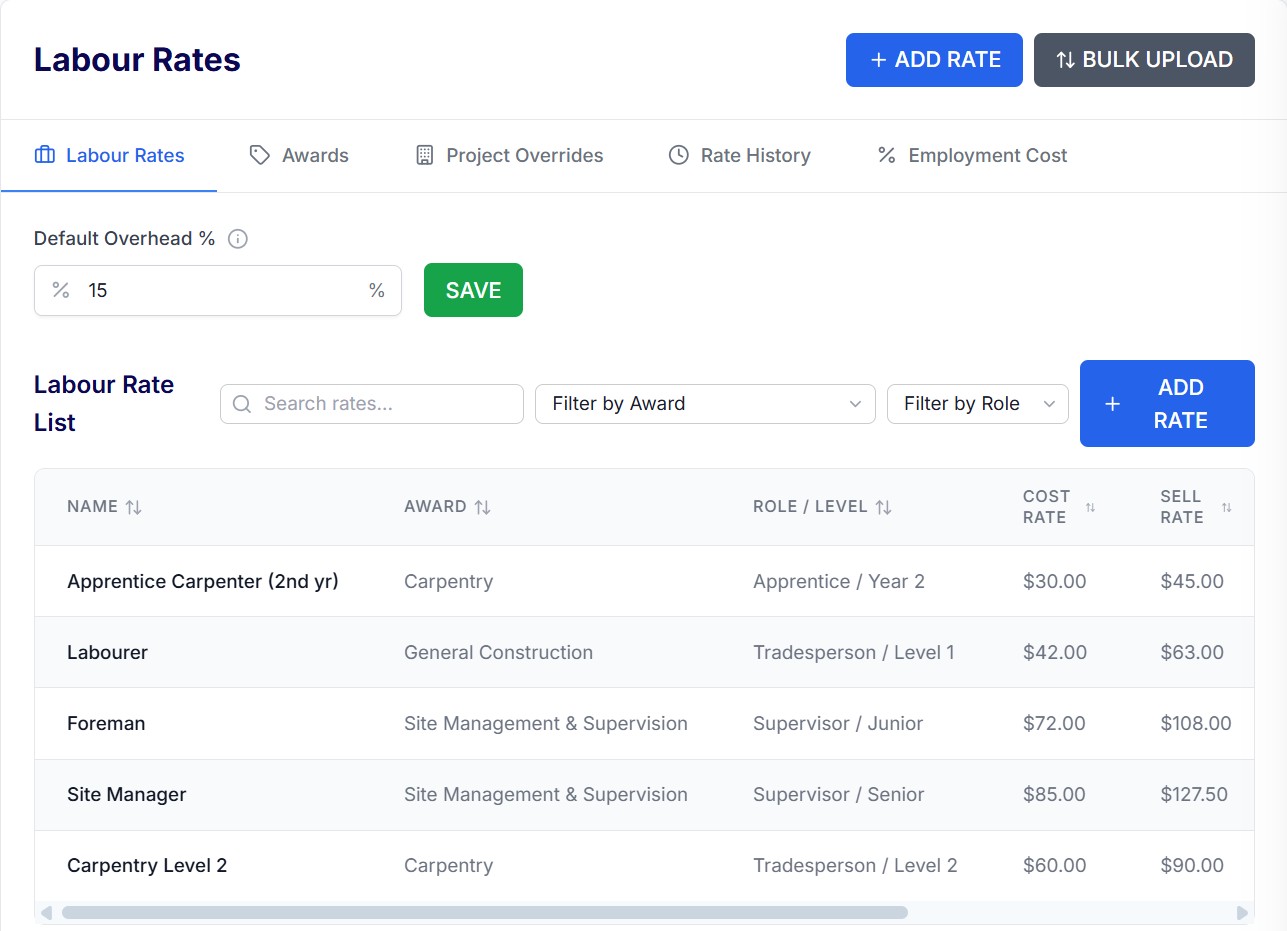
Labour rates and awards
Build your rate library once: ordinary, overtime, weekend and allowance rates by role, linked to the award each one sits under. Add on-costs for super, leave, workers comp and payroll tax so the cost that posts to the budget is the true cost of the hour, not just the wage.
- Rates by role, trade or individual worker
- Awards and overtime rules in one place
- Effective dates, so a pay rise never rewrites last month
- Duplicate rates caught before they cost you
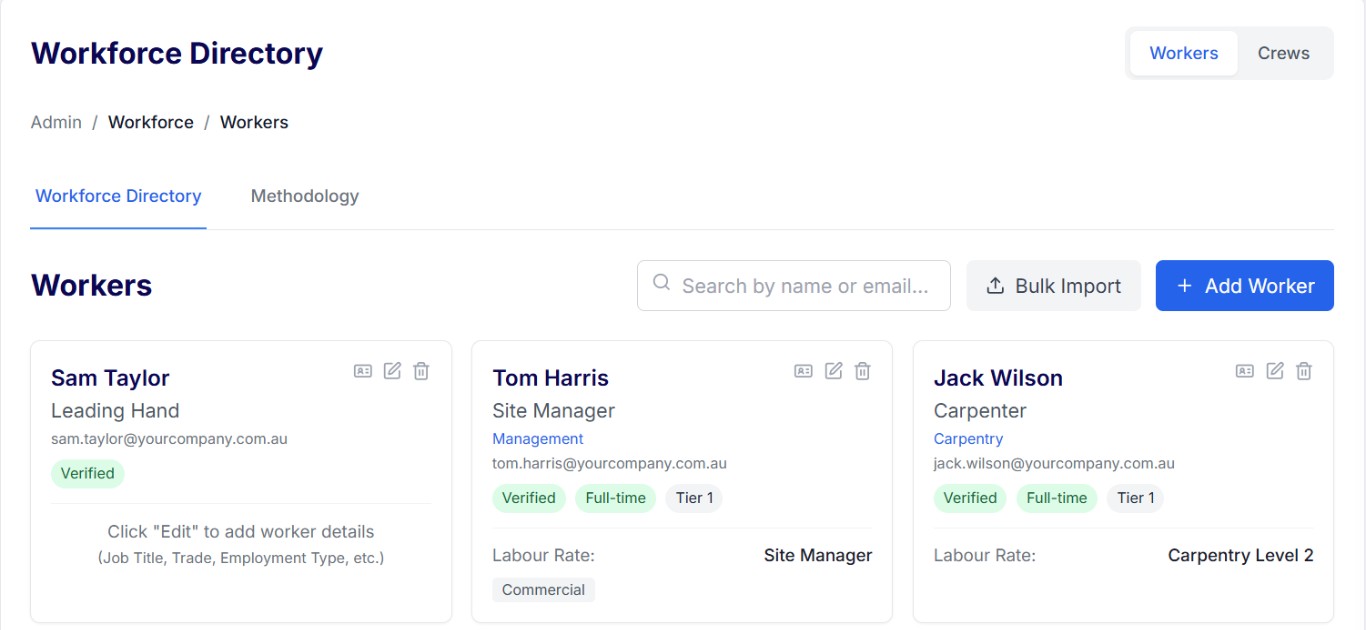
Workforce directory
One record for every worker: trade, role, labour rate, licences and tickets, inductions, emergency contacts and payroll details. The same record signs them on at the gate, prices their timesheet and fills the payroll export.
- Employee number, department and pay type for payroll
- Tickets and licences with expiry alerts
- Inductions and emergency contacts on the same record
- Employees and labour hire in one list, by project
Forecast Labour Before It's Spent
Allocate your own crews to programme tasks, see who is booked where next week, and compare planned hours with actual hours as the timesheets come in.

Planned hours vs actual hours, by task, every week.
Each programme task shows the crew allocated to it, the hours planned and the hours approved so far. Drift shows up while there is still time to move people.
From the Site Gate to Payroll Without a Single Re-key
Each stage carries the hours from the stage before. The same approved hour is the cost on the budget and the line on the payslip.
- 01 Sign on
 QR code at the gate. Induction and SWMS checked. Worker on site, on record.
- 02 Daily Time RecordStart, finish, breaks and tasks in DS Site. Locked once submitted. Works offline.
- 03 Weekly timesheetBuilds itself from the daily records. Seven-day grid for every worker. Rate and role shown.
- 04 CodingProject, cost code or overhead on every entry. Rounding rule applied.
- 05 Double approvalAdmin checks the hours, the manager signs off the week. Both stamps before anything is costed or paid. Every change is logged.
- 06 Labour cost
Approved hours post to the Budget Register as wages. Labour to date, by cost code. Same day, not month end. - 07 PayrollExport to Deputy, Smartly or CSV. Matches the timesheet to the minute.
- 08 Forecast and marginLabour actuals feed forecast to complete. The monthly report and Xero see the same numbers as the site.

Why Project Timesheets Beat Another Time Clock
A time clock tells you who to pay. Deep Space tells you what every hour cost the project, and pays it correctly too.
Labour cost, not just hours
Your cost codes on every entry
No per-worker fees
Built for ANZ payroll
Safety and time in one sign-on
An audit trail on every hour
Overheads you can finally see
Two sets of eyes on every week
“Everything is included. No modules, no add-ons, no getting stung every time we need one more thing.”
Matt Hornby, Construction Manager, Matland Group
Built With Builders Who Run Their Own Crews
Shaped with NZ and AU builders who self-perform carpentry, fit-out and civil works. Recent releases: per-entry coding, overhead hours, labour posting to the budget, rounding rules, overrides with audit, and Deputy exports. Next: Smartly import and export, payroll employee details and planned vs actual labour by task.
Timesheets Run on One Connected Platform
See your crew's week land on the budget.
Bring last week's timesheets. We'll set up your rates and cost codes, approve a real week with you and show the labour post to the budget and the payroll export it produces.