
AI Takeoff in Construction: Why the Gap After the Takeoff Matters More
Why AI takeoff only matters when it is connected to everything that comes next.
Every builder we talk to has a version of the same story. Different city, different drawings, same Thursday night.
Over the last few months we have sat across the table from dozens of commercial builders across Australia and New Zealand. When the conversation turns to estimating, the same people keep showing up. You probably know them. You might be one of them.
Story 1: The estimator buried in drawings
Meet Sarah. (Not her real name. Her problem is very real.)
Sarah is a QS at a mid-tier commercial builder in New Zealand. A tender for a new coolstore has just landed: 104 sheets, closing Monday.
She will spend the next three days opening a sheet, checking the scale, measuring, counting, writing it down, and opening the next one. Then the architect issues Revision C on Friday afternoon.
Her director saw an AI takeoff product in the NZIQS newsletter and forwarded it with one line: "Can we get something like this?"
What Sarah does now
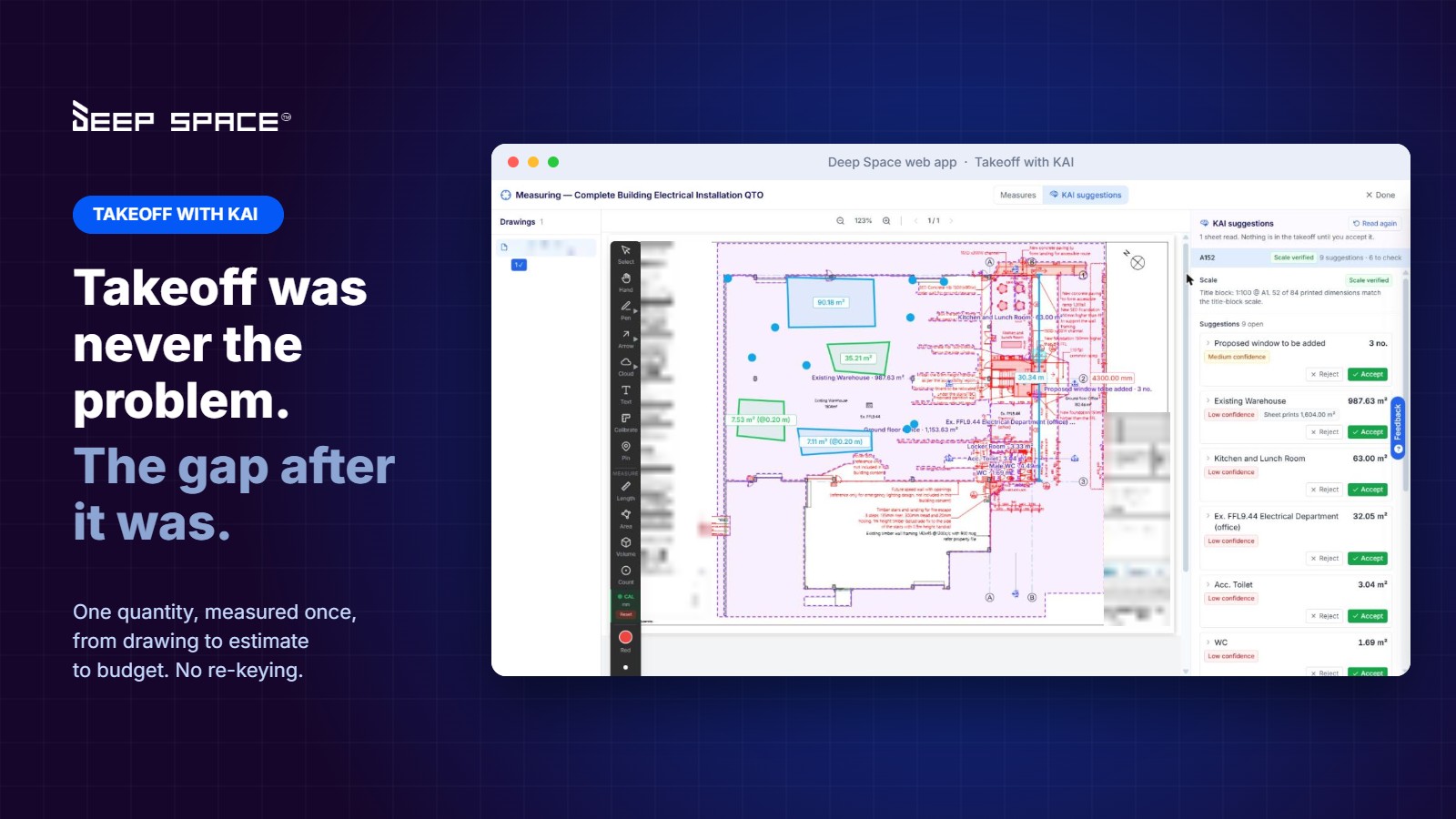
She opens her takeoff package in the Deep Space web app and presses Takeoff with KAI.
KAI reads every sheet in the set and shows her which sheet it is on. When it is done, she opens KAI suggestions and sees every count and area it proposes, drawn right on the drawing, each with a confidence level and the evidence behind it.
Accept, and it becomes a takeoff measure. Reject, and it is gone. Sarah stays in control. KAI does the grind.
On one power and data layout, KAI counted 29 double power outlets, 14 double data points, 8 floorbox data, 5 floorbox power, 12 existing outlets and 11 light switches in a single pass.
Story 2: The scale trap nobody sees at 11pm
Every estimator has done this once.
The title block says 1:100. You measure. Three days later someone notices the drawing was issued at A1 and printed at A3. The real scale is 1:200, and every area on that sheet is out by a factor of four.
KAI does not just read the title block. It checks it against the dimensions printed on the sheet. On one of our test drawings, the title block said 1:100 and the printed dimensions said otherwise. KAI flagged it: "The title-block scale looks wrong."
The scale the estimator had set by hand for that page? 1:200. KAI got there on its own and showed why.
That is the kind of catch that saves a tender.
Story 3: The director who said "the AI stuff is a nice to have"
Meet Tom. (Not his real name either.)
Tom runs a commercial builder across NSW, Queensland and Victoria. Aged care, health, councils, education. His team prices around $40M of work a year and wins about 40% of it. He has been on Procore for six years, describes himself as a tech nerd in a construction man's body, and he told us something we have not forgotten:
The AI stuff is a nice to have. The real juice is in estimating and budget allocating, before the project even starts.
He was right. And he was blunt about why. Two things kept him up at night:
- Takeoffs nobody can review. His estimators measure in square and linear metres, and he needs to open a quantity and see exactly where it came from.
- No margin guardrails. In his current setup, an estimator could submit a tender at a 1% margin and nobody would know until it was won.
That is not a software problem. That is a business risk with a tender deadline on it.
What Tom gets now
- Every quantity is reviewable. Whether an estimator measured it or KAI suggested it, it is drawn on the drawing, labelled, and linked to the line it feeds.
- AI that earns its place. KAI does not replace the estimator. It does the counting and the scale checking, so the estimator spends their time on pricing and judgement, where the margin actually lives.
- Margin set once, carried all the way. Preliminaries, overheads, profit and contingency sit on the estimate and flow into the budget when the project is won.
Tom did not want AI for the sake of AI. He wanted his estimate and his budget to be the same thing.
Story 4: The director re-keying at midnight
Meet Dan. (Also not his real name.)
Dan co-owns a national fit-out builder with desks on the Sunshine Coast and in Brisbane. Hospitality fit-outs, a $10M club redevelopment with a basement and lifts, growing fast.
His estimators use a dedicated estimating product. His project team runs on Procore. Accounts runs on a separate financial package, connected through a middleware product. Invoices go through another. Site diaries through another again.
So every time a project is won, Dan personally spends about an hour re-keying the estimate into a budget. As a director. And when it is done, the budget is out by $200 and someone has to go and find out why.
When we asked what he wanted, he did not say "AI". He said:
I just want the estimate to become the budget.
This is the real problem. Not the takeoff. Not the estimate. The gaps between them.
Why a takeoff on its own is only half an answer
AI takeoff is one of the hottest categories in construction tech right now. Togal.AI, Traft, Estimator+ and others are all doing interesting work.
But most standalone tools share one thing: the quantities stop at the takeoff. Someone still exports them, re-keys them into an estimate, then again into a budget, then again into subcontract packages and claims.
Every handover is a chance for a miskey. Every miskey is margin leaking out of the project. You can have the fastest takeoff in the world and still have Dan up at midnight.
The power of one connected platform
Here is what changes when the takeoff lives inside the same platform that runs the rest of the project. One quantity. One journey. No re-keying.
- Takeoff. KAI reads the drawings and proposes quantities. The estimator accepts them.
- Estimate. Accepted measures flow into the estimate, mapped to the builder's own cost codes, where rates and margins are applied.
- Budget. The estimate pushes to the budget when the project is won. Dan's hour of re-keying becomes a click.
- Subcontractor tendering. Trade packages go to market from the same project. KAI levels the quotes that come back and flags scope gaps.
- Commitments and claims. Subcontracts and POs draw against the same budget lines. Subcontractor claims are read from the inbox and matched by KAI.
- Cost to complete. The forecast knows what was priced, what is committed and what has been spent, all on the same line.
- Accounting. Approved costs sync directly to your accounting or financial package. No middleware.
- Site. DS Site captures what is happening in the field against the same project.
The number Sarah measured on Thursday night is the same number Dan's PM is tracking six months later. Nobody typed it twice.
That is the Builder's Wheel in action. Work flows clockwise through Win, Set Up, Build, Move the Money and Govern. Money flows back the other way. And margin sits at the centre, protected at every handover.
Coming next: when Revision C lands on Friday
In a disconnected world, a new drawing revision means re-measure, re-estimate, re-price, and hope you catch what changed.
Because the takeoff, the estimate and the budget are the same data in Deep Space, the next step on our roadmap is revision-aware takeoff: KAI reads the new revision, proposes only what changed, and lands those changes in a new estimate version showing how far the quantity moved and what it did to the dollars.
Not "the drawing changed". "The drawing changed, and here is what it just did to your margin."
Built for how ANZ builders actually work
- Your cost codes, not ours. Quantities map to the structure you already use.
- You stay in control. KAI suggests and shows its evidence and confidence. Nothing goes in without your say.
- Your drawings stay in your project. Takeoff reads straight from Project Documents. No uploading to a separate system.
- Unlimited users. Estimators, PMs, site and accounts, all on the same project.
Want to see it on your own drawings?
We are working with a handful of builders to put Takeoff with KAI against their real tender sets, connected end to end from takeoff to budget. If you are tired of being Sarah on a Thursday night, or Dan at midnight, book a demo with the Deep Space team and bring a live drawing set.
Frequently asked questions
What is AI takeoff in construction?
AI takeoff uses AI to read construction drawings, check the scale and propose quantities such as counts, areas and lengths, so estimators review and accept measures instead of drawing every one by hand.
Does Takeoff with KAI replace the estimator?
No. KAI proposes quantities with a confidence level and the evidence behind each one. The estimator accepts, edits or rejects every suggestion, and nothing is added to the takeoff without their approval.
How is Takeoff with KAI different from standalone AI takeoff tools?
Most standalone tools stop at the takeoff, so quantities are exported and re-keyed into an estimate and budget. In Deep Space, accepted quantities flow into the estimate, the budget, subcontractor tendering, claims and your accounting package on one connected platform.
Can KAI catch a wrong drawing scale?
Yes. KAI reads the title block scale and checks it against the dimensions printed on the sheet, and flags the sheet when the two do not agree, such as an A1 drawing printed at A3.