

AI Agents in Construction: What Mid-Tier Builders Need to Know (2026)
An AI agent is only as good as the project data it can see, the software wrapped around it, and the approvals it has to pass through. Here is what that means for a $10M to $200M builder, in plain terms.
Every builder is asking about AI agents. Most are asking the wrong question.
In the last two months we have sat across the table from GMs, operations managers, QSs and HSEQ leads at commercial builders from Sydney to Auckland. Almost every conversation turns to the same topic: AI agents.
One GM told us he wants something that will "tell me when this project is three days overdue and what's causing it." A commercial lead in New Zealand is already using a general-purpose AI to rebuild trade scopes and tender comparison sheets in minutes instead of weeks. Another builder's team uses ChatGPT and Claude on the side, with no shared templates and no single "our way" of doing things.
The interest is real. But the question most builders start with ("which AI agent should we buy?") is the wrong one. The better questions are:
- What would the agent actually do on a Tuesday morning?
- What data would it read, and is that data any good?
- What software sits around it, and who approves what it produces?
This guide answers those questions. No hype and no science fiction. Just what AI agents are, why the software around them matters more than the model, where they earn their keep on a commercial project today, where they still fall short, and how to tell a real one from a demo.
What an AI agent actually is (in builder terms)
An AI agent is software that watches for something to happen, reads the relevant information, works out what should happen next, and prepares that next step for a person to approve. That is it.
The easiest way to understand it is to compare it with two things builders already know: chatbots and automation rules.
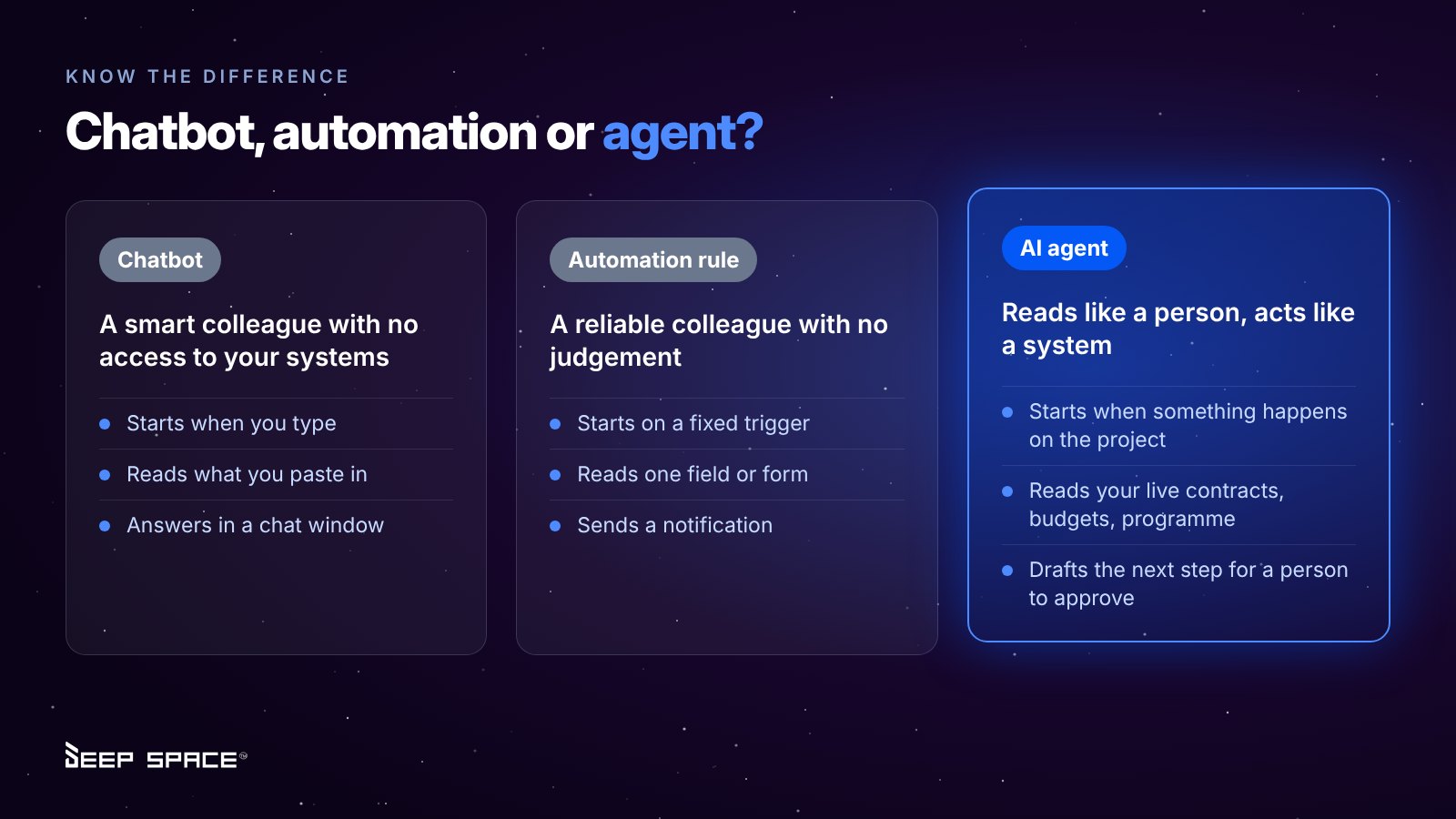
A chatbot is a very smart colleague with no access to your systems. An automation rule is a very reliable colleague with no judgement. An agent sits between the two: it can read a messy PDF claim like a person would, and it can act inside your systems like a rule would.
Here is the difference on a real task. Ask a chatbot to "rewrite this scope for a facade package" and it will do a good job with what you paste in. Set an automation rule to "email the PM when an RFI is seven days old" and it will fire every time. An agent reads a subcontractor's claim, matches it to the subcontract, flags a variation that was never approved, and drafts the payment schedule.
The four parts of a useful construction agent
- A trigger. Something real on the project: an email in the invoices inbox, an IFC drawing set uploaded, a client decision falling overdue.
- Context. The records it needs to make sense of the trigger: the subcontract and schedule of values, the budget line, the programme activity, the contract's notice periods.
- A drafted action. A payment schedule, a register update, a notice of delay, a scope of works, a tender comparison.
- A human checkpoint. The right person (by role, project and dollar value) reviews, edits and approves. Nothing goes to a subcontractor, a client or Xero without it.
If a vendor cannot point to all four in their demo, you are looking at a chatbot with a new label.
The model is not the product. The harness is.
Here is the part most AI marketing skips. The large language models behind agents (from Google, OpenAI, Anthropic and others) are now widely available, and they leapfrog each other every few months. Any software company can plug one in. So the model itself is rarely what makes an agent good or bad for your business.
What matters is the harness: the software wrapped around the model that tells it what it can see, what it can do, and when it must stop and ask. Think of the model as a capable new hire with a strong degree. The harness is the induction, the procedures manual, the delegated authority and the supervisor. Without it, even the brightest graduate is a liability on a live project.
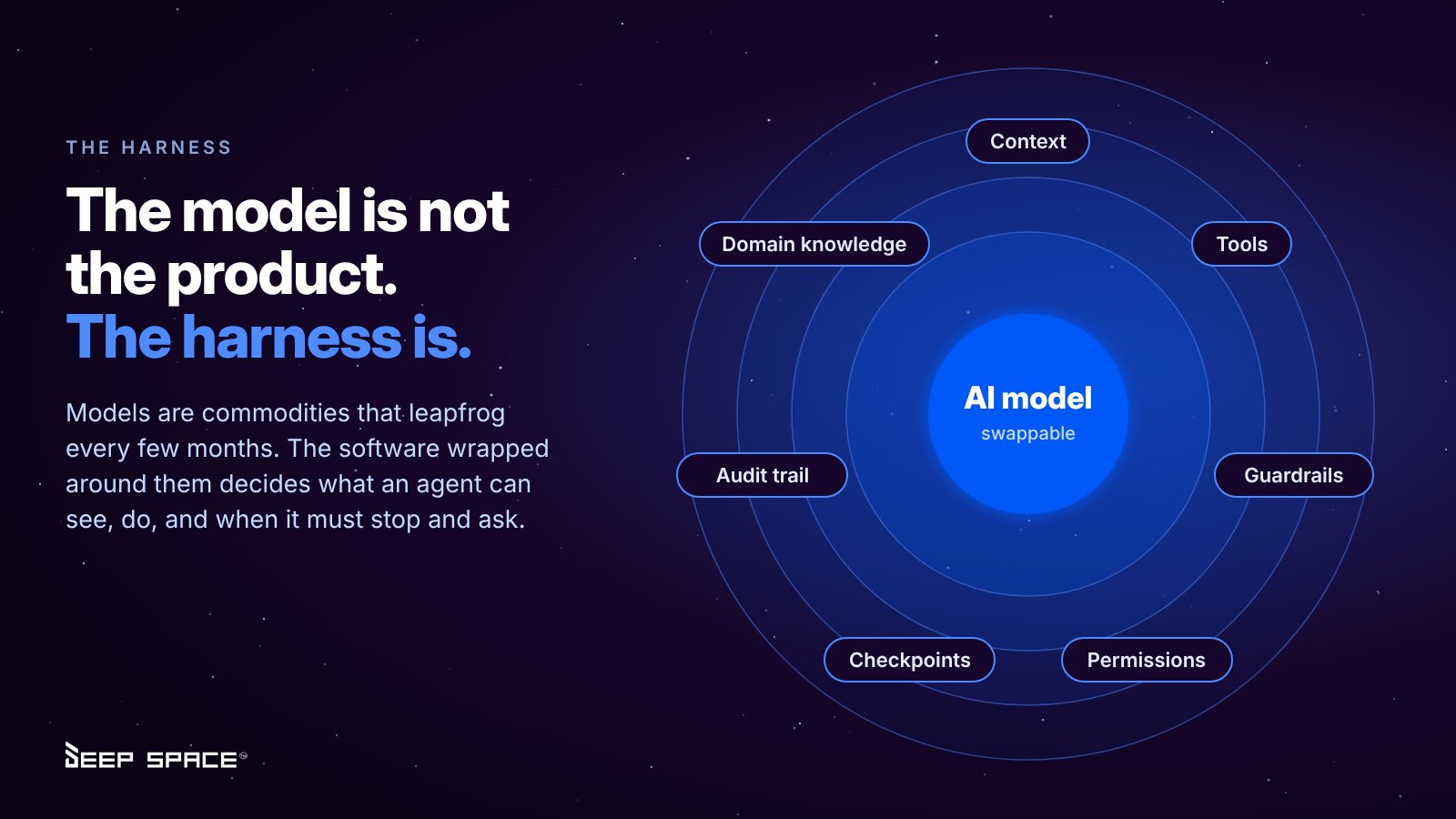
What a construction-grade harness includes
- Context. The right project records loaded at the right moment: the subcontract, the schedule of values, the programme activity, the notice periods. Not the whole company file, and not whatever someone happened to paste in.
- Tools. The specific actions the agent is allowed to take, such as reading an inbox, drafting a payment schedule or updating a drawing register. Nothing outside that list.
- Guardrails. Rules it cannot break: never issue to a subcontractor without approval, never certify above the commitment, never cross a project or workspace boundary.
- Permissions. The agent acts as the user, with that user's role-based access, so it cannot see or change what they cannot.
- Checkpoints. Approval routes by role and dollar value, with confidence scores so uncertain items go to a person rather than straight through.
- Audit trail. A record of what the agent drafted, what a person changed and who approved it. In a payment dispute, that is your evidence.
- Domain knowledge. ANZ contract forms, security of payment timeframes, cost structures and the way commercial builders actually work.
Why this matters when you choose software
A general chatbot has a powerful model and almost no harness. That is why it is great for rewriting a scope and risky for anything touching money or contracts. A bolt-on AI feature in an older platform often has a harness that can only see one module. A platform built with AI from the ground up can give the agent the full project record, the full permission model and the full approval chain.
It also protects your investment. When the harness is well built, the model underneath can be upgraded as better ones arrive, without you rebuilding your workflows. Your processes, permissions and data stay put; the agent just gets smarter.
So when you are comparing vendors, ask two questions: which model do you use, and can you swap it? And more importantly: show me the harness.
Why most AI agent projects stall: the data underneath
An agent can only reason about what it can see. For most mid-tier builders, what it can see is scattered across five or more systems.
A typical stack we hear about on discovery calls looks like this: Procore or Aconex for documents and RFIs, HammerTech or a site app for safety, Jobpac, Cheops, MYOB or Xero for finance, Microsoft Project for the programme, CostX or Cubit for takeoffs, Estimate One for tenders, and Excel holding it all together. Plus a growing layer of staff using ChatGPT or Claude on the side.
Now ask an agent a simple question: "Which of our subcontractors claimed more than their programme progress this month?"
To answer it, the agent needs the subcontract (in one system), the claim (in an inbox), the programme (in an .mpp file on someone's laptop) and the payment history (in the accounting system). If those do not share the same project, cost code and company records, the agent either cannot answer or, worse, answers confidently and wrongly.
This is why some builders are spending nine months building a Power BI data warehouse over their existing stack before they even start on agents. It is a sensible instinct. But it is a stopgap: a warehouse shows you what happened, it cannot draft the payment schedule or issue the notice.
What "AI-ready" data actually means
- One company directory. The same subcontractor, with the same ABN, insurances and contacts, used in tendering, contracts, claims and site sign-on.
- One cost structure. Budget categories and cost codes that run from estimate to budget to commitment to claim to forecast.
- Linked records. A variation knows its client instruction, its notice, its drawing revision and its subcontract.
- Permissions that carry through. If a site manager cannot see commercial data in the platform, an agent working for them cannot either.
Get these right and agents become useful almost by default. Skip them and no amount of AI will save you.
Where agents earn their keep today
The highest-value agents in construction are not general assistants. They are narrow, workflow-specific agents that take one repetitive, document-heavy task off a skilled person's desk.
We map them to the Builder's Wheel: work flows clockwise through Win, Set Up, Build, Move the Money and Govern, money flows back the other way, and margin sits in the middle. Every agent below exists to protect that margin.
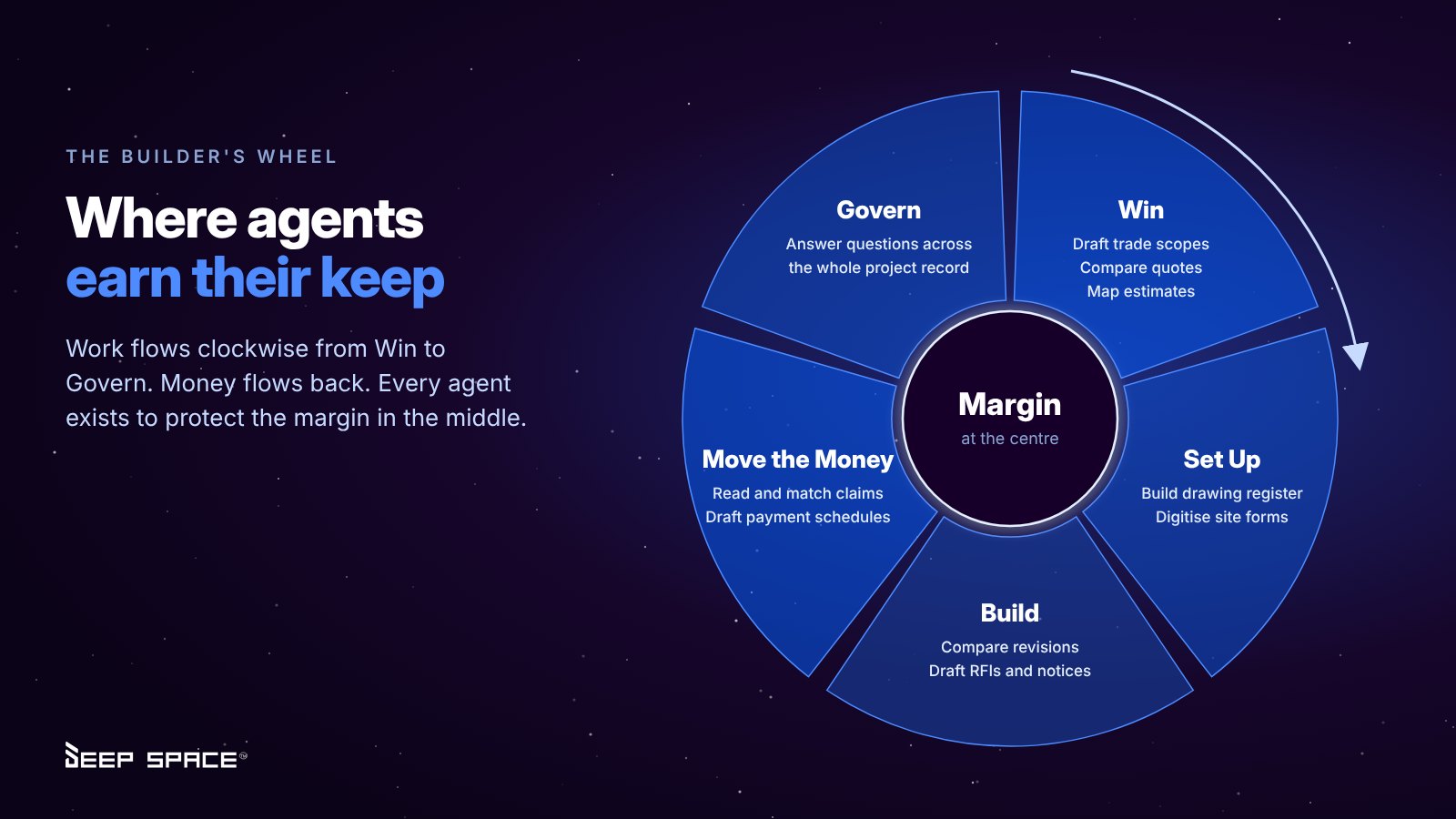
- Win. Read drawings and specs to draft trade scopes of works. Compare subcontractor quotes into like-for-like columns. Map an existing estimate spreadsheet to your cost codes. Your estimators review, tighten and pick the price instead of re-keying.
- Set Up. Read title blocks to build the drawing register and supersede old revisions. Turn existing paper or Word forms (ITPs, SWMS, checklists) into digital DS Site forms.
- Build. Compare drawing revisions and highlight what changed. Draft RFIs and notices to ANZ contract standards, sent from your own Outlook.
- Move the Money. Read invoices and claims from a shared inbox, match them to the subcontract or PO, flag unapproved variations and over-claims, and draft the payment schedule.
- Govern. Answer questions across the whole project record ("Was a PO issued for this?") instead of digging through three systems.
The invoice inbox: a worked example
This is the agent builders most often ask us to show again.
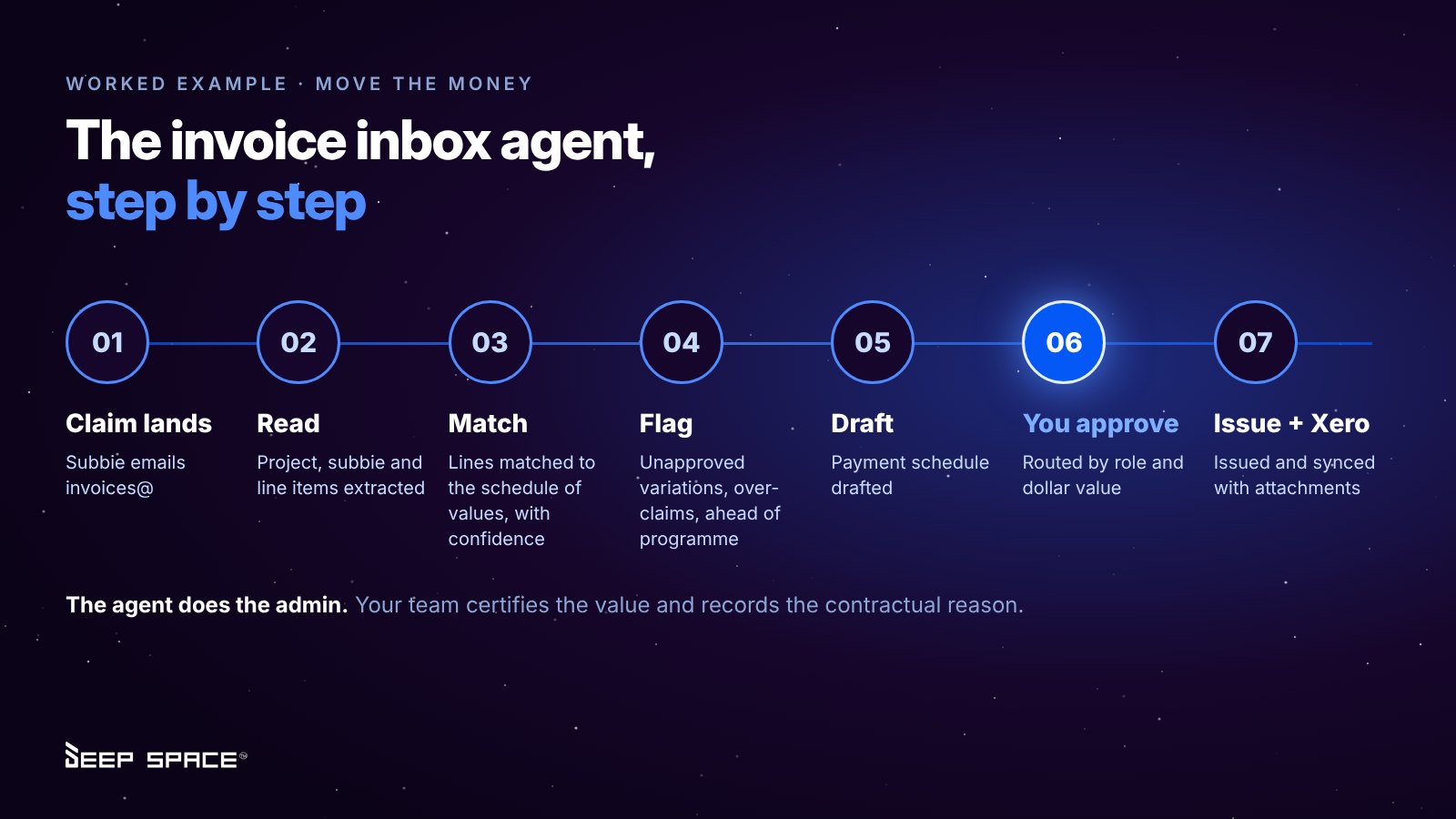
- A subcontractor emails a progress claim to your invoices@ inbox.
- The agent reads the PDF, identifies the project, subcontractor and subcontract, and pulls out each line item.
- It matches lines to the schedule of values and gives a confidence score. Anything it cannot match is set aside for a person.
- It flags issues: a line claiming a variation that has not been approved, a total that exceeds the commitment, or progress that runs ahead of the programme (a 40% claim on a task that is 10% complete).
- It drafts the payment schedule.
- The schedule routes to the right approver by role and value. For example, a PM up to $20,000 and a director above $50,000.
- Once approved, it is issued and pushed to Xero with the attachments.
One customer's commercial team described what is left as "only like two steps." The skilled part (certifying the value and recording the contractual reason) stays with the person. The admin goes.
Where agents still fall short
Be wary of anyone who says agents can do everything. Today:
- 2D drawing takeoff is not reliable enough to run unattended. AI can count fittings and assist with measurement, but complex 2D takeoff without human checking is not there yet. Ask any vendor to run it on your drawings, not theirs.
- Drawing quality matters. Poorly titled or bound PDF sets produce poor results. We have seen agents drop discipline prefixes and confuse a civil 101 with a structural 101.
- Spreadsheets with no cost-code logic need rules. If your estimate headings do not match your cost codes, the agent needs a mapping before it can help.
- Over-reliance is the real risk. Drawings change and sites change. Experienced judgement still matters most.
The questions builders are asking us
These come straight from recent discovery calls and implementation sessions.
"Can the agent just approve the green ones?"
One commercial team proposed scoring every claim green, amber or red, then auto-approving reliable green claims once the process is proven. It is a sound end goal. The right path is to start read-only and draft-only, measure how often the agent is right on your projects, then widen its authority one workflow at a time. Earn the trust before you hand over the keys.
"Who can ask it what?"
As one prospect put it, just because you can ask a question does not mean a PM should be able to query that data. Agents must inherit your existing role-based permissions. A site manager's agent should not see margin. An estimator's agent should not see head contract claims.
"Does it learn from our data and share it with others?"
It should not. Ask every vendor directly: does the model train on your data, does it learn across customers' workspaces, and where is the data hosted? In Deep Space, KAI does not learn across projects or across workspaces, runs on enterprise-grade models through Google Vertex AI, and sits inside an ISO 27001 certified platform.
"Can we use ChatGPT or Claude with it?"
Yes, and this is changing fast. Through MCP (Model Context Protocol), staff can connect their preferred AI assistant to the platform and ask questions of live project data, using their own permissions and read-only access. The embedded agents keep running the workflows (invoice processing, register updates, scope drafting), while the general assistant becomes a way to ask questions across everything.
"Will this replace my QS or contract administrator?"
No. It replaces the re-keying, chasing and checking that stops them doing the work they are actually paid for. With labour as tight as it is across ANZ, the builders getting the most from agents are using them to grow from $20M to $50M without doubling their back office.
"How do we start without a nine-month project?"
Pick one live project and one workflow. Run it through a full claim cycle. Validate the agent on a small sample ("I've done five and I'm happy with it") before scaling. Then add the next workflow.
How to evaluate an AI agent vendor: 10 questions
Take this list into your next demo. A good vendor will welcome every question.
- Show me the trigger. What real project event starts the agent, and can I see it fire live?
- Use my documents. Will you run it on one of our claims, drawing sets or estimates, not a demo file?
- Show me the harness. What can the agent see, what tools can it use, and which model sits underneath? Can the model be swapped?
- Where is the human checkpoint? Who approves, and can I set approvals by role, project and dollar value?
- What happens when it is unsure? Does it show a confidence level and set uncertain items aside, or guess?
- Does it respect our permissions? Can a user's agent see anything the user cannot?
- Is our data used for training? Does it learn across other customers' workspaces? Where is it hosted?
- Is there an audit trail? Can I see what the agent drafted, what a person changed, and who approved it?
- Is it in the price? Are agents charged per user, per invoice, per token or as a premium add-on?
- What does it not do well yet? If the answer is "nothing", keep looking.
How KAI works inside Deep Space
KAI is the AI layer built into the Deep Space web app and DS Site. It is not a separate product or a chat window bolted onto the side. It runs inside the workflows, on the same records your team already uses, from tender to final account.
- One connected record. Directory, cost codes, budgets, commitments, claims, programme, drawings and correspondence all live in one platform, so KAI has the context an agent needs.
- Human in the loop by design. KAI drafts, compares, matches and flags. Your people review and approve through configurable approval workflows.
- Permissions carry through. KAI and any connected assistant see only what the user is allowed to see.
- Your choice of assistant. Connect ChatGPT or Claude through MCP for read-only questions across live project data.
- No usage meter. KAI is included in the flat annual subscription, with unlimited users and no per-invoice or per-claim charges.
- Built for ANZ. Local contract frameworks, Xero integration, and local support in Australia and New Zealand.
We are also building the next generation of proactive agents with our customers: agents that tell you a project is slipping and why, rank subcontractor performance, and surface risks to directors before the monthly report. If you want to help shape them on your own projects, we want to hear from you.
The bottom line
AI agents are not magic, and they are not hype either. They are a practical way to take the repetitive, document-heavy work off your best people, as long as four things are true: your data is connected, the harness around the model is built for construction, your approvals are clear, and you start small.
The builders getting ahead are not the ones with the most AI subscriptions. They are the ones with one clean source of truth and a well-harnessed agent working quietly on top of it.
See KAI work on your own documents. Bring a real subcontractor claim, a drawing set or an estimate and watch what happens. Book a demo with the Deep Space team.
Frequently asked questions
What is an AI agent in construction?
An AI agent is software that watches for a project event (an invoice arriving, a drawing being issued, a programme date slipping), reads the relevant project records, and drafts the next step for a person to approve, such as a payment schedule, a register update or a notice.
How is an AI agent different from ChatGPT or Claude?
A general chatbot only knows what you paste into it and answers in a chat window. A construction agent is triggered by real project events, reads your live contracts, budgets and programme, and produces a drafted record inside your workflow, with an approval step before anything is issued.
What is an AI harness?
The harness is the software around the AI model: the context it is given, the tools it may use, its guardrails, permissions, approval checkpoints, audit trail and domain knowledge. Models are widely available and change often, so the harness is what decides whether an agent is safe and useful on a live project.
Will AI agents replace quantity surveyors or contract administrators?
No. Agents remove the re-keying, matching and chasing so QSs and contract administrators can focus on certifying values, managing risk and protecting margin. The professional judgement and approval stay with people.
Is our project data used to train AI models?
It should not be, and you should ask every vendor directly. In Deep Space, KAI does not learn across projects or across customer workspaces, and it runs inside an ISO 27001 certified platform with role-based permissions.
How should a builder start with AI agents?
Pick one live project and one workflow, such as the invoice inbox. Run it through a full claim cycle, validate the agent on a small sample, then widen its scope one workflow at a time.