
Migrating From Procore to Deep Space: A 90-Day Switch Plan for ANZ Builders
For many commercial builders across Australia and New Zealand, the problem is no longer whether construction software matters. The problem is whether the current stack actually helps teams run projects better. Over the last decade, platforms like Procore became the default choice for many construction businesses globally. But across the ANZ mid-tier commercial market, a different pattern has started emerging.
Project managers are still chasing updates across spreadsheets. Programme changes still sit disconnected from commercial impact. RFIs, variations, site issues, safety workflows, invoices, and delivery updates still live across multiple systems. That is exactly why searches around Procore alternatives in Australia, Deep Space vs Procore, and construction management software for ANZ builders continue increasing in visibility across the market.
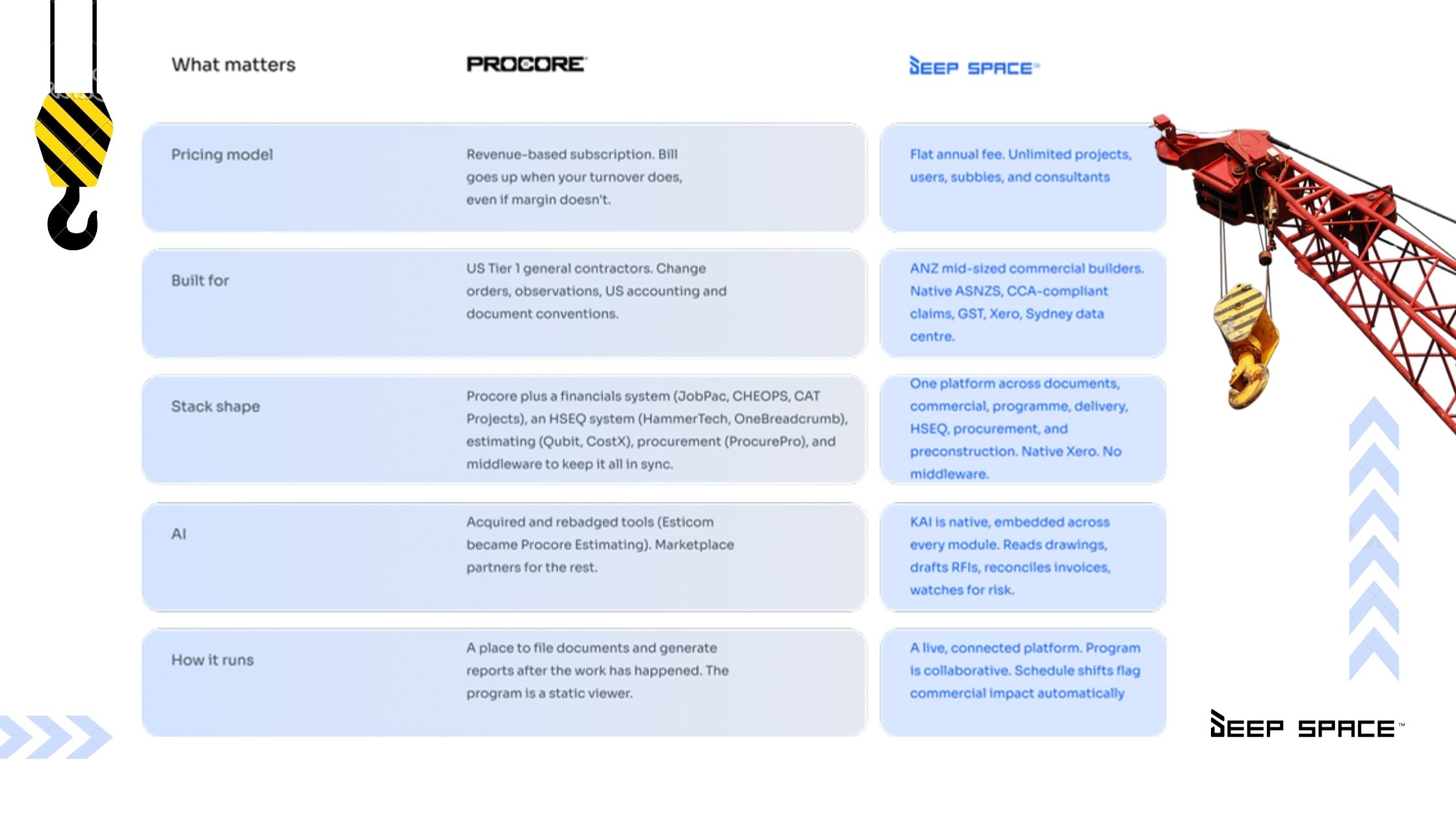
The issue is not that Procore is a bad platform. The issue is operational fit. According to Deep Space vs Procore, Deep Space was built specifically for mid-sized commercial builders across Australia and New Zealand, with native ANZ workflows, local contract logic, GST handling, Xero integration, and connected operational modules.
And for many builders, that distinction matters more than feature count.

Why Mid-Tier ANZ Builders Are Reassessing Their Construction Stack
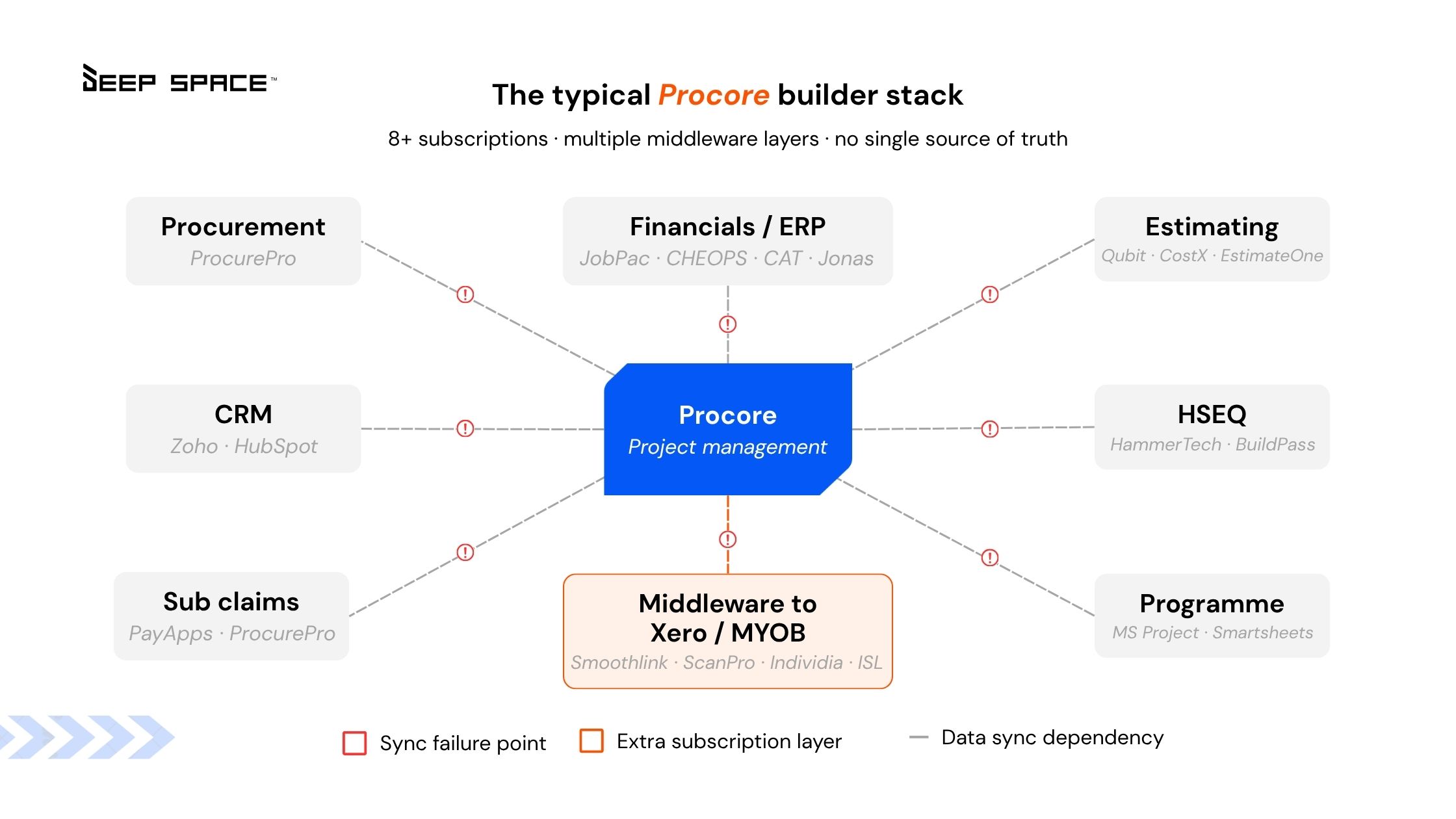
The reality for many commercial builders is this: Most construction software stacks expanded over time instead of becoming simpler. A typical setup often looks like:
- Procore for project management
- Separate HSEQ software
- Xero integrations through middleware
- Excel forecasting
- MS Project schedules
- External procurement tools
- RFIs managed partially through email
- Site communication happening through WhatsApp or phone calls
The result is operational fragmentation. Deep Space’s comparison guide directly calls this out, describing how many builders end up running “eight or more subscriptions” with multiple middleware layers just to keep systems connected. For project managers, that usually translates into:
- delayed visibility
- duplicate admin
- disconnected reporting
- manual reconciliation
- slower commercial decisions
- poor schedule-to-cost visibility
That is one of the biggest reasons builders begin evaluating a construction software migration checklist and exploring alternatives designed specifically for the ANZ market.
Why Most Construction Software Migrations Fail
Most migration projects fail because leadership treats them like a software installation. In reality, migrations are operational change projects. The risk is not losing files. The risk is disrupting live jobs.
For ANZ commercial builders managing active projects, migrations affect:
- project managers
- QS teams
- site supervisors
- subcontractors
- delivery coordination
- commercial forecasting
- safety workflows
- claims and variations
- invoice approvals
- programme visibility
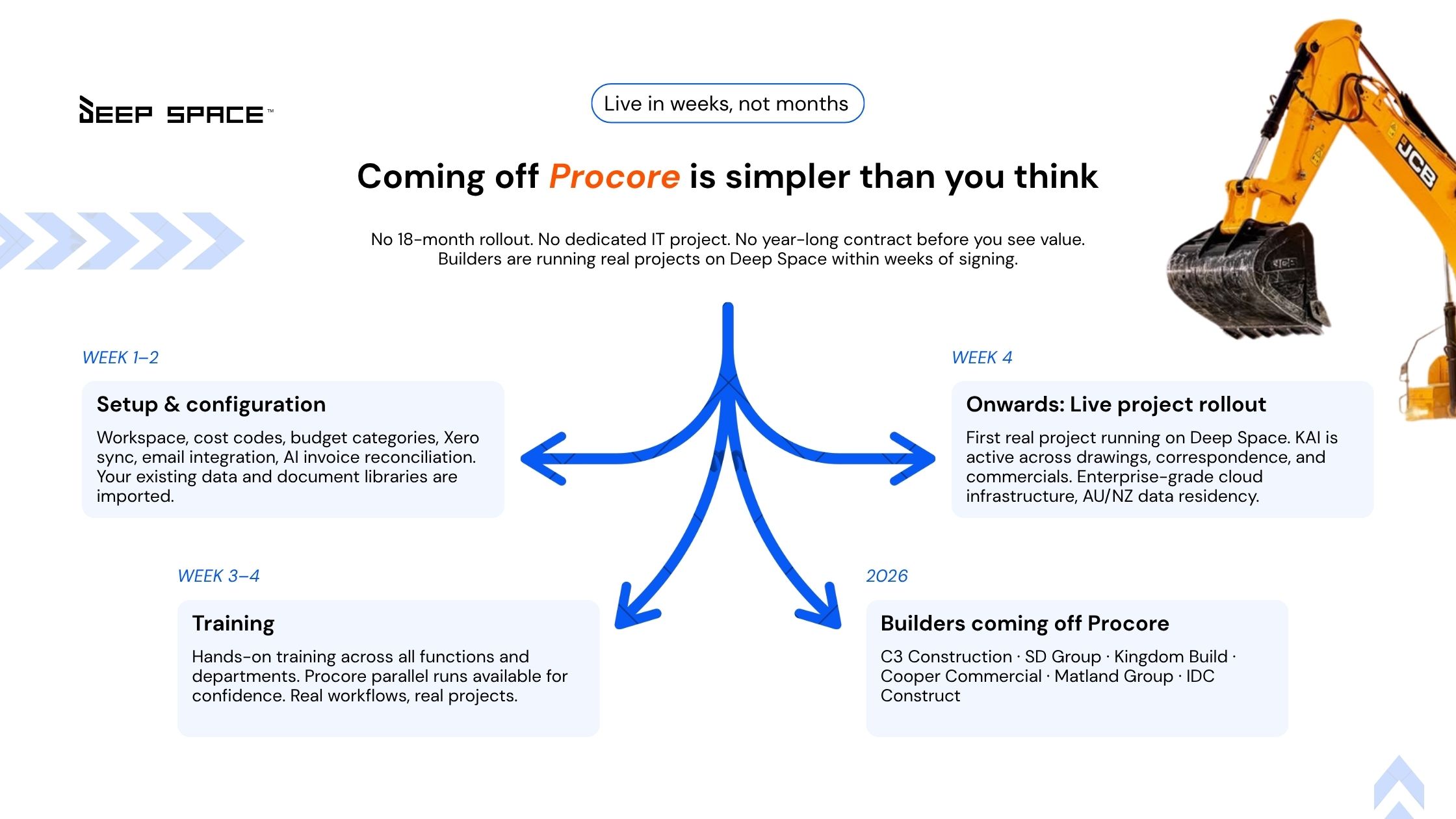
This is why the deep space migration approach focuses heavily on phased rollout and live operational continuity rather than “rip-and-replace” implementation. The website itself positions builders as being able to run real projects within weeks rather than waiting through long enterprise-style implementation cycles.
Days 1-30: Stabilise Live Project Operations
The first month should focus on continuity, not complexity. According to the Deep Space migration guide, early rollout typically prioritises:
- workspace setup
- cost codes
- budget categories
- Xero sync
- document migration
- email integration
- live project configuration
This stage is critical because operational trust is built early. If project teams cannot quickly:
- locate drawings
- raise RFIs
- access programme data
- manage claims
- track variations
- review site updates
then adoption slows immediately.
This is where Deep Space positions itself differently from traditional disconnected stacks. Instead of separate operational systems sitting beside each other, the platform connects:
- programme
- commercial
- delivery
- HSEQ
- documentation
- procurement
inside one environment.
That matters because project managers do not work module by module. They work across everything simultaneously.
Days 30-60: Expand Operational Adoption Across Teams
Once project leadership stabilises core workflows, the next phase focuses on wider operational rollout. This includes:
- field teams
- subcontractors
- commercial managers
- consultants
- delivery coordination
- invoice handling
- site reporting
- inductions and compliance
This is where many traditional enterprise rollouts struggle. The deeper the software complexity, the harder adoption becomes across operational teams. Deep Space repeatedly positions itself around reducing onboarding friction for mid-tier builders. The site specifically references:
- “live in weeks, not months”
- “hands-on training”
- “real workflows, real projects”
That distinction matters because many ANZ project teams do not have dedicated internal software administrators managing rollout full time. The platform also positions KAI as embedded operational intelligence rather than a separate AI tool. According to the comparison page, KAI can:
- review drawing uploads
- surface coordination issues
- draft RFIs
- compare revisions
- identify programme-driven commercial risk
Importantly, these are workflow-level functions already described publicly by Deep Space, not speculative AI claims.
Days 60-90: Replace Legacy Operational Dependency
The final migration phase is where builders start reducing reliance on disconnected legacy systems. This phase typically focuses on:
- forecasting visibility
- commercial reporting
- variation workflows
- invoice reconciliation
- executive reporting
- cross-project visibility
- subcontractor coordination
- programme-to-cost alignment
One of the clearest operational differences highlighted on the Deep Space comparison page is the relationship between program and commercial workflows. The site specifically contrasts the following:
- static scheduling environments
- disconnected commercial tracking
- delayed cost forecasting
against live-connected programme intelligence. For many commercial builders, this becomes one of the strongest operational reasons for migrating from disconnected stacks. Because when schedule delays, variations, claims, procurement impacts, and commercial forecasting sit disconnected from each other, visibility always arrives late. And late visibility is expensive.
Why More Builders Want Connected Construction Workflows
Across the ANZ construction market, margin pressure, labour shortages, subcontractor coordination issues, and growing project complexity are forcing builders to rethink operational systems. Builders are increasingly prioritising:
- faster visibility
- fewer disconnected tools
- operational simplicity
- connected commercial workflows
- better field adoption
- AI-supported project intelligence
- local ANZ contract handling
- easier rollout across teams
This is exactly the positioning Deep Space continues reinforcing across both its migration guide and its comparison pages. The conversation is no longer "Which platform has the most features?” The real question is: “Which platform helps project teams operate with less friction?”
That is a very different buying decision. And increasingly, it is why more builders evaluating construction project management software ANZ-wide are reassessing whether large enterprise-first systems still match how mid-tier commercial builders actually work. Book a demo for any information about deep space.
FAQs
What is the best Procore alternative Australian builders are considering?
For many mid-tier commercial builders, the focus is shifting toward platforms purpose-built for ANZ workflows, connected operations, local contract handling, and faster implementation. Deep Space positions itself specifically around this market segment.
How long does migrating from Procore to Deep Space take?
Deep Space states builders can begin running live projects within weeks through phased rollout and operational onboarding. Exact timelines vary depending on project complexity and historical data requirements.
What should a construction software migration checklist include?
A proper construction software migration checklist should include the following:
- active project review
- drawing migration
- programme setup
- commercial workflows
- Xero integration
- user permissions
- subcontractor onboarding
- reporting structure
- HSEQ workflows
- team training
Why are builders searching for construction management software for ANZ builders?
Many global platforms were originally designed around US enterprise workflows. ANZ commercial builders often need local contract logic, GST handling, CCA-compliant workflows, and operational structures suited to mid-tier commercial projects.
What makes Deep Space different from Procore?
According to Deep Space’s comparison page, the platform focuses on connected workflows across programmes, commercial, delivery, HSEQ, procurement, and documentation, with KAI embedded across workflows rather than operating as a separate AI add-on.
Is Deep Space built for Tier 1 infrastructure contractors?
Deep Space explicitly states it is designed for mid-sized commercial builders across Australia and New Zealand rather than Tier 1 infrastructure megaproject environments.