

What a Connected Construction Platform Actually Looks Like in Practice (With Real Workflow Examples)
The phrase "connected construction platform" gets used a lot. Software vendors put it on every homepage. Sales decks are full of diagrams showing modules linked by arrows. But for most mid-tier commercial builders in Australia, the day-to-day reality looks nothing like the diagram. The programme is in MS Project. The cost is in Excel. RFIs and site instructions go out through email. HSEQ is in a separate app. And somewhere in between all of it, your PMs and QSs are spending hours every week just assembling a picture of where a project actually stands before they can make a decision.
This post is about what genuine connection between construction workflows actually looks like, using real workflow examples from how mid-tier commercial builders run projects today versus what a properly connected platform enables in practice.
The Disconnection Problem Is a Data Problem
Before getting into workflow examples, it's worth being clear about what the problem actually is. When your tools don't share data, every handoff between functions creates friction. A variation gets raised. The PM records it in the delivery register. The QS updates the cost plan in Excel. The programme isn't updated because nobody has time. Three weeks later, the commercial manager is presenting a forecast that doesn't reflect three scope changes that happened in the last fortnight. None of those people did anything wrong. The problem is structural. The systems they're working in don't share a single project record, so every update requires someone to manually carry information from one place to another. Multiply that across a project team running five concurrent jobs and the compounding effect is significant.
A connected construction management software platform solves this not by giving you a better Excel, but by making the handoff disappear entirely.
Workflow Example 1: Drawing Uploaded, RFI Raised, Variation Captured
Here's what this workflow looks like across disconnected tools.
- A structural engineer issues a revised drawing. Your PM downloads it, saves it to Dropbox, emails the relevant trades, and manually updates the drawing register in Excel. Two weeks later, a site supervisor flags a clash between the revised structure and the existing services layout. The PM raises an RFI via email, tracks it in a separate spreadsheet, and chases the engineer for a response. When the response comes back requiring additional work, the QS is notified separately and manually adds a variation to the cost plan.
- In a connected construction platform, the same sequence looks like this. The engineer uploads the revised drawing directly. The platform detects it as a new revision, supersedes the previous version, and distributes it to the relevant trades automatically. On upload, the AI layer reviews the drawing against the existing consultant package and flags the services clash before anyone on site notices it. A draft RFI is generated with the relevant drawing linked and the issue described. The PM reviews and sends it. When the response comes back, the resulting instruction is linked to the original RFI and the variation is captured in the cost register in the same workflow, not in a separate Excel update three days later.
The outcome is the same. The work is done faster, with a cleaner audit trail, and the commercial impact is captured in real time rather than retrospectively.
Workflow Example 2: Programme Slip That Triggers a Commercial Flag
This is the workflow where disconnected tools cause the most damage for mid-tier builders in Australia.
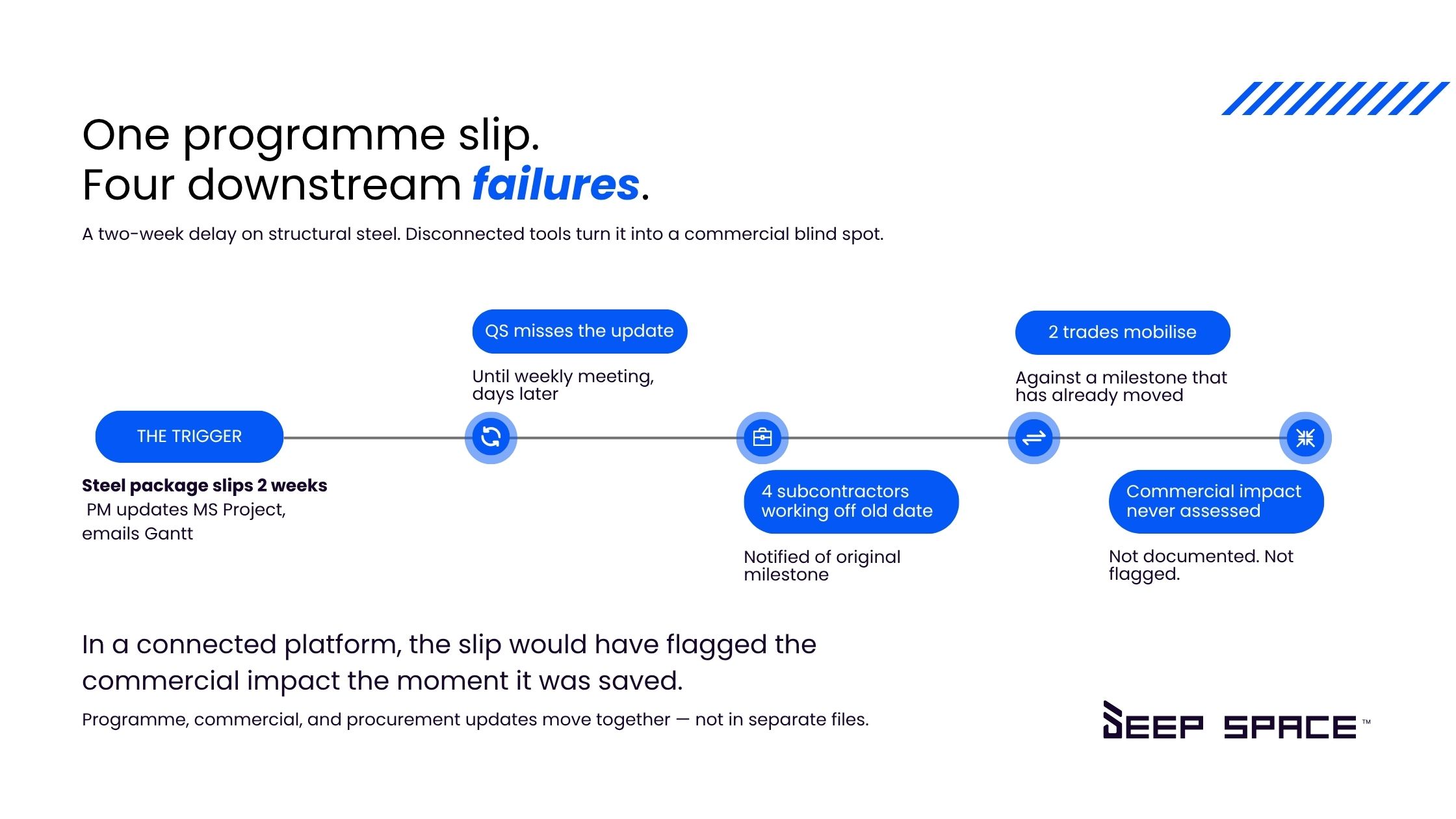
- The structural steel package slips by two weeks. The PM updates the programme in MS Project, saves the file, and emails the updated Gantt to the project team. The QS doesn't see it until the next weekly meeting. By then, four subcontractor packages have already been notified of the original programme milestone, two have mobilised based on it, and the commercial impact of the delay has not been assessed or documented.
- In a connected construction software platform, when the structural steel milestone moves, the programme change is immediately visible across the platform. The trades affected by the dependency are automatically flagged. The commercial module surfaces the cost impact of the delay: extended preliminaries, subcontractor rescheduling costs, and any contract entitlements that need to be assessed. The QS and PM are looking at the same information at the same time, and the conversation about how to respond can happen before the subcontractors are already on site.
This is what programme and cost integration in construction actually means in practice. Not a dashboard showing two numbers side by side, but a live connection where a change in one triggers a flag in the other.
Workflow Example 3: Subcontractor RFI Through to Payment
Subcontractor management generates more email than any other function on a commercial project. The construction RFI management workflow is a good example of why.
- A subcontractor has a query about the scope of their package. They email the PM. The PM forwards it to the engineer. The engineer responds to the PM. The PM updates the RFI register in Excel and emails the subcontractor back. If the response requires a site instruction, that goes out via a separate email. If the instruction generates a variation, the QS gets another email. The subcontractor submits a claim for the variation, which the QS reconciles against the instruction and approves in yet another system before it reaches Xero.
- In a connected platform, the subcontractor raises the query through their portal. It flows directly into the RFI register, linked to the relevant drawing and package. The engineer responds through the same system. The site instruction is issued from within the platform, linked to the RFI, and the variation claim is submitted and assessed in the same workflow. When it's approved, it syncs to Xero without a manual export.
Every step is in one place. The audit trail is complete. And the subcontractor's portal gives them visibility over their own package without the PM needing to relay information through email.
Workflow Example 4: HSEQ Integrated With Delivery
For most mid-tier builders in Australia, safety and delivery live in completely separate systems. SWMS are approved in one place, inductions are managed in another, and the site supervisor's daily sign-on has no connection to the programme or the delivery register.
When HSEQ is built into the same platform as delivery, a safety hold on a work package can be linked directly to the programme activity it affects. If a trade's insurance has expired, the platform can block payment approval automatically without anyone having to manually cross-reference two systems. Incidents logged on site are visible to the commercial team if they carry cost implications, not in a separate report that arrives at the end of the month.
This kind of connection between safety and commercial workflow doesn't require a complex integration. It requires both functions to sit inside a single project record.
What Genuine Connection Actually Requires
The construction subcontractor management platform space is full of tools that claim integration but deliver it through middleware, connectors, and APIs that break under load and fail silently. Genuine connection requires programme, cost, documents, delivery, and HSEQ to share the same underlying project data. Not synced data. The same data.
When that's true, replacing construction spreadsheets in Australia becomes possible not because the platform has a better spreadsheet function, but because the spreadsheet is no longer needed. The information is already where it needs to be.
For mid-tier commercial builders in ANZ, the question is not whether a connected construction platform is worth having. It clearly is. The question is whether the platform you're evaluating actually delivers connection at the data level, or whether it's just a collection of modules that happen to share a login.
Deep Space is an all-in-one construction management platform built for mid-tier commercial builders in Australia and New Zealand. Programme, commercial, delivery, documents, HSEQ, and AI intelligence across every workflow in a single connected platform. Book a demo to see how it runs on a real project.
Frequently Asked Questions
What is a connected construction platform?
A connected construction platform is software where programme, cost, documents, delivery, and safety all share the same underlying project data. When a change happens in one area, it flows through to the others automatically. This is different from a collection of tools that are loosely integrated through connectors or middleware, where data has to be manually carried between systems or can fall out of sync.
How is a connected construction platform different from using multiple tools together?
The difference is whether your tools share a single project record or whether they sync data between separate records. When you use MS Project for programme, Excel for cost, and email for delivery, every update requires someone to manually carry information from one place to another. A genuinely connected platform removes that handoff entirely because the information only exists in one place.
What workflows benefit most from a connected construction platform?
The workflows that benefit most are the ones where two functions need to talk to each other in real time: programme and cost, RFIs and variations, drawing revisions and delivery, and HSEQ holds and payment approvals. These are exactly the workflows that break down in disconnected systems because the handoff between functions relies on someone manually passing information across.
Can mid-tier builders in Australia realistically move off spreadsheets and disconnected tools?
Yes, and the builders who have done it consistently say the shift was faster than expected. The key is starting with a platform that is configured to how your business actually runs, rather than a generic enterprise system that requires months of customisation before it reflects your workflows. Builders running on a properly connected platform typically go live on a real project within weeks, not months.
Does a connected construction platform replace tools like Xero, MS Project, or HSEQ software?
It depends on the platform. Some connected platforms are genuinely all-in-one, with native programme, commercial, HSEQ, and accounting integrations built in. Others claim connection but still require separate subscriptions for financial management, safety, and scheduling. The question to ask any vendor is whether those connections are native or whether they rely on third-party middleware to keep data in sync.