The construction program everyone actually works from
Not the one stuck in someone's app. Not the one printed and pinnedto the wall. Not the PDF emailed every fortnight. The live one. Built forconstruction. Connected to your budget, procurement, and forecast.Shared with subbies and clients on your terms.
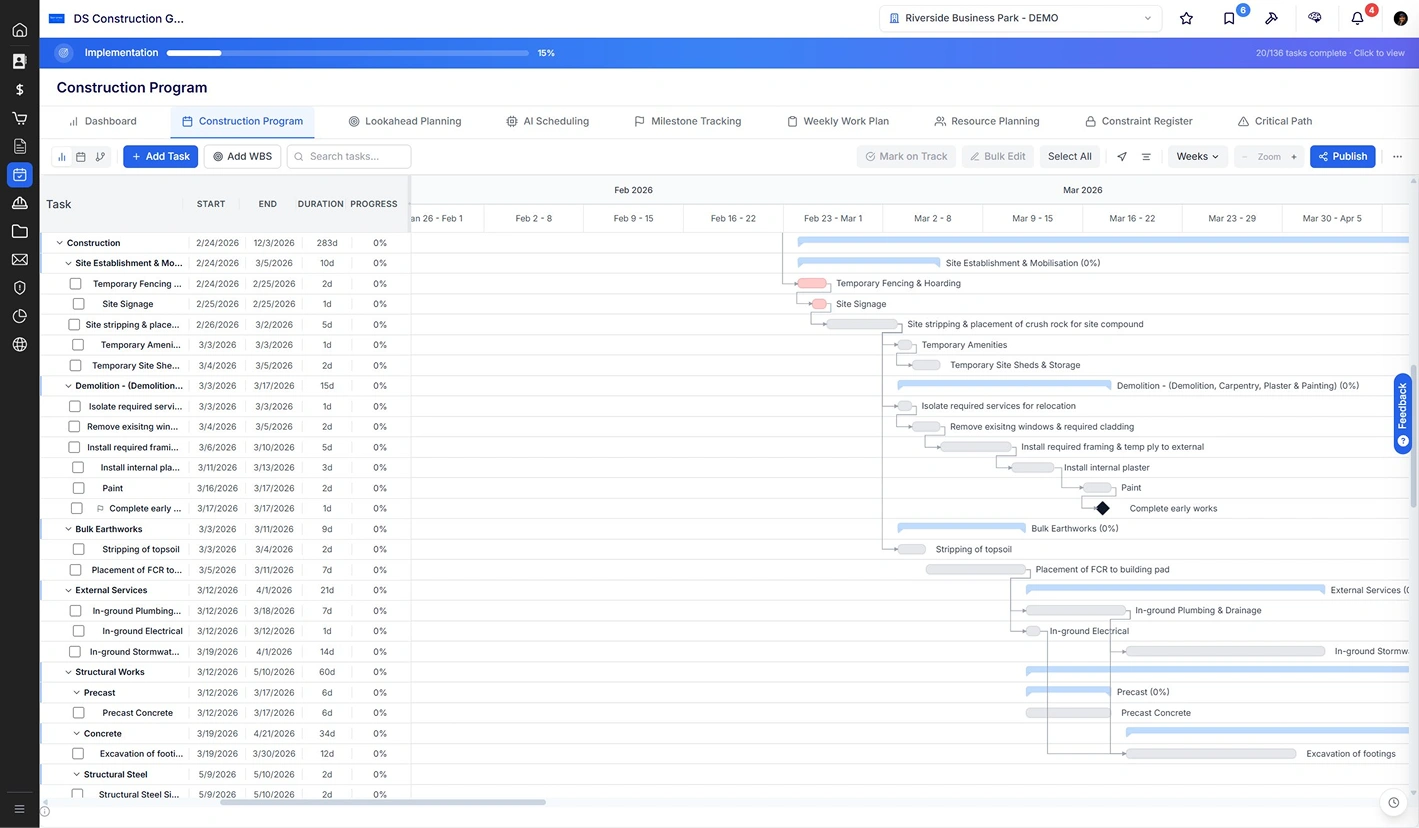

The program is the project. So why does it live everywhere except where the project does?
Most builders run a program that lives outside their project platform. The planner builds it. The team works around it. Subbies don't see it. The client gets a stale PDF. Cost forecasts ignore it. By the time the master is updated, the slip is three weeks old.
The program lives in one person's app.
Built once by the planner. Opened by no oneelse. Site team works off a printout. Subbiesdon't see it. The seat licence sits unused on alaptop while the team chases status by phone.

Subbies aren't accountable to dates they never see.
The look-ahead is printed and pinned to the wall. Fifteen subbies on the project, fifteen separate phone calls each week. Program dates and reality drift. By the time the planner updates the master, the slip is already three weeks old.
Program disconnected from cost, procurement, and forecast.
A move on the program doesn't move anythingelse. Procurement dates are re-keyed manually. Cost forecasts stay frozen on last month's plan. The cash flow chart is wrong before the meeting starts.

“If it can come back to fifteen different subbies easily and automatically, that beats going back to one person monthly.”
Director, Melbourne commercial builder. During an onboarding session with the Deep Space team.
Native to construction. Not adapted from generic project management.
A Gantt that understands construction, not a tool that goes in every direction. WBS, dependencies, lags, milestones, critical path. Built for builders who need a program that runs the project, not a program that documents one.

Your full program. WBS hierarchy. Dependencies. Critical path. One screen, everyone works from.
Build it from scratch or import your existing MS Project file. WBS structure, dependencies (FS, SS, FF, SF) with lags, milestones, planned versus actual dates. Mark on Track when work confirms, drag durations on the Gantt, drop new dependencies. The look you expect, with the collaboration you need.
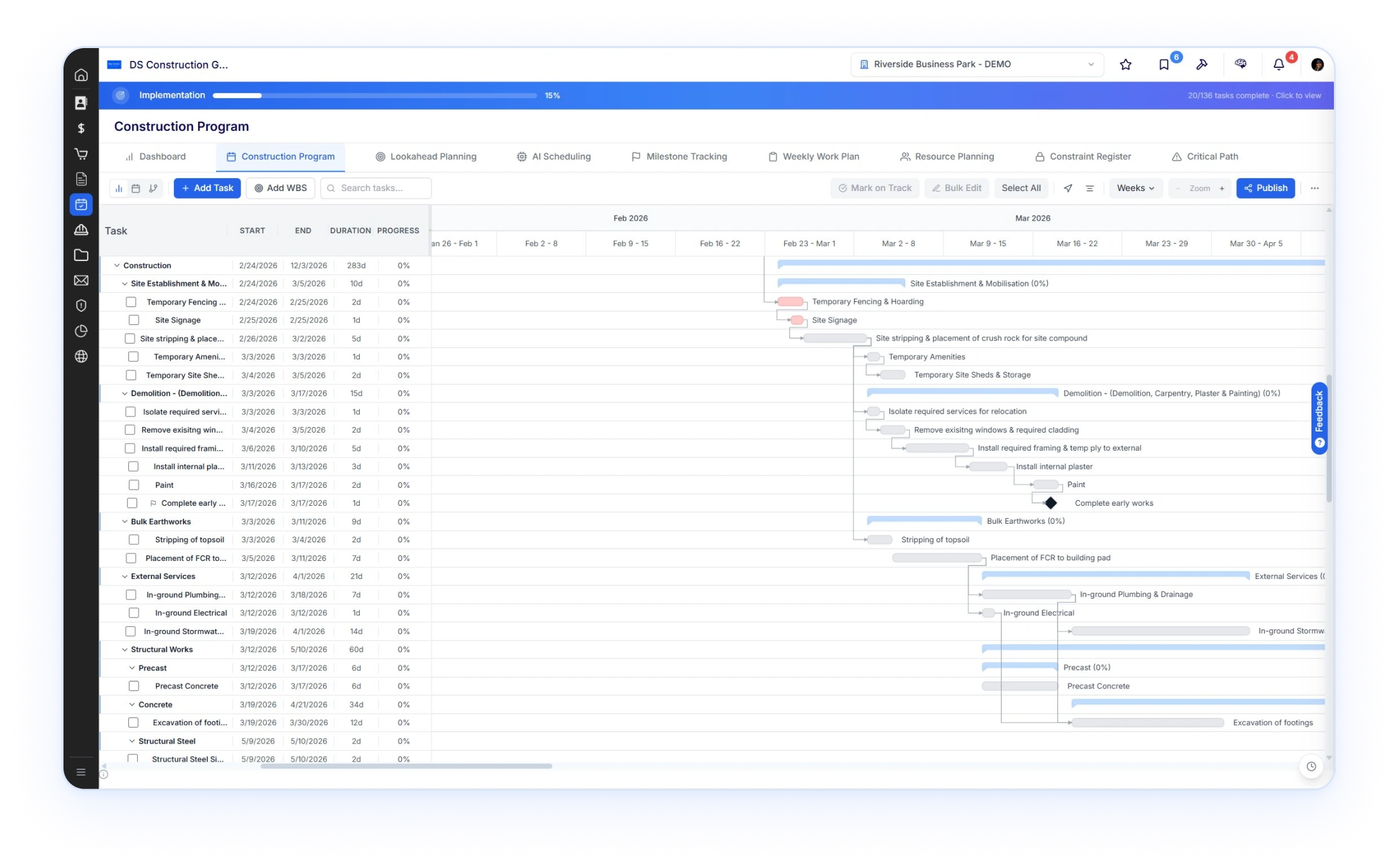
Subbies see only their tasks. They commit. They request changes. Your program stays clean.
Every task carries the subbie. Toggle Share with subby and the work appears in theirportal weekly view. They confirm dates as they go, mark tasks complete, or raise a requestto change a date. You approve, decline, or call them. Either way, the program staysaccurate without one person doing fifteen phone calls every week.
.webp)
.svg)
Every task carries the subbie. And the cost code, procurement package, and resources tomatch.
Open a task, assign the subby, set the cost code and procurement package, allocate resources. The task is the connection point between program, commercial, procurement, and the people doing the work. Save it, share it with the subby, and the data flowseverywhere it needs to.
- 1Subby assignment per task with trade filter. Their tasks appear in theirportal weekly view. They commit, mark complete, or request a datechange.
- 2Request-change workflow. The subby raises it from their portal, youget a notification, you approve or decline with notes. Default is decline.The audit trail is automatic.
- 3Weekly Work Plan drag-drop. Confirm Ready Tasks onto actual days.The same view appears in the subby's portal so site, office, and tradesall see the same week.
- 4Cost code and procurement package linkage on the task itself.Resources (labour, equipment, subbies) tracked alongside.
- 5WBS-level Show to client toggle separate from subby sharing. Subbiessee their work, client sees the rollup, you see the lot.
.webp)
The version your client sees is the version you Publish. Not a stale PDF.
Toggle Show to client at the WBS level for the items the client should see. The client portal shows the high-level rollup. When you need a formal document, Publish to a branded shareable link the client opens with no login, plus a server-side PDF in A3, A2, or A1 landscape ready for the meeting. Version history lives with the contract.


.svg)
Publish a clean, branded program. Client opens the link.No login. No stale PDF in their inbox.
Click Publish and Deep Space generates a shareable link the client opens in their browser. They see the live program, the version you chose to publish, with your branding. For client meetings, attach the server-side PDF in A3, A2, or A1 landscape. Each Publish is versioned so you can prove what was shared, when, and what's changed since.
The look-ahead the site team actually uses. Live, not a print out on the wall.
Two-, four-, eight-, and twelve-week lookaheads in calendar, Gantt, or timeline view.Weekly Work Plan with drag-drop confirmation. The same view shared with subbies intheir portal. The week's plan is alive on a phone or a screen, not pinned to a noticeboard.
.svg)
Switch lookahead windows in one click. Confirm the week with drag-drop.
Pick the window. Two-week for tight site coordination. Eight-week for procurement runway. Twelve-week for phase planning. Then drop into Weekly Work Plan to confirm what's actually happening this week. Drag a Ready Task onto Tuesday. The actual date locks, the master program updates, the subby's portal reflects it, the cost forecast adjusts.
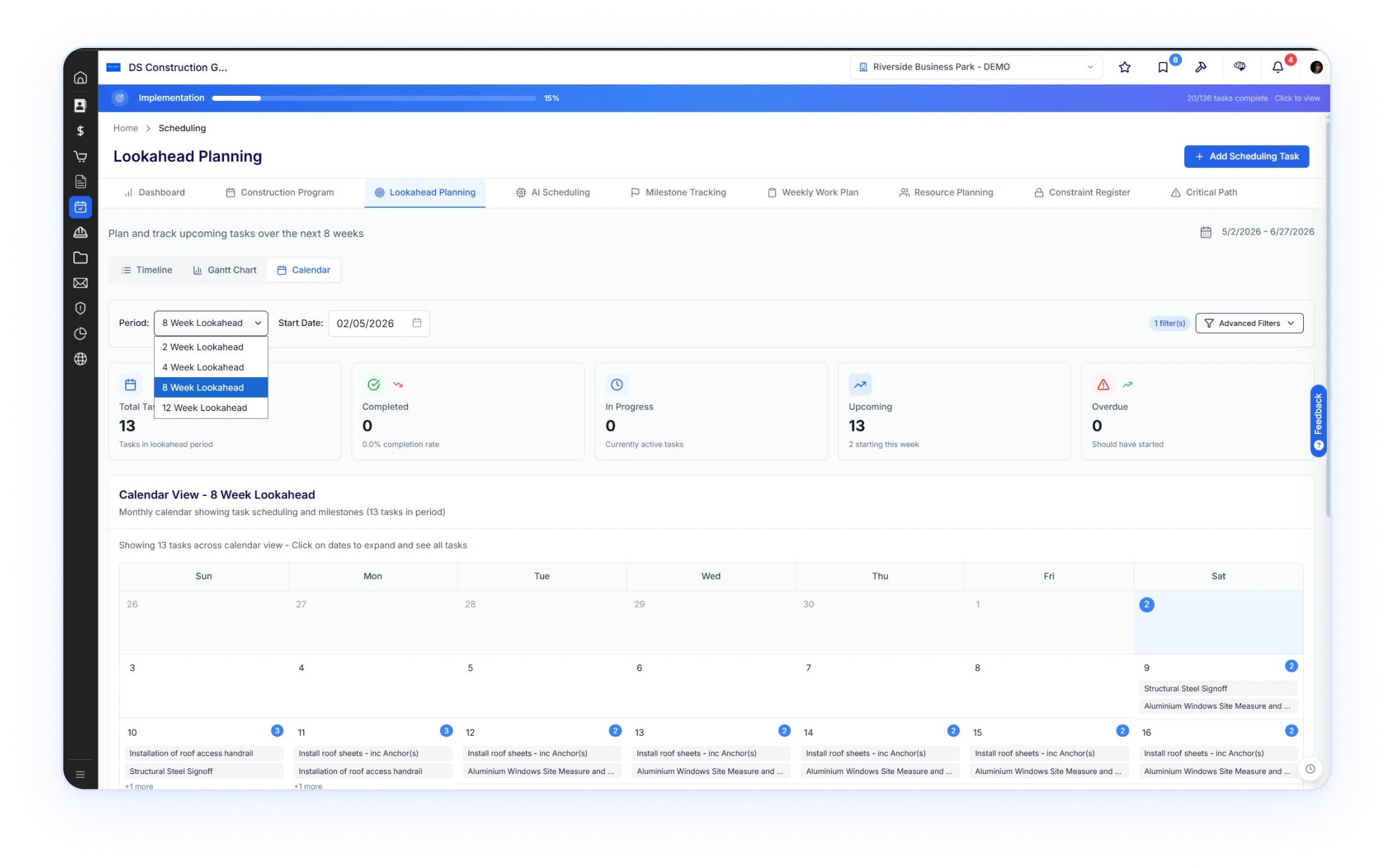
One task. Wired to everything that depends on it.
In every other system, the program is a separate workbook. The cost forecast is a separateworkbook. The procurement schedule is a third workbook. They drift apart the momentone date moves. In Deep Space, they're the same record. Open any task and you see whatit's linked to. Move it, and every connection updates.
.svg)
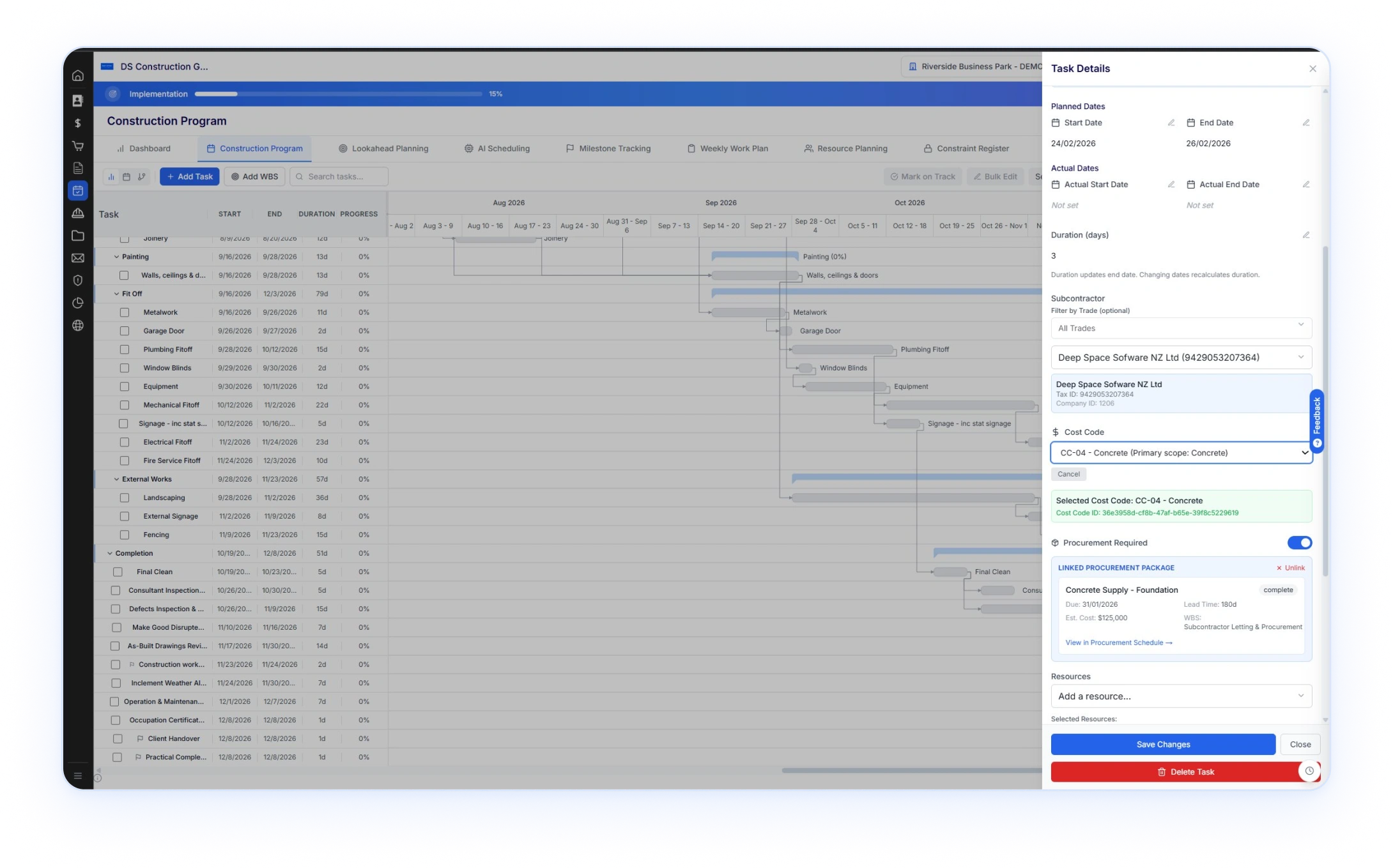
Cost code. Subbie. Procurement package. Lead time. Resources. Every link visible on the task itself.
Open a program task and the right-hand drawer shows the lot.Planned and actual dates. Duration. The subbie awarded the work.The cost code the work codes to. Whether procurement isrequired, and if it is, the linked package with its due date, leadtime, estimated cost, and current status. Click through to theprocurement schedule. Edit the dates. Save. Every downstreamrecord knows.
- 1Subbie attached to the task. Same record that drives the subby portalweekly view and the resource-planning roll-up.
- 2Cost code linkage. The task feeds Cost-to-Complete and ForecastFinal Cost in the commercial module. No re-keying.
- 3Procurement Required toggle. When on, the task links to aprocurement package with due date, lead time, estimated cost, andlive status (e.g. complete, at risk, overdue).
- 4Click View in Procurement Schedule to drop into the package detail.The same record, in its other context.
- 5Resources allocated per task. Labour, equipment, subbies. Roll upacross the project and across the portfolio.

Now move that task by 10 days. Watch what happens.
A delivery slips, the precast install moves out 10 days. In a typical setup, that's three workbooks to update by hand. In Deep Space, you change one date.
- step 1A program task moves. Install precast +10 days, slipped from a delivery delay.
- step 2Procurement Schedule recalculates. Required On Site dates shift, Procurement Start dates back-plan off the new install date. Risk states update on packages now at risk of late delivery.
- step 3Cost forecast updates. Cash flow S-curve redraws based on the new commitment dates. Cost-to-Complete and Forecast Final Cost both reflect the change.
- step 4Subbie portal updates. Affected subbies see the new dates in their weekly view. Notifications fire on tasks now overdue or at risk.
- step 5Client portal reflects the rollup change. The Show to client items show the revised milestone dates. No new PDF to send, no email update required.
This is what happens when program, cost, procurement, and portals share the same data model. One task. One date. Everythingelse updates.
Every project. One Gantt. Variance, progress, and clashes in a single view.
Most builders run twelve to forty active projects at any one time. The portfolio Gantt rollsevery one of them up. Top-level WBS per project, planned versus actual, variance in days,progress percentage. Click any row to drop into the project. The view your managementteam reads from in Monday morning meetings.

.svg)
The portfolio view your
management team trusts. Not aScreenshot in a slide deck.
One row per project. Start, End, Variance in days, Progress percent, plus a quarter-by-quarter timeline showing where each project sits. Sort, filter, search. Click into any project to drill down. The same view powers the Monday morning operations meeting and the Friday afternoon CEO update, sourced live from the underlying programs.
- 1One row per project, top-level WBS visible. Sort by start, end, variance,or progress. Search across the portfolio.
- 2Variance in days versus baseline. Red for slipping projects, green forahead. CEO sees the same number the project director does.
- 3Quarter, month, week, or day zoom. Same timeline, different resolution.No double-keying into a separate reporting tool.
- 4Click a project to drill in. Same WBS, same tasks, same dependencies.Portfolio view and project view are the same data.
- 5Project Overview, S-Curve, Resources, and Milestones tabs sitalongside, all rolled up across the portfolio.

SPI, variance, S-curve. Program performance in pictures.
Schedule Performance Index, variance percentage, variance in days, tasks completed versus planned. The Schedule S-Curve shows planned versus actual cumulative completion. Behind, on track, or ahead, surfaced the moment a task confirms.
.svg)
SPI, Variance, S-Curve. Behind, on
track, or ahead, in numbers aCFO understands.
Earned-value-style metrics built into the program module.Schedule Performance Index calculated from completed versus planned tasks. Variance percentage and variance in days. The Schedule S-Curve plots planned versus actual cumulative progress over time. The kind of analytics that used to require a separate reporting tool, sitting one click from the program they describe.

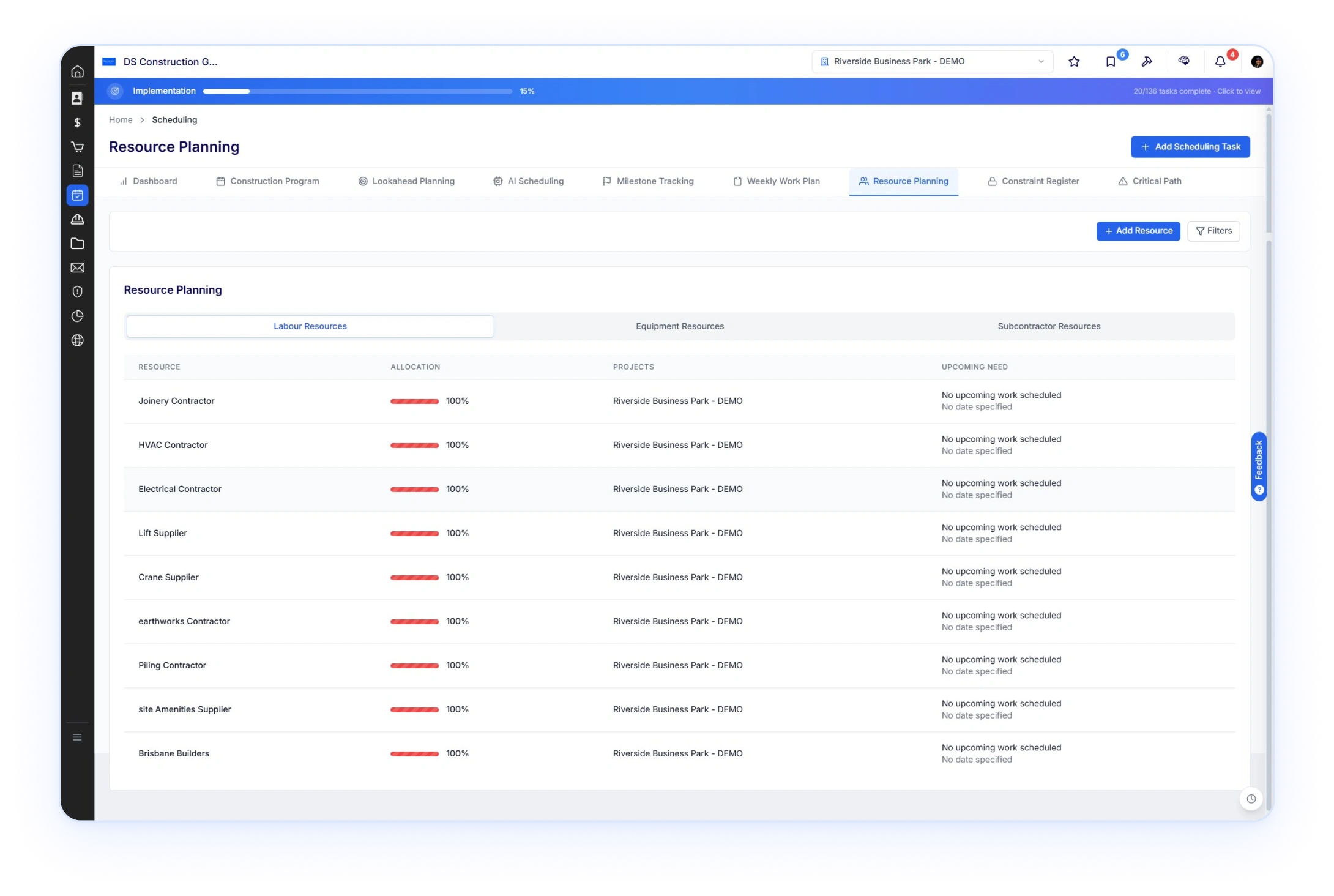
Resources by labour, equipment, subbies. Where they're allocated. When they're next needed.
.svg)
Same subby across three jobs?
See the clash before the call.
Three resource categories. Labour, equipment, subcontractor. Allocate to tasks in the program, view per project or across the portfolio. Allocation percentages, current projects, upcoming need dates. The clash detection that stops you double-booking a crane or a steel fixer across two jobs running the same week.
Deep Space is the only platform that launched program alongside cost, procurement, and portals. From day one.
Most platforms launched as something else. Drawings and RFIs. Job costing. A bidding tool thatbolted on a Gantt later. The program module came years afterwards as a separate product set. Whichis why it's universally bagged. Which is why it doesn't talk to procurement. Which is why builders stillmaintain a separate file on someone's laptop and email PDFs to the client.
Deep Space launched in 2025 as one platform. Program, cost, procurement, subbie portal, clientportal, document control, HSEQ. Every module shipped together, sharing the same data, the sameUI, the same project record. Because we're the only platform built recently enough to do that. Nomiddleware between modules. No "we acquired the scheduling product." No retrofit.
.svg)
Program moves fast.
Bring your existing program in. Run it from Deep Space alongside everything else. Then watch new capability land every cycle, shaped by real customer onboarding sessions and live projects on real sites. The version you see today is not the version you'll see next month.

Program is one module.
The platform is many.
Deep Space is one connected platform. Program drives procurement and forecast. The Commercial module runs your budget, claims, retentions, and Xero sync. The CDE controls drawings, documents, and correspondence. HSEQ runs your safety and quality. Subbie and client portals are built in. KAI sits across the lot.
.png)


.png)